모든 이벤트 유형을 받는 웹훅 엔드포인트는 처리할 노이즈가 많아요. 설치 어트리뷰션만 필요하다면 수천 개의 link.clicked 이벤트로 수신기가 막힐 필요는 없어요. Slack 연동이 추천 완료 알림만 필요하다면 클릭 페이로드를 파싱해서 버릴 이유가 없어요.
필터링하면 부하가 줄고, 핸들러 로직이 단순해지고, 연동이 목적에 맞게 유지돼요. 이 가이드는 필터링 전략을 다뤄요. Tolinku 웹훅 필터링은 모든 계층에 걸쳐 적용할 수 있어요: 소스 단 이벤트 선택, 수신 측 라우팅, 콘텐츠 기반 필터링. 웹훅 설정은 웹훅 설정 가이드부터 보세요.를 참고하세요. 페이로드 상세 내용은 웹훅 이벤트 타입 가이드.
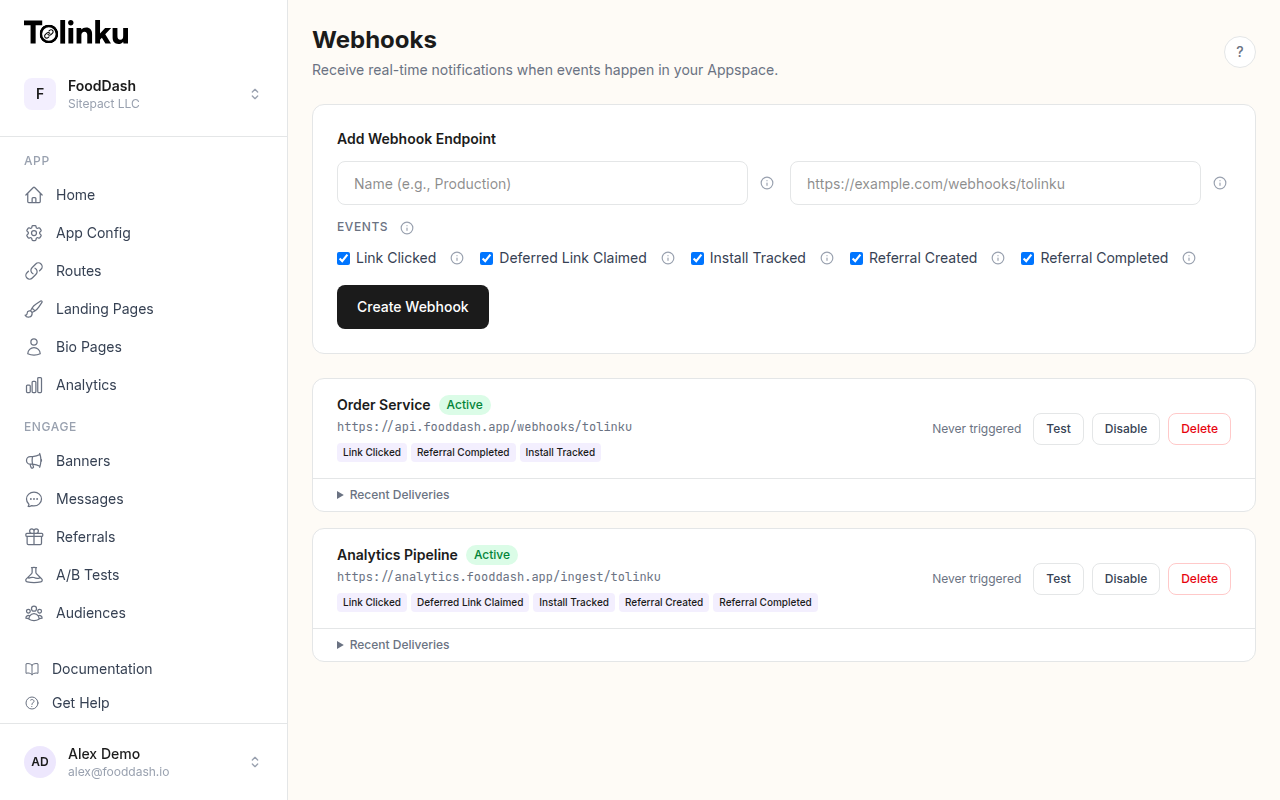 생성 폼, 웹훅 목록, 전달 로그가 있는 웹훅 페이지.
1단계: 발생 지점에서 필터링
이벤트가 애초에 전송되지 않도록 막는 필터가 가장 효율적이에요. 웹훅을 설정할 때 Tolinku Appspace에서 구독할 이벤트 타입을 선택해요.
이벤트 타입은 다음과 같아요:
link.clickeddeferred_link.claimedinstall.trackedreferral.createdreferral.completed
웹훅 엔드포인트가 추천 워크플로만 처리한다면 구독할 이벤트는 referral.created 와 referral.completed뿐이에요. Tolinku는 해당 엔드포인트에 다른 이벤트 타입을 보내지 않아요.
용도별 여러 웹훅 사용하기
모든 이벤트를 받아 코드에서 걸러내는 웹훅 하나 대신, 연동마다 별도의 웹훅을 만드세요:
| 웹훅 이름 | 이벤트 | 엔드포인트 |
|---|---|---|
| 분석 파이프라인 | 모든 이벤트 | https://api.example.com/webhooks/analytics |
| Slack 알림 | install.tracked, referral.completed |
https://api.example.com/webhooks/slack |
| CRM 업데이트 | referral.created, referral.completed |
https://api.example.com/webhooks/crm |
| 이메일 트리거 | install.tracked, referral.completed |
https://api.example.com/webhooks/email |
각 엔드포인트는 필요한 이벤트만 받아요. 낭비되는 대역폭도, 처리 비용도 없어요.
유료 플랜에서는 Appspace당 웹훅을 최대 50개까지 만들 수 있어요(무료 플랜은 1개). 목적별 엔드포인트를 충분히 둘 수 있어요.
2단계: 수신 측에서 필터링
소스 단 필터링을 써도 더 세밀한 제어가 필요할 수 있어요. 이때 X-Webhook-Event 헤더를 쓰면 본문을 파싱하기 전에 이벤트를 라우팅할 수 있어요.
헤더 기반 라우팅
app.post('/webhooks/tolinku', (req, res) => {
  // 서명 검증...
  res.status(200).send('OK');

  const eventType = req.headers['x-webhook-event'] as string;

  switch (eventType) {
    case 'install.tracked':
      handleInstall(req.body);
      break;
    case 'referral.completed':
      handleReferralCompletion(req.body);
      break;
    default:
      // 다른 이벤트 타입은 무시
      break;
  }
});
이 방식은 JSON 본문을 파싱한 뒤 event.event을 확인하는 것보다 빠르지만, 트래픽이 적을 때는 차이가 거의 없어요.
허용 목록 패턴
수신기가 처리할 이벤트를 정의하고, 그 밖의 이벤트는 조용히 거부하세요:
const HANDLED_EVENTS = new Set([
  'install.tracked',
  'referral.created',
  'referral.completed',
]);

app.post('/webhooks/tolinku', (req, res) => {
  // 서명 검증...
  res.status(200).send('OK');

  const eventType = req.headers['x-webhook-event'] as string;
  if (!HANDLED_EVENTS.has(eventType)) return;

  const event = JSON.parse(req.body.toString());
  processEvent(event);
});
필터링된 이벤트에도 항상 200을 응답하세요. 200이 아닌 응답은 재시도를 유발해서 양쪽 모두 리소스를 낭비해요.
3단계: 콘텐츠 기반 필터링
때로는 이벤트 타입뿐 아니라 이벤트 데이터 기준으로 필터링해야 해요. 본문을 파싱한 뒤 특정 필드를 확인하세요.
플랫폼별 필터링
async function processEvent(event: any) {
  // Only process iOS events
  if (event.data.platform !== 'ios') return;

  await handleIOSEvent(event);
}
캠페인별 필터링
const MONITORED_CAMPAIGNS = new Set([
  'paid-social-q2',
  'email-newsletter-may',
  'influencer-summer',
]);

async function processEvent(event: any) {
  if (!MONITORED_CAMPAIGNS.has(event.data.campaign)) return;

  await handleMonitoredCampaign(event);
}
시간 범위별 필터링
지난 한 시간 이내 이벤트만 처리하세요(수신기 재시작 후 밀린 이벤트를 따라잡을 때 유용해요):
async function processEvent(event: any) {
  const eventAge = Date.now() - new Date(event.timestamp).getTime();
  const ONE_HOUR = 60 * 60 * 1000;

  if (eventAge > ONE_HOUR) {
    console.log(`오래된 이벤트 건너뜀: ${event.timestamp}`);
    return;
  }

  await handleEvent(event);
}
4단계: 라우터 패턴
여러 소비자가 있는 복잡한 연동에서는 규칙을 평가하고 핸들러로 전달하는 이벤트 라우터를 만드세요.
interface FilterRule {
  name: string;
  condition: (event: any) => boolean;
  handler: (event: any) => Promise<void>;
}

const rules: FilterRule[] = [
  {
    name: 'slack-installs',
    condition: (e) => e.event === 'install.tracked',
    handler: notifySlack,
  },
  {
    name: 'crm-referrals',
    condition: (e) =>
      e.event === 'referral.completed' && e.data.platform !== 'web',
    handler: updateCRM,
  },
  {
    name: 'analytics-all',
    condition: () => true,
    handler: sendToAnalytics,
  },
  {
    name: 'fraud-check',
    condition: (e) =>
      e.event === 'referral.created' || e.event === 'link.clicked',
    handler: checkForFraud,
  },
];

async function routeEvent(event: any) {
  const matching = rules.filter(rule => rule.condition(event));

  await Promise.allSettled(
    matching.map(rule =>
      rule.handler(event).catch(err =>
        console.error(`Handler ${rule.name} failed:`, err.message)
      )
    )
  );
}
각 규칙은 독립적이에요. 새 연동을 추가하려면 규칙을 추가하면 되고, 기존 코드를 수정할 필요가 없어요. Promise.allSettled 를 쓰면 핸들러 하나가 실패해도 나머지 핸들러가 막히지 않아요.
큐를 활용한 필터링
수신기와 처리기 사이에 메시지 큐를 쓴다면, 큐에 넣기 전에(큐 볼륨을 줄이려고) 또는 소비자 단에서(큐를 범용으로 유지하려고) 필터링하세요.
큐에 넣기 전 필터링
// 가치가 높은 이벤트만 큐에 넣기
app.post('/webhooks/tolinku', (req, res) => {
  // 서명 검증...
  res.status(200).send('OK');

  const eventType = req.headers['x-webhook-event'] as string;
  if (eventType === 'link.clicked') return; // 클릭은 큐에 넣지 않음

  queue.add({ body: req.body.toString(), eventType });
});
컨슈머에서 필터링
// 컨슈머는 추천 이벤트만 처리
worker.process(async (job) => {
  if (!job.data.eventType.startsWith('referral.')) return;

  const event = JSON.parse(job.data.body);
  await processReferral(event);
});
첫 번째 방식은 큐 볼륨을 줄여요. 두 번째 방식은 큐를 범용으로 유지해서, 수신기를 바꾸지 않고도 나중에 소비자를 추가할 수 있어요.
토픽 기반 라우팅
큐가 토픽을 지원한다면(Kafka, SNS/SQS), 이벤트 타입별로 다른 토픽에 라우팅하세요:
const TOPIC_MAP: Record<string, string> = {
  'link.clicked': 'deep-link-clicks',
  'deferred_link.claimed': 'deep-link-installs',
  'install.tracked': 'deep-link-installs',
  'referral.created': 'deep-link-referrals',
  'referral.completed': 'deep-link-referrals',
};

app.post('/webhooks/tolinku', async (req, res) => {
  // 서명 검증...
  res.status(200).send('OK');

  const eventType = req.headers['x-webhook-event'] as string;
  const topic = TOPIC_MAP[eventType] || 'deep-link-other';

  await kafka.send({
    topic,
    messages: [{ value: req.body.toString() }],
  });
});
각 소비자는 필요한 토픽만 구독해요. 클릭 소비자는 deep-link-clicks를 구독하고, CRM 소비자는 deep-link-referrals.
필터링 모범 사례
소스에서 먼저 필터링하기 소스 수준 필터링(Tolinku 대시보드에서 이벤트 유형을 선택하는 방식)을 쓰면 트래픽이 인프라에 닿기 전에 걸러져요. 가장 저렴하고 가장 효과적인 필터예요.
항상 200 응답하기 이벤트를 필터링해서 버리는 경우에도 재시도를 막으려면 200으로 응답하세요. Tolinku는 2xx가 아닌 응답을 실패로 보고 재시도하므로, 그만큼 부하가 늘어나요.
필터링된 이벤트 기록하기 이벤트를 필터링할 때는 수신했고 버렸다는 사실을 기록하세요. 디버깅에 도움이 돼요. ("핸들러가 링크 클릭을 처리하지 않는 이유가 뭔가요?" "필터가 그 이벤트를 제외하고 있기 때문이에요.")
필터 주기적으로 검토하기 연동이 바뀌면 전에 걸러 낸 이벤트가 다시 필요해질 수 있어요. 웹훅 구독과 필터 규칙을 분기마다 검토하면 오래된 설정이 쌓이지 않아요.
과도한 필터링 피하기 수신 측에서 필터링을 많이 해야 한다면, 필요한 이벤트만 구독하는 웹훅을 따로 만드는 편이 나을 수 있어요. 목적에 맞는 웹훅 여러 개가 복잡한 필터 로직이 들어간 웹훅 하나보다 깔끔해요.
전달되거나 필터링된 이벤트를 모니터링하려면 웹훅 전송 모니터링 가이드. 전체 이벤트 유형 참고 자료는 웹훅 이벤트 타입 가이드.
딥 링킹 팁을 메일로 받아 보세요
일주일에 한 번만 보내요. 스팸은 없어요.