C'è qualcosa di stimolante nel vedere gli eventi dei deep link arrivare su Slack in tempo reale. Il team growth vede una notifica di installazione e capisce che una campagna funziona. Il team di ingegneria vede un errore di webhook e lo analizza prima che diventi un ticket di supporto. Un product manager vede un completamento di referral e sa che il flusso dei referral funziona.
Questa guida copre tre modi per inviare webhook di Tolinku eventi a Slack: un'integrazione diretta con gli Incoming Webhook di Slack, un receiver personalizzato con messaggi formattati in modo ricco, e un percorso senza codice con Zapier. Scegli quello che si adatta alla disponibilità di sviluppo del tuo team.
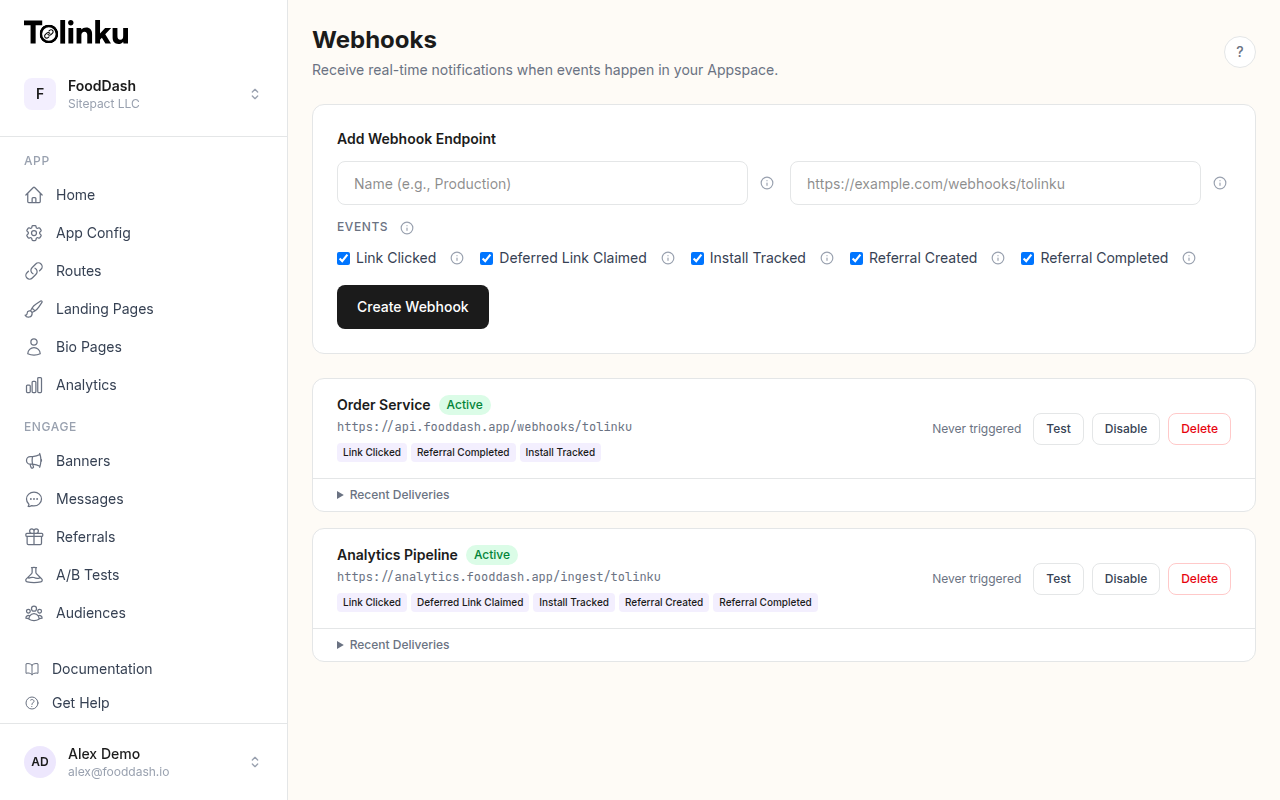 La pagina dei webhook con il modulo di creazione, l'elenco dei webhook e il log delle consegne.
Opzione 1: Incoming Webhook diretto di Slack
L'approccio più semplice. Gli Incoming Webhooks permettono di inviare una richiesta POST con un messaggio JSON a un URL di canale. Non serve installare nessuna app Slack (basta un URL webhook da Slack).
Configura l'Incoming Webhook di Slack
- Vai su api.slack.com/apps e crea una nuova app (o usane una esistente)
- Secondo Features > Incoming Webhooks, attivalo
- Click Aggiungi un nuovo webhook al workspace e seleziona il canale (es. #deep-link-events)
- Copia l'URL del webhook (es.
https://hooks.slack.com/services/T00000000/B00000000/XXXXXXXXXXXXXXXXXXXXXXXX)
Costruisci il receiver
import express from 'express';
import crypto from 'crypto';

const app = express();
app.use('/webhooks', express.raw({ type: 'application/json' }));

const WEBHOOK_SECRET = process.env.WEBHOOK_SECRET!;
const SLACK_WEBHOOK_URL = process.env.SLACK_WEBHOOK_URL!;

app.post('/webhooks/tolinku', async (req, res) => {
  const signature = req.headers['x-webhook-signature'] as string;
  const expected = crypto
    .createHmac('sha256', WEBHOOK_SECRET)
    .update(req.body)
    .digest('hex');

  if (signature !== expected) {
    return res.status(401).send('Invalid signature');
  }

  res.status(200).send('OK');

  const event = JSON.parse(req.body.toString());
  await sendToSlack(event);
});

async function sendToSlack(event: any) {
  const message = formatSlackMessage(event);

  await fetch(SLACK_WEBHOOK_URL, {
    method: 'POST',
    headers: { 'Content-Type': 'application/json' },
    body: JSON.stringify(message),
  });
}

app.listen(3000);
Formatta i messaggi
Le notifiche di solo testo funzionano, ma Block Kit i messaggi sono più facili da scorrere in un canale affollato.
function formatSlackMessage(event: any) {
  const { event: eventType, timestamp, data } = event;
  const time = new Date(timestamp).toLocaleString('en-US', {
    timeZone: 'UTC',
    hour12: false,
  });

  const emoji = getEmoji(eventType);
  const title = getTitle(eventType);

  const fields: Array<{ type: string; text: string }> = [];

  if (data.campaign) {
    fields.push({
      type: 'mrkdwn',
      text: `*Campagna:* ${data.campaign}`,
    });
  }
  if (data.platform) {
    fields.push({
      type: 'mrkdwn',
      text: `*Piattaforma:* ${data.platform}`,
    });
  }
  if (data.token) {
    fields.push({
      type: 'mrkdwn',
      text: `*Link:* ${data.prefix || ''}/${data.token}`,
    });
  }
  if (data.device_type) {
    fields.push({
      type: 'mrkdwn',
      text: `*Dispositivo:* ${data.device_type}`,
    });
  }

  return {
    blocks: [
      {
        type: 'section',
        text: {
          type: 'mrkdwn',
          text: `${emoji} *${title}*`,
        },
      },
      ...(fields.length > 0
        ? [
            {
              type: 'section',
              fields,
            },
          ]
        : []),
      {
        type: 'context',
        elements: [
          {
            type: 'mrkdwn',
            text: `${time} UTC`,
          },
        ],
      },
    ],
  };
}

function getEmoji(eventType: string): string {
  const emojis: Record<string, string> = {
    'link.clicked': ':link:',
    'deferred_link.claimed': ':calling:',
    'install.tracked': ':iphone:',
    'referral.created': ':handshake:',
    'referral.completed': ':tada:',
    'test': ':test_tube:',
  };
  return emojis[eventType] || ':bell:';
}

function getTitle(eventType: string): string {
  const titles: Record<string, string> = {
    'link.clicked': 'Link cliccato',
    'deferred_link.claimed': 'Deferred link riscattato',
    'install.tracked': 'Installazione tracciata',
    'referral.created': 'Referral creato',
    'referral.completed': 'Referral completato',
    'test': 'Webhook di test',
  };
  return titles[eventType] || eventType;
}
Questo genera un messaggio Slack pulito e strutturato, con tipo di evento, campi rilevanti e timestamp.
Opzione 2: notifiche filtrate
Probabilmente non vuoi che ogni link.clicked evento riempia il tuo canale Slack. I link ad alto traffico possono generare migliaia di clic al giorno. Ecco come tenere alto il rapporto segnale/rumore.
Filtra alla fonte
Quando configuri il webhook in Tolinku, seleziona solo gli eventi per cui vuoi ricevere notifiche. Per la maggior parte dei team, install.tracked, referral.createde referral.completed sono gli eventi più utili da notificare. Lascia link.clicked per la tua pipeline di analytics.
Filtra nel receiver
Se ti iscrivi a più eventi su un solo webhook, filtra nel tuo handler:
const NOTIFY_EVENTS = new Set([
  'install.tracked',
  'referral.created',
  'referral.completed',
]);

async function sendToSlack(event: any) {
  if (!NOTIFY_EVENTS.has(event.event)) return;

  const message = formatSlackMessage(event);
  await fetch(SLACK_WEBHOOK_URL, {
    method: 'POST',
    headers: { 'Content-Type': 'application/json' },
    body: JSON.stringify(message),
  });
}
Aggrega invece di notificare ogni evento
Per gli eventi click, un riepilogo periodico è più utile delle notifiche singole. Raccogli gli eventi in un buffer e invia un digest:
let clickBuffer: any[] = [];

setInterval(async () => {
  if (clickBuffer.length === 0) return;

  const count = clickBuffer.length;
  const campaigns = new Map<string, number>();
  for (const event of clickBuffer) {
    const campaign = event.data.campaign || 'sconosciuto';
    campaigns.set(campaign, (campaigns.get(campaign) || 0) + 1);
  }

  const campaignList = [...campaigns.entries()]
    .sort((a, b) => b[1] - a[1])
    .map(([name, n]) => `  ${name}: ${n}`)
    .join('\n');

  await fetch(SLACK_WEBHOOK_URL, {
    method: 'POST',
    headers: { 'Content-Type': 'application/json' },
    body: JSON.stringify({
      text: `:chart_with_upwards_trend: *${count} clic sui link* negli ultimi 15 minuti\n${campaignList}`,
    }),
  });

  clickBuffer = [];
}, 15 * 60 * 1000); // Ogni 15 minuti
Opzione 3: più canali
Instrada eventi diversi verso canali Slack diversi, per il pubblico giusto:
const CHANNEL_MAP: Record<string, string> = {
  'install.tracked': process.env.SLACK_GROWTH_CHANNEL!,
  'referral.created': process.env.SLACK_GROWTH_CHANNEL!,
  'referral.completed': process.env.SLACK_SALES_CHANNEL!,
  'link.clicked': process.env.SLACK_ANALYTICS_CHANNEL!,
};

async function sendToSlack(event: any) {
  const channelUrl = CHANNEL_MAP[event.event];
  if (!channelUrl) return;

  const message = formatSlackMessage(event);
  await fetch(channelUrl, {
    method: 'POST',
    headers: { 'Content-Type': 'application/json' },
    body: JSON.stringify(message),
  });
}
Ogni Incoming Webhook di Slack è legato a un canale specifico, quindi ti serve un URL di webhook separato per ogni canale di destinazione.
Opzione 4: senza codice con Zapier
Se non vuoi ospitare un ricevitore, usa Zapier per collegare i webhook di Tolinku a Slack:
- Crea uno Zap con "Webhooks by Zapier" come trigger (Catch Hook)
- Aggiungi uno step Filter per selezionare i tipi di evento che ti servono
- Aggiungi un'azione Slack: "Send Channel Message"
- Mappa i campi del webhook nel messaggio
Il compromesso: Zapier non verifica le firme dei webhook e la consegna dipende dall'intervallo di polling del tuo piano Zapier. Per notifiche non critiche va bene. Per gli alert in produzione, usa un ricevitore personalizzato.
Gestire i fallimenti
Se l'API di Slack è giù o ha raggiunto il rate limit, la notifica fallisce. Questo non dovrebbe influire sull'elaborazione dei webhook. Fai sempre queste cose:
- Rispondi 200 a Tolinku prima di provare la notifica Slack
- Intercetta e logga gli errori dell'API Slack senza rilanciarli
- Valuta un retry semplice con backoff esponenziale per gli errori di Slack
async function sendToSlack(event: any) {
  if (!NOTIFY_EVENTS.has(event.event)) return;

  const message = formatSlackMessage(event);

  for (let attempt = 0; attempt < 3; attempt++) {
    try {
      const resp = await fetch(SLACK_WEBHOOK_URL, {
        method: 'POST',
        headers: { 'Content-Type': 'application/json' },
        body: JSON.stringify(message),
      });
      if (resp.ok) return;
      if (resp.status === 429) {
        // Rate limited; wait and retry
        const retryAfter = parseInt(resp.headers.get('retry-after') || '5');
        await new Promise(r => setTimeout(r, retryAfter * 1000));
        continue;
      }
      console.error(`Slack API error: ${resp.status}`);
      return;
    } catch (err) {
      console.error('Slack send failed:', err);
      if (attempt < 2) await new Promise(r => setTimeout(r, 1000 * (attempt + 1)));
    }
  }
}
L'API dei webhook di Slack ha un rate limit di 1 message per second per webhook URL. Se ne invii di più, raggruppa o aggrega le notifiche.
Per le istruzioni di configurazione, vedi la guida alla configurazione dei webhook. Per verificare l'integrazione, usa gli strumenti della guida al testing dei webhook.
Ricevi consigli sul deep linking nella tua casella di posta
Una email a settimana. Niente spam.