There's something motivating about watching deep link events roll into Slack in real time. The growth team sees an install notification and knows a campaign is working. The engineering team sees a webhook failure and investigates before it becomes a support ticket. A product manager sees a referral completion and knows the referral flow is functioning.
This guide covers three ways to send Tolinku webhook events to Slack: a direct integration using Slack's Incoming Webhooks, a custom receiver with rich message formatting, and a no-code path through Zapier. Pick the one that matches your team's engineering bandwidth.
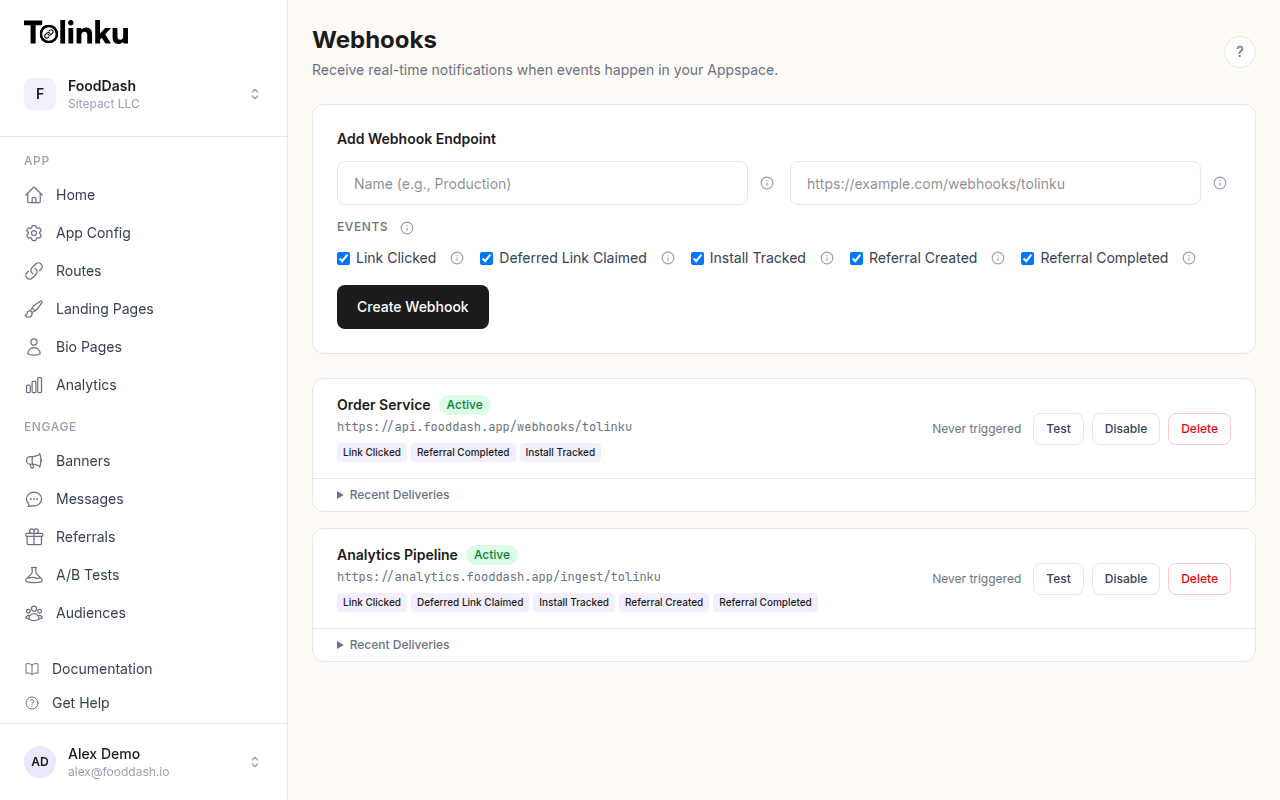 The webhooks page with create form, webhook list, and delivery log.
Option 1: Direct Slack Incoming Webhook
The simplest approach. Slack's Incoming Webhooks let you POST a JSON message to a channel URL. No Slack app installation needed (just a webhook URL from Slack).
Set Up the Slack Webhook
- Go to api.slack.com/apps and create a new app (or use an existing one)
- Under Features > Incoming Webhooks, toggle it on
- Click Add New Webhook to Workspace and select the channel (e.g., #deep-link-events)
- Copy the webhook URL (e.g.,
https://hooks.slack.com/services/T00000000/B00000000/XXXXXXXXXXXXXXXXXXXXXXXX)
Build the Receiver
import express from 'express';
import crypto from 'crypto';

const app = express();
app.use('/webhooks', express.raw({ type: 'application/json' }));

const WEBHOOK_SECRET = process.env.WEBHOOK_SECRET!;
const SLACK_WEBHOOK_URL = process.env.SLACK_WEBHOOK_URL!;

app.post('/webhooks/tolinku', async (req, res) => {
  const signature = req.headers['x-webhook-signature'] as string;
  const expected = crypto
    .createHmac('sha256', WEBHOOK_SECRET)
    .update(req.body)
    .digest('hex');

  if (signature !== expected) {
    return res.status(401).send('Invalid signature');
  }

  res.status(200).send('OK');

  const event = JSON.parse(req.body.toString());
  await sendToSlack(event);
});

async function sendToSlack(event: any) {
  const message = formatSlackMessage(event);

  await fetch(SLACK_WEBHOOK_URL, {
    method: 'POST',
    headers: { 'Content-Type': 'application/json' },
    body: JSON.stringify(message),
  });
}

app.listen(3000);
Format Messages
Plain text notifications work, but Block Kit messages are easier to scan in a busy channel.
function formatSlackMessage(event: any) {
  const { event: eventType, timestamp, data } = event;
  const time = new Date(timestamp).toLocaleString('en-US', {
    timeZone: 'UTC',
    hour12: false,
  });

  const emoji = getEmoji(eventType);
  const title = getTitle(eventType);

  const fields: Array<{ type: string; text: string }> = [];

  if (data.campaign) {
    fields.push({
      type: 'mrkdwn',
      text: `*Campaign:* ${data.campaign}`,
    });
  }
  if (data.platform) {
    fields.push({
      type: 'mrkdwn',
      text: `*Platform:* ${data.platform}`,
    });
  }
  if (data.token) {
    fields.push({
      type: 'mrkdwn',
      text: `*Link:* ${data.prefix || ''}/${data.token}`,
    });
  }
  if (data.device_type) {
    fields.push({
      type: 'mrkdwn',
      text: `*Device:* ${data.device_type}`,
    });
  }

  return {
    blocks: [
      {
        type: 'section',
        text: {
          type: 'mrkdwn',
          text: `${emoji} *${title}*`,
        },
      },
      ...(fields.length > 0
        ? [
            {
              type: 'section',
              fields,
            },
          ]
        : []),
      {
        type: 'context',
        elements: [
          {
            type: 'mrkdwn',
            text: `${time} UTC`,
          },
        ],
      },
    ],
  };
}

function getEmoji(eventType: string): string {
  const emojis: Record<string, string> = {
    'link.clicked': ':link:',
    'deferred_link.claimed': ':calling:',
    'install.tracked': ':iphone:',
    'referral.created': ':handshake:',
    'referral.completed': ':tada:',
    'test': ':test_tube:',
  };
  return emojis[eventType] || ':bell:';
}

function getTitle(eventType: string): string {
  const titles: Record<string, string> = {
    'link.clicked': 'Link Clicked',
    'deferred_link.claimed': 'Deferred Link Claimed',
    'install.tracked': 'Install Tracked',
    'referral.created': 'Referral Created',
    'referral.completed': 'Referral Completed',
    'test': 'Test Webhook',
  };
  return titles[eventType] || eventType;
}
This produces a clean, structured Slack message with the event type, relevant fields, and timestamp.
Option 2: Filtered Notifications
You probably don't want every link.clicked event flooding your Slack channel. High-traffic links can generate thousands of clicks per day. Here are strategies for keeping the signal-to-noise ratio high.
Filter at the Source
When configuring your webhook in Tolinku, select only the events you want notifications for. For most teams, install.tracked, referral.created, and referral.completed are the high-value events worth notifying on. Leave link.clicked for your analytics pipeline instead.
Filter in the Receiver
If you subscribe to multiple events on one webhook, filter in your handler:
const NOTIFY_EVENTS = new Set([
  'install.tracked',
  'referral.created',
  'referral.completed',
]);

async function sendToSlack(event: any) {
  if (!NOTIFY_EVENTS.has(event.event)) return;

  const message = formatSlackMessage(event);
  await fetch(SLACK_WEBHOOK_URL, {
    method: 'POST',
    headers: { 'Content-Type': 'application/json' },
    body: JSON.stringify(message),
  });
}
Aggregate Instead of Notify Per Event
For click events, a periodic summary is more useful than individual notifications. Buffer events and send a digest:
let clickBuffer: any[] = [];

setInterval(async () => {
  if (clickBuffer.length === 0) return;

  const count = clickBuffer.length;
  const campaigns = new Map<string, number>();
  for (const event of clickBuffer) {
    const campaign = event.data.campaign || 'unknown';
    campaigns.set(campaign, (campaigns.get(campaign) || 0) + 1);
  }

  const campaignList = [...campaigns.entries()]
    .sort((a, b) => b[1] - a[1])
    .map(([name, n]) => `  ${name}: ${n}`)
    .join('\n');

  await fetch(SLACK_WEBHOOK_URL, {
    method: 'POST',
    headers: { 'Content-Type': 'application/json' },
    body: JSON.stringify({
      text: `:chart_with_upwards_trend: *${count} link clicks* in the last 15 minutes\n${campaignList}`,
    }),
  });

  clickBuffer = [];
}, 15 * 60 * 1000); // Every 15 minutes
Option 3: Multiple Channels
Route different events to different Slack channels for the right audience:
const CHANNEL_MAP: Record<string, string> = {
  'install.tracked': process.env.SLACK_GROWTH_CHANNEL!,
  'referral.created': process.env.SLACK_GROWTH_CHANNEL!,
  'referral.completed': process.env.SLACK_SALES_CHANNEL!,
  'link.clicked': process.env.SLACK_ANALYTICS_CHANNEL!,
};

async function sendToSlack(event: any) {
  const channelUrl = CHANNEL_MAP[event.event];
  if (!channelUrl) return;

  const message = formatSlackMessage(event);
  await fetch(channelUrl, {
    method: 'POST',
    headers: { 'Content-Type': 'application/json' },
    body: JSON.stringify(message),
  });
}
Each Slack Incoming Webhook is bound to a specific channel, so you need a separate webhook URL for each destination channel.
Option 4: No-Code with Zapier
If you don't want to host a receiver, use Zapier to connect Tolinku webhooks to Slack:
- Create a Zap with "Webhooks by Zapier" as the trigger (Catch Hook)
- Add a Filter step to select the event types you want
- Add a Slack action: "Send Channel Message"
- Map the webhook fields into the message
The tradeoff: Zapier doesn't verify webhook signatures, and delivery depends on your Zapier plan's polling interval. For non-critical notifications, this is fine. For production alerting, use a custom receiver.
Handling Failures
If Slack's API is down or rate-limited, your notification will fail. This shouldn't affect your webhook processing. Always:
- Respond 200 to Tolinku before attempting the Slack notification
- Catch and log Slack API errors without rethrowing
- Consider a simple retry with exponential backoff for Slack failures
async function sendToSlack(event: any) {
  if (!NOTIFY_EVENTS.has(event.event)) return;

  const message = formatSlackMessage(event);

  for (let attempt = 0; attempt < 3; attempt++) {
    try {
      const resp = await fetch(SLACK_WEBHOOK_URL, {
        method: 'POST',
        headers: { 'Content-Type': 'application/json' },
        body: JSON.stringify(message),
      });
      if (resp.ok) return;
      if (resp.status === 429) {
        // Rate limited; wait and retry
        const retryAfter = parseInt(resp.headers.get('retry-after') || '5');
        await new Promise(r => setTimeout(r, retryAfter * 1000));
        continue;
      }
      console.error(`Slack API error: ${resp.status}`);
      return;
    } catch (err) {
      console.error('Slack send failed:', err);
      if (attempt < 2) await new Promise(r => setTimeout(r, 1000 * (attempt + 1)));
    }
  }
}
Slack's webhook API has a rate limit of 1 message per second per webhook URL. If you're sending more than that, batch or aggregate your notifications.
For setup instructions, see the webhook setup guide. To verify your integration, use the tools in the webhook testing guide.
Get deep linking tips in your inbox
One email per week. No spam.