These two terms get used interchangeably, confused with each other, and sometimes treated as the same thing. They're not. Short links and deep links solve different problems, operate at different layers of the stack, and serve different purposes. But they work together beautifully when combined.
This guide clarifies what each one is, when to use which, and how they complement each other in a mobile marketing stack.
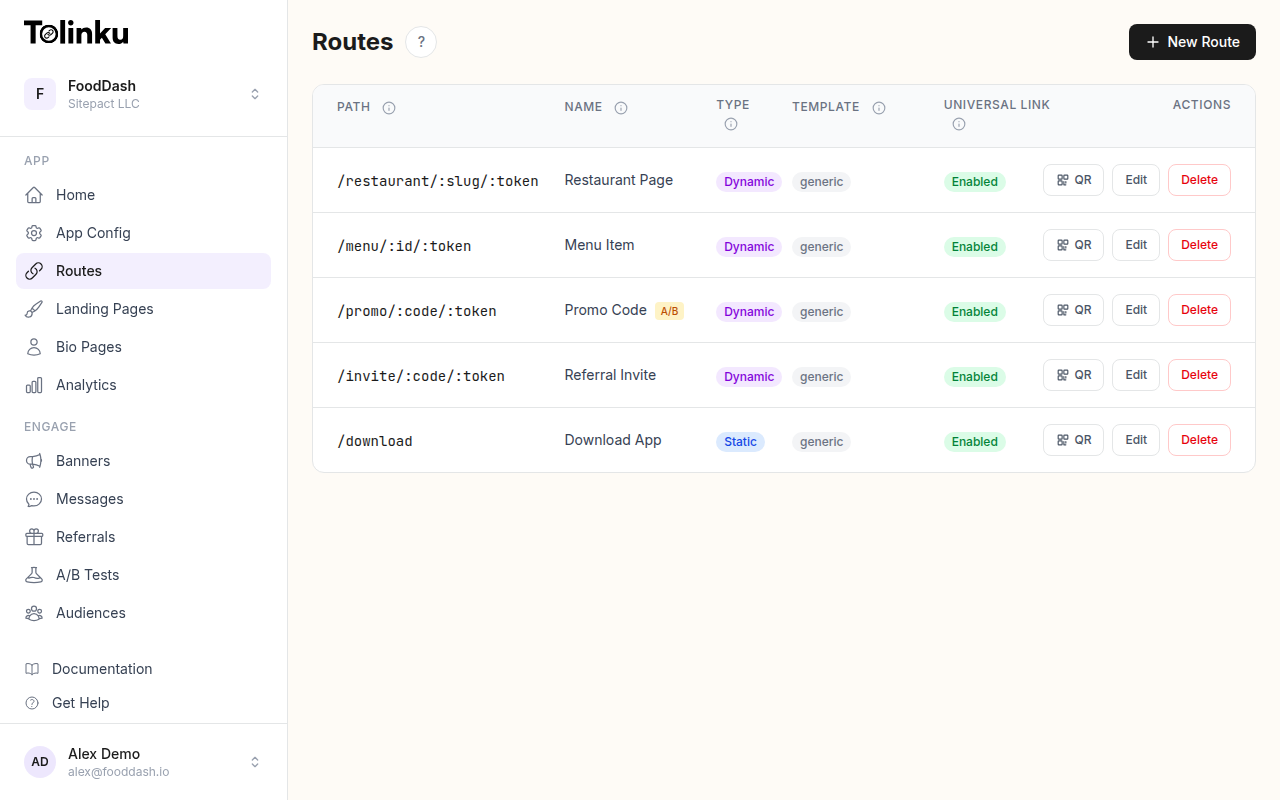 Tolinku route configuration with QR code generation for each deep link.
What Is a Short Link?
A short link is simply a shortened URL that redirects to a longer destination URL. It's a convenience layer.
Short link:  go.app.com/summer-sale
Redirects to: https://www.yourstore.com/campaigns/summer-2026/landing-page?utm_source=email&utm_medium=newsletter&utm_campaign=summer_promo_2026
The short link exists because the long URL is:
- Hard to share verbally
- Ugly in social media posts
- Impossible to print on physical materials
- Difficult to type manually
Short links solve a presentation problem. They make URLs shareable, brandable, and trackable. Behind the scenes, clicking a short link triggers a server-side redirect (HTTP 301 or 302) to the actual destination.
Popular URL shorteners like bit.ly, tinyurl, and ow.ly are pure short link services. They shorten URLs and track clicks. That's the full extent of what they do.
What Is a Deep Link?
A deep link is a URL that opens a specific screen or content within a mobile app, rather than just opening the app's home screen.
Deep link:  https://yourapp.com/product/wireless-earbuds
Opens:      The Wireless Earbuds product page inside your mobile app
The "deep" in deep link refers to navigating deep into the app's content hierarchy, not just the app's front door. Without deep linking, a URL can only do two things: open a web page, or open an app to its home screen. Deep links add the ability to specify exactly where in the app the user should land.
Deep links work through platform-specific mechanisms:
- iOS: Universal Links use an
apple-app-site-association(AASA) file to tell iOS which URLs should open in your app - Android: App Links use a
assetlinks.jsonfile for the same purpose
For a thorough technical overview, see The Complete Guide to Deep Linking.
The Key Differences
| Aspect | Short Link | Deep Link |
|---|---|---|
| Purpose | Make URLs shorter and trackable | Route users to specific app content |
| Technology | HTTP redirect (301/302) | Universal Links, App Links, URI schemes |
| Destination | Any web URL | A specific screen in a mobile app |
| App required? | No | Yes (or deferred until install) |
| Works on desktop? | Yes | Only the web fallback |
| Analytics | Click counts, geography | Click-to-install funnels, attribution |
| Platform awareness | None (same destination for all devices) | Routes differently per OS |
The fundamental distinction: short links solve a URL cosmetics problem; deep links solve a user routing problem.
A short link doesn't know or care whether the user is on iOS, Android, or desktop. It redirects everyone to the same destination. A deep link understands the user's platform and routes them to the right experience: the iOS app, the Android app, or a web fallback.
How They Work Together
In practice, the most effective links are both short and deep. A platform like Tolinku combines both capabilities into a single URL:
go.yourapp.com/product/wireless-earbuds
This URL is:
- Short: Concise, branded, shareable
- Deep: Opens the Wireless Earbuds screen in the app
- Platform-aware: Routes iOS users to the iOS app, Android users to the Android app, desktop users to the web
- Trackable: Records clicks, devices, geography
- Deferred: If the user doesn't have the app, sends them to the store and preserves context for first launch
This combined approach is what most modern deep linking platforms offer. The URL acts as a short link (brief, branded, tracked) that also functions as a deep link (platform-aware, app-opening, context-preserving).
When You Only Need Short Links
Pure URL shortening is sufficient when:
- Your app doesn't exist yet: You're a web-only business and just need shorter, branded URLs
- Desktop-only content: The destination is a web page that doesn't have a mobile app equivalent
- Simple redirects: You need a memorable URL for a marketing campaign that points to a landing page
- Non-app contexts: Internal links, event registrations, document sharing
In these cases, a URL shortener does the job. You don't need platform detection, app routing, or deferred deep linking.
When You Need Deep Links
Deep links become necessary when:
- You have a mobile app: And you want users to land on specific content within it
- Cross-platform routing: You need the same URL to behave differently on iOS, Android, and web
- Deferred deep linking: Users without the app should install it and still land on the right content
- Attribution: You need to track which marketing touchpoint led to an app install
- Referral programs: Each referrer needs a unique link that attributes new users back to them
For a breakdown of the different deep link types, see Types of Deep Links: Standard, Deferred, and Contextual.
When You Need Both
Most mobile apps benefit from combining short links and deep links. Here are the common scenarios:
Social Media Sharing
Users share content from your app. The shared URL needs to be:
- Short enough for character-limited platforms
- Branded for trust
- Deep-linked so recipients open the content in the app
- Deferred so recipients without the app still get the right content after installing
Email Campaigns
Marketing emails contain links to specific products or content. These links need to be:
- Trackable (short link analytics)
- Platform-aware (open in app if installed, web if not)
- Fallback-enabled (desktop users go to the web page)
QR Codes on Physical Materials
QR codes encode a URL. That URL should be:
- Short (fewer modules = easier to scan)
- Deep-linked (scan → open app to specific content)
- Dynamic (destination can be updated without reprinting)
For QR code specifics, see QR Codes and Short Links for Mobile Apps.
Referral Programs
Referral links must be:
- Unique per referrer (API-generated short link)
- Deep-linked to the referral welcome screen
- Deferred so new users get attributed after install
- Shareable across any channel
Common Misconceptions
"A short link IS a deep link"
No. A short link from bit.ly or tinyurl is just a redirect. It doesn't know about your app, doesn't route by platform, and doesn't preserve context through app installation. A deep link can be short, but a short link isn't automatically deep.
"Deep links only work with custom URL schemes"
Custom URL schemes (yourapp://product/123) were the original deep linking method, but they're unreliable. They don't work in all browsers, fail if the app isn't installed, and can conflict with other apps. Modern deep linking uses Universal Links (iOS) and App Links (Android), which are standard HTTPS URLs.
"URL shorteners provide deep linking"
Most URL shorteners are web-only. They redirect to a web URL. Period. They don't detect the user's platform, don't open apps, and don't handle the case where the app isn't installed. Some shorteners have added basic app opening capability, but it's typically limited compared to dedicated deep linking platforms.
"You need a different link for each platform"
With a deep linking platform, one URL handles all platforms. go.yourapp.com/product/earbuds sends iOS users to the iOS app, Android users to the Android app, and desktop users to the web page. You never need to create platform-specific links.
Choosing the Right Solution
Use a URL shortener if: You're web-only, don't have a mobile app, and just need shorter, trackable links.
Use a deep linking platform if: You have a mobile app and need platform-aware routing, deferred deep linking, attribution, or any combination of short + deep link functionality.
Use a combined platform like Tolinku if: You want short links, deep links, QR codes, analytics, and referral tracking in a single tool without stitching together multiple services.
The distinction between short links and deep links matters for choosing the right tool. But for mobile apps, the answer is almost always: you need both, and they should come from the same platform so the data and behavior are unified.
Get deep linking tips in your inbox
One email per week. No spam.