Every deep link interaction produces a trail of events. A user clicks a link. The app opens via deferred deep linking. A referral converts. Each of these moments is a discrete event type that your webhook endpoint can receive, parse, and act on.
If you are new to webhooks in the deep linking context, start with Webhooks and Integrations for Deep Linking, which covers the fundamentals of setting up webhook receivers and securing your endpoints. This article goes deeper into the individual event types: what each payload contains, when each event fires, and how to build handlers that route events to the right systems.
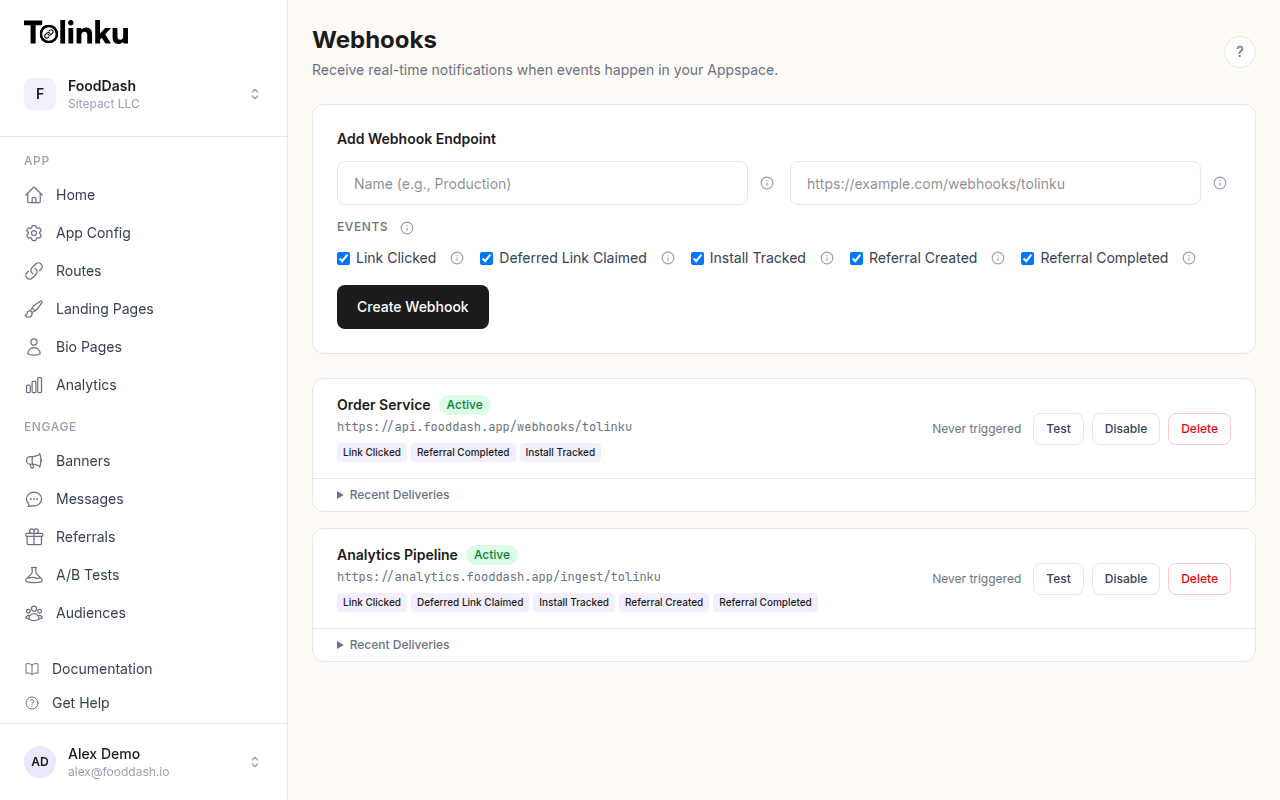 The webhooks page with create form, webhook list, and delivery log.
The Core Event Types
Tolinku produces five webhook event types, each mapping to a specific moment in the user journey:
| Event Type | Fires When | Typical Use |
|---|---|---|
link.clicked |
User taps or clicks a deep link | Click analytics, campaign tracking |
deferred_link.claimed |
App claims a deferred deep link after install | Attribution, onboarding flows |
install.tracked |
SDK reports a new app install | User acquisition tracking, welcome sequences |
referral.created |
A new referral link is generated | Referral program monitoring |
referral.completed |
A referred user reaches the reward milestone | Reward fulfillment, referral analytics |
Not every integration needs all five. A basic analytics sync might only subscribe to link.clicked and install.tracked. A referral program needs referral.created and referral.completed. The key is subscribing only to what you will actually process, which reduces noise and keeps your handler focused.
Tolinku lets you select exactly which event types each webhook endpoint receives. See the webhook event types documentation for the full reference.
Payload Structure
All webhook deliveries share a common envelope structure. Tolinku sends each event as an HTTP POST with these headers:
| Header | Value |
|---|---|
Content-Type |
application/json |
X-Webhook-Signature |
HMAC-SHA256 hex signature |
X-Webhook-Event |
The event type string (e.g., link.clicked) |
User-Agent |
Tolinku/1.0 |
Every payload follows this envelope:
{
  "event": "link.clicked",
  "timestamp": "2026-05-17T09:41:22.318Z",
  "data": { }
}
The event field tells your handler which type of event arrived. The timestamp is ISO 8601 in UTC. The data object contains event-specific fields.
Event Payloads in Detail
link.clicked
This is the highest-volume event. It fires every time a user clicks or taps a deep link.
{
  "event": "link.clicked",
  "timestamp": "2026-05-17T09:41:22.318Z",
  "data": {
    "prefix": "promo",
    "token": "summer-sale",
    "hostname": "links.yourapp.com",
    "ip": "203.0.113.42",
    "platform": "ios",
    "device_type": "mobile",
    "campaign": "summer2026"
  }
}
Click events are the raw material for campaign dashboards. The prefix and token fields identify which route was clicked (e.g., /promo/summer-sale). The platform field tells you whether the click came from iOS, Android, or web. The campaign field is populated from the utm_campaign query parameter on the link, which is useful for tying clicks back to specific marketing campaigns.
deferred_link.claimed
Fires when the app SDK claims a deferred deep link after a new install. This confirms that the user installed the app, opened it, and was matched back to the original click.
{
  "event": "deferred_link.claimed",
  "timestamp": "2026-05-17T10:03:47.892Z",
  "data": {
    "deep_link_path": "/promo/summer-sale",
    "method": "token",
    "ip": "203.0.113.42"
  }
}
The method field indicates how the deferred link was resolved. A value of token means the link was claimed using an explicit deferred link token. A value of signals means the platform matched the user using device signals (fingerprinting). This distinction is useful for understanding your attribution quality: token-based matches are deterministic, while signal-based matches are probabilistic.
install.tracked
Fires when the SDK reports a new app install. This event is distinct from deferred_link.claimed because it fires for all installs that hit your deep link domain, not just those that claim a deferred link.
{
  "event": "install.tracked",
  "timestamp": "2026-05-17T10:01:15.204Z",
  "data": {
    "hostname": "links.yourapp.com",
    "ip": "203.0.113.42",
    "platform": "android",
    "device_type": "mobile",
    "campaign": "summer2026"
  }
}
Install events are high-value because they represent new user acquisition. The payload includes the same platform and campaign fields as click events, letting you attribute installs back to the originating campaign.
referral.created
Fires when a new referral link is generated through the SDK. This tells you a user has entered your referral program.
{
  "event": "referral.created",
  "timestamp": "2026-05-17T14:22:10.553Z",
  "data": {
    "referral_code": "ABC123",
    "referrer_id": "user_789",
    "referral_url": "https://links.yourapp.com/ref/ABC123"
  }
}
Use this event to track referral program participation rates. The referral_code is the unique code assigned to the referrer. The referral_url is the full deep link URL that the referrer can share.
referral.completed
Fires when a referred user reaches the reward milestone defined in your referral program configuration. This is the trigger for issuing rewards.
{
  "event": "referral.completed",
  "timestamp": "2026-05-17T15:10:33.204Z",
  "data": {
    "referral_code": "ABC123",
    "referrer_id": "user_789",
    "referred_user_id": "user_456",
    "milestone": "completed"
  }
}
The referrer_id and referred_user_id fields let you credit both sides of the referral. The milestone field indicates which milestone was reached, corresponding to the milestones you configured in your Appspace's referral settings.
Building an Event Handler
A practical webhook handler needs to do three things: verify the signature, route events to the correct processing logic, and respond quickly. Tolinku enforces a 10-second delivery timeout; if your endpoint takes longer, the delivery is marked as failed and retried.
Here is a complete handler in Node.js with Express:
import express from "express";
import crypto from "crypto";

const app = express();
app.use("/webhooks", express.raw({ type: "application/json" }));

const WEBHOOK_SECRET = process.env.TOLINKU_WEBHOOK_SECRET; // whsec_...

function verifySignature(payload, signature) {
  const expected = crypto
    .createHmac("sha256", WEBHOOK_SECRET)
    .update(payload)
    .digest("hex");
  const sig = Buffer.from(signature, "hex");
  const exp = Buffer.from(expected, "hex");
  if (sig.length !== exp.length) return false;
  return crypto.timingSafeEqual(sig, exp);
}

// Event handlers mapped by type
const handlers = {
  "link.clicked": handleClick,
  "deferred_link.claimed": handleDeferredClaim,
  "install.tracked": handleInstall,
  "referral.created": handleReferralCreated,
  "referral.completed": handleReferralCompleted,
};

app.post("/webhooks/tolinku", async (req, res) => {
  const signature = req.headers["x-webhook-signature"];

  if (!signature || !verifySignature(req.body, signature)) {
    return res.status(401).json({ error: "Invalid signature" });
  }

  const event = JSON.parse(req.body.toString());

  // Respond immediately, process async
  const handler = handlers[event.event];
  if (handler) {
    res.status(200).json({ status: "accepted" });
    handler(event).catch(console.error);
  } else {
    res.status(200).json({ status: "unhandled" });
  }
});
The handler responds with 200 before processing the event. Tolinku retries failed deliveries on a schedule of 1 minute, 5 minutes, and 30 minutes, so you may receive duplicates if your endpoint is temporarily unavailable. Build your handlers to be idempotent: processing the same event twice should produce the same result as processing it once.
For idempotency, you can hash the event payload (since the envelope does not include a unique event ID) and store processed hashes in Redis or your database:
async function isDuplicate(event) {
  const hash = crypto
    .createHash("sha256")
    .update(JSON.stringify(event))
    .digest("hex");
  const exists = await redis.get(`webhook:${hash}`);
  if (exists) return true;
  await redis.set(`webhook:${hash}`, "1", "EX", 86400); // 24h TTL
  return false;
}
Integration Patterns
Analytics Sync
Push click and install data to your analytics warehouse:
async function handleClick(event) {
  await analyticsDB.insert("deep_link_clicks", {
    prefix: event.data.prefix,
    token: event.data.token,
    campaign: event.data.campaign,
    platform: event.data.platform,
    device_type: event.data.device_type,
    timestamp: event.timestamp,
  });
}
CRM Updates
Update user profiles when installs arrive:
async function handleInstall(event) {
  await crm.createOrUpdate({
    source: "deep_link",
    campaign: event.data.campaign,
    platform: event.data.platform,
    first_seen: event.timestamp,
  });
}
Referral Reward Fulfillment
Trigger rewards when referrals complete:
async function handleReferralCompleted(event) {
  await rewardService.issueReward(event.data.referrer_id, {
    type: "referral_bonus",
    referred_user: event.data.referred_user_id,
    milestone: event.data.milestone,
  });

  await slack.send("#referrals", {
    text: `Referral ${event.data.referral_code} completed. ` +
          `${event.data.referrer_id} referred ${event.data.referred_user_id}.`,
  });
}
Choosing Which Events to Subscribe To
When creating a webhook in Tolinku, you select exactly which event types your endpoint should receive. The webhook creation form lets you check or uncheck individual event types.
Here is a decision framework:
Subscribe to link.clicked if you need real-time click analytics, want to detect click fraud, or need to trigger actions immediately on link interaction.
Subscribe to deferred_link.claimed if you are building onboarding flows that depend on the original deep link context, or need to track deferred deep link attribution quality.
Subscribe to install.tracked if you are tracking user acquisition, attributing installs to campaigns, or triggering welcome sequences for users who arrived via deep links.
Subscribe to referral.created if you are monitoring referral program participation, tracking how many users generate referral links, or syncing referral data to external CRM systems.
Subscribe to referral.completed if you are fulfilling referral rewards, tracking referral conversion rates, or notifying teams when referrals convert.
If you are just getting started, begin with link.clicked and install.tracked. These two events give you the most actionable data with the least handler complexity. Add referral events as your integration matures.
Error Handling and Retry Logic
Webhook deliveries can fail. Your server might be down, or a transient database error might cause a 500 response. Tolinku retries failed deliveries up to three times with increasing delays: 1 minute, 5 minutes, and 30 minutes after the initial failure. Your handler needs to be resilient to duplicates and graceful with errors.
A defensive handler wraps processing in a try/catch and logs failures without crashing:
app.post("/webhooks/tolinku", async (req, res) => {
  // ... signature verification ...

  const event = JSON.parse(req.body.toString());
  res.status(200).json({ status: "accepted" });

  try {
    const handler = handlers[event.event];
    if (handler) await handler(event);
  } catch (err) {
    console.error(`Failed to process ${event.event}:`, err);
    // Queue for retry via your own job system
    await retryQueue.add({ event, attempts: 0 });
  }
});
Always respond with 200 before processing. If you respond with a non-2xx status, the platform will retry, and you could end up processing the event multiple times once your system recovers.
Next Steps
Webhook event types are the building blocks of a connected deep linking system. Each event type represents a specific moment in the user journey, and each carries the data you need to act on that moment. Start with the events that map to your most important business metrics, build handlers that are idempotent and fast, and expand your subscriptions as your integration needs grow.
To configure webhooks in your Tolinku Appspace, visit the webhook settings page and select the event types you need. The event types documentation has the full payload reference for each type.
Get deep linking tips in your inbox
One email per week. No spam.