Media and content apps (news, video, podcasts, blogs, magazines) face a unique challenge with smart banners: the user is already consuming the content on the web. Why would they install an app to read the same article? The banner needs to answer that question with a compelling reason, not just say "get our app."
Content-aware smart banners solve this by connecting the banner to the specific content the user is viewing. Instead of a generic "Download our app" message, the banner says "Continue reading in the app" or "Watch this video ad-free in the app." The deep link ensures the user lands on the exact content they were viewing, not the home screen.
This guide covers smart banner strategies specific to media and content apps. For the general smart banners setup, see the smart banners guide. For banner positioning, see banner position and UX.
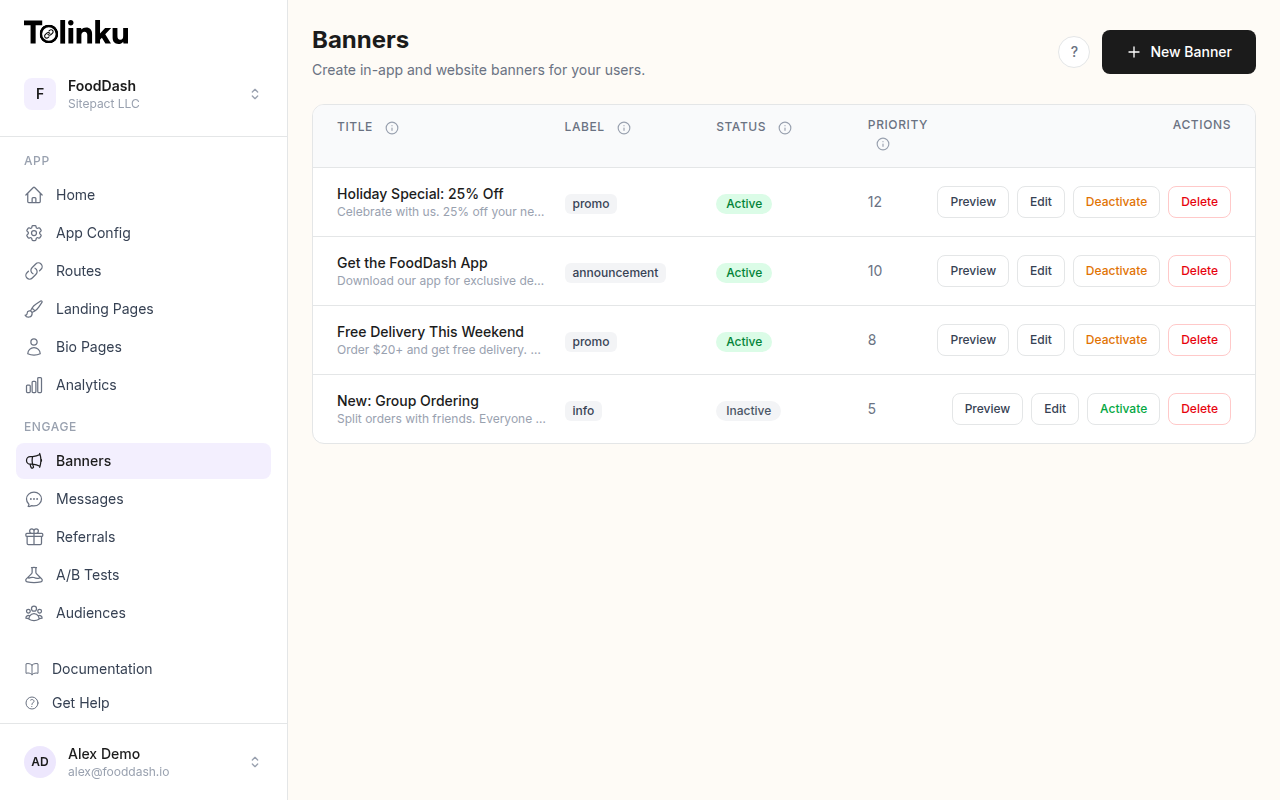 The banners list page showing all configured smart banners with status toggles.
Why Media Apps Need Different Banners
The Content Paradox
Most app install banners work by showing value that is not available on the web. For e-commerce, it might be "exclusive app-only discounts." For social apps, it might be "message your friends." But media apps have a problem: the content is already available on the web page the user is reading.
Generic banners fail for media apps because:
- "Download our app" does not explain why.
- "Better reading experience" is vague and unverifiable.
- The user is already in the middle of consuming content and does not want to be interrupted.
What Works
Content-aware banners work because they:
- Reference the specific content the user is viewing.
- Offer a tangible benefit for consuming that content in the app (offline, ad-free, bookmarks, personalization).
- Use deferred deep linking to ensure the user lands on the same content after install.
Content-Aware Banner Patterns
Pattern 1: "Continue in the App"
Show the banner when the user is partway through an article or video:
const bannerConfig = {
  message: "Continue reading this article in the app",
  subtext: "Ad-free, offline access, personalized feed",
  cta: "Open in App",
  deepLink: window.location.pathname, // Current article URL
  showAfterScroll: 50, // Show after 50% scroll
};
The banner appears after the user has demonstrated interest (scrolled past the fold). The deep link is the current page URL, so the user lands on the same article in the app.
Pattern 2: Content Preview Banner
Show a rich banner with the article thumbnail, title, and reading time:
<div class="smart-banner smart-banner--content">
<img src="/thumbnails/article-123.jpg" class="smart-banner__thumb" alt="" />
<div class="smart-banner__info">
<span class="smart-banner__label">Reading in the app</span>
<span class="smart-banner__title">The Future of AI in Journalism</span>
<span class="smart-banner__meta">8 min read, ad-free</span>
</div>
<a href="https://tolk.link/article-123" class="smart-banner__cta">Open</a>
<button class="smart-banner__close" aria-label="Dismiss">×</button>
</div>
This banner mirrors the content the user is already reading, creating visual continuity between the web and the app.
Pattern 3: "Unlock More" Banner
For paywalled or gated content, the banner promotes the app as a way to access more content:
const bannerConfig = {
  message: "Read unlimited articles in the app",
  subtext: "Free trial, no credit card required",
  cta: "Start Free Trial",
  deepLink: "/subscribe?source=web_banner",
  showOn: "paywalled-articles", // Only show on paywalled content
};
This works well for news and magazine apps with subscription models. The app offers a free trial that the web does not (or the app trial is more prominent).
Pattern 4: Related Content Banner
Show a banner that recommends related content available in the app:
function buildRelatedContentBanner(currentArticle) {
  return {
    message: `More on "${currentArticle.category}" in the app`,
    subtext: `${currentArticle.relatedCount}+ related articles, personalized for you`,
    cta: "Explore",
    deepLink: `/category/${currentArticle.categorySlug}`,
  };
}
This pattern works well at the end of an article, when the user has finished the content and is looking for more.
Pattern 5: Video/Podcast Banner
For video and audio content, the banner promotes the in-app experience:
const videoBannerConfig = {
  message: "Watch in HD, ad-free",
  subtext: "Background play, downloads, picture-in-picture",
  cta: "Watch in App",
  deepLink: `/videos/${videoId}`,
  showOn: "video-pages",
};
Video and podcast apps have strong reasons to promote the app: background playback, downloads for offline listening, picture-in-picture, and better streaming quality.
Deferred Deep Linking for Content
The critical technical piece: when a user installs the app from a content-aware banner, they must land on the same content. This requires deferred deep linking.
Passing Content Context
Include the current page's content identifier in the deep link:
function getBannerDeepLink() {
  // Get the current content's canonical URL or ID
  const canonical = document.querySelector('link[rel="canonical"]')?.href;
  const articleId = document.querySelector('meta[name="article-id"]')?.content;

  return canonical || `${window.location.origin}${window.location.pathname}`;
}
Handling the First Open
When the app opens after install, the deferred link resolves to the article:
func handleDeferredLink(_ path: String) {
    // Parse the content path
    if path.contains("/articles/") || path.contains("/videos/") || path.contains("/podcasts/") {
        // Navigate directly to the content
        let contentVC = ContentViewController(url: path)
        navigationController?.pushViewController(contentVC, animated: true)
    } else {
        // Unknown path; show the feed
        navigationController?.pushViewController(FeedViewController(), animated: true)
    }
}
Timing and Placement
When to Show
For media apps, timing matters more than for other app types because the user is actively consuming content:
Do not show immediately. Let the user start reading. Show after 30-50% scroll or 15+ seconds on the page.
Do not show on landing pages. Users arriving from search engines are not committed yet. Wait for engagement signals (scroll depth, second page view, time on site) before showing the banner.
Show on article pages, not the homepage. The homepage is a navigation page. Article pages are where the user demonstrates content interest.
Show at natural breaks. Between paragraphs, after a section heading, or at the end of the article. Not in the middle of a sentence or over a photo.
Where to Place
Bottom of screen (sticky): Least intrusive for reading. Does not push content down. Best default for media apps.
Inline (between sections): Appears as part of the content flow. Works well for long-form articles when placed after the third or fourth section.
End of article: Catch users who have finished the content and are looking for what to do next. High intent moment.
Measuring Banner Performance for Content Apps
Track these content-specific metrics:
- Banner CTR by content type: Do article banners convert better than video banners? Which categories drive the most installs?
- Content completion rate: Do users who see the banner finish the article, or does the banner interrupt them?
- Post-install content engagement: Do users who install from a content banner consume more content than organic installs?
- Content retention: Do content-aware banner installs have better Day-7 retention than generic banner installs?
Tolinku for Media Apps
Tolinku's smart banners support content-aware configuration. Set up banners that automatically include the current page's deep link, ensuring users land on the same content after install. Configure banner targeting by page type (article, video, podcast) in the Tolinku dashboard.
For deep linking the content, see Tolinku's deep linking feature. For the complete smart banners setup, see the smart banners guide.
Get deep linking tips in your inbox
One email per week. No spam.