Email remains one of the highest-converting channels for driving app engagement. When you add deep links to emails, users can tap straight into specific app screens instead of landing on a generic homepage. A/B testing these deep links (the destinations, CTA text, link placement, and fallback behavior) lets you find the combination that maximizes opens, taps, and in-app conversions.
For Universal Links in email, see Universal Links in Email Campaigns: Setup and Pitfalls. For e-commerce email deep links, see E-Commerce Email Deep Links That Convert.
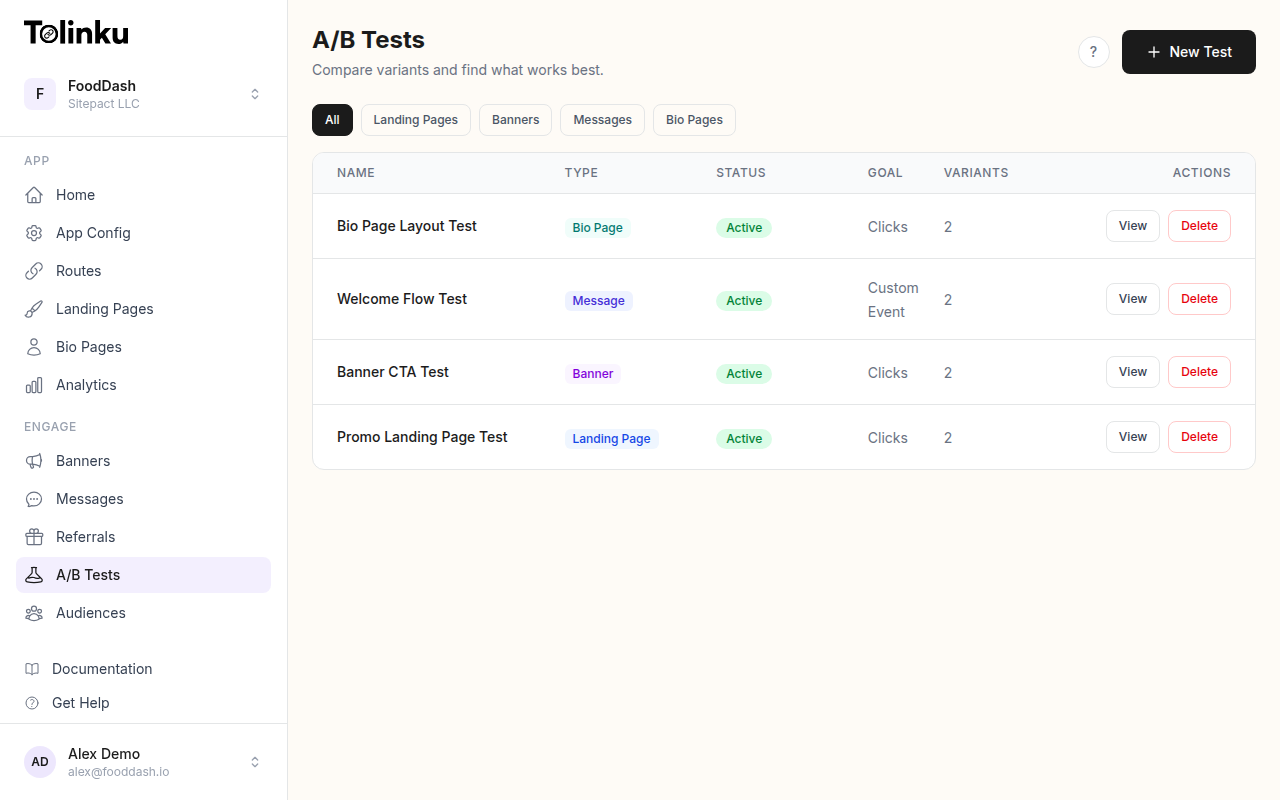 The A/B tests list page showing test names, status, types, and variant counts.
What to Test
Test Variables by Impact
| Variable | Impact | Difficulty | Notes |
|---|---|---|---|
| Deep link destination | High (15-30% lift) | Medium | Where in the app does the user land? |
| CTA text | High (10-25% lift) | Easy | "Open in App" vs. "View Your Order" |
| Link placement | Medium (5-15% lift) | Easy | Above fold vs. inline vs. footer |
| App vs. web destination | High (10-40% lift) | Medium | Route to app or mobile web? |
| Number of deep links | Medium (5-10% lift) | Easy | One primary CTA vs. multiple links |
| Fallback page | Medium (10-20% lift) | Medium | Where non-app users go |
| Subject line (with app mention) | High (10-20% open lift) | Easy | "Open in app" vs. no mention |
Testing Deep Link Destinations
App Screen Variants
The same email can route users to different in-app screens:
const emailDestinationTest = {
  id: 'email_destination_v2',
  emailType: 'order_shipped',
  variants: [
    {
      id: 'order_detail',
      weight: 50,
      deepLink: '/orders/:orderId',
      ctaText: 'Track Your Order',
      fallbackUrl: 'https://example.com/orders/:orderId',
    },
    {
      id: 'tracking_map',
      weight: 50,
      deepLink: '/orders/:orderId/tracking',
      ctaText: 'See Live Tracking',
      fallbackUrl: 'https://example.com/orders/:orderId/tracking',
    },
  ],
  primaryMetric: 'email_cta_tap',
  secondaryMetrics: ['app_open', 'order_detail_view', 'repeat_purchase_7d'],
};
App vs. Web Destination
Test whether routing to the app or mobile web produces better outcomes:
const appVsWebTest = {
  id: 'app_vs_web_v1',
  emailType: 'weekly_digest',
  variants: [
    {
      id: 'app_deep_link',
      weight: 50,
      link: 'https://example.com/content/:id', // Universal Link, opens app if installed
      ctaText: 'Read in App',
    },
    {
      id: 'web_link',
      weight: 50,
      link: 'https://example.com/content/:id?no_app_redirect=true',
      ctaText: 'Read Now',
    },
  ],
  primaryMetric: 'content_read_complete',
  secondaryMetrics: ['session_duration', 'next_action'],
};
Typical results:
| Scenario | App Link Wins | Web Link Wins |
|---|---|---|
| User has app installed | Always | Never |
| User doesn't have app | Never (friction) | Always |
| Transaction email (order, receipt) | Usually | Rarely |
| Content/newsletter | Sometimes | Often |
| Re-engagement campaign | Usually | Rarely |
The key insight: if most of your email audience has the app installed, deep links win. If many recipients don't have the app, web links avoid the friction of an app store redirect.
CTA Text Testing
Email CTA Variants
const emailCtaTest = {
  id: 'email_cta_v3',
  variants: [
    { id: 'generic', ctaText: 'View Details', weight: 20 },
    { id: 'app_specific', ctaText: 'Open in App', weight: 20 },
    { id: 'action_specific', ctaText: 'Track Your Package', weight: 20 },
    { id: 'benefit', ctaText: 'See Delivery Updates', weight: 20 },
    { id: 'urgency', ctaText: 'Check Status Now', weight: 20 },
  ],
  primaryMetric: 'email_cta_tap',
};
Results by email type:
| Email Type | Best CTA Style | Example |
|---|---|---|
| Order confirmation | Action-specific | "View Your Order" |
| Shipping notification | Benefit | "Track Your Package" |
| Promotional | Benefit or urgency | "Claim Your 20% Off" |
| Re-engagement | Direct | "Come Back and See What's New" |
| Weekly digest | Content preview | "Read This Week's Top Stories" |
| Account alert | Urgency | "Review Your Account Now" |
Subject Line Testing
Subject lines that mention the app can increase open rates:
const subjectLineTest = {
  id: 'subject_app_mention_v1',
  variants: [
    {
      id: 'no_mention',
      subject: 'Your order has shipped',
      weight: 50,
    },
    {
      id: 'app_mention',
      subject: 'Your order has shipped - track it live in the app',
      weight: 50,
    },
  ],
  primaryMetric: 'email_open_rate',
  secondaryMetrics: ['email_cta_tap', 'app_open'],
};
Mentioning the app in the subject line typically increases open rates by 5-10% for users who have the app installed, but has no effect (or slight negative effect) for users without the app.
Link Placement Testing
Single vs. Multiple Deep Links
const linkPlacementTest = {
  id: 'link_placement_v1',
  variants: [
    {
      id: 'single_cta',
      weight: 50,
      layout: {
        heroLink: true,    // One big CTA button
        inlineLinks: false,
        footerLink: false,
      },
    },
    {
      id: 'multiple_links',
      weight: 50,
      layout: {
        heroLink: true,     // Primary CTA
        inlineLinks: true,  // Links within content
        footerLink: true,   // Repeat CTA at bottom
      },
    },
  ],
  primaryMetric: 'any_link_tap',
  secondaryMetrics: ['hero_tap', 'inline_tap', 'footer_tap'],
};
Typical results:
- Single CTA: Higher tap rate on the one button (focused attention)
- Multiple links: Higher total taps (users who scroll past the hero CTA tap the footer one)
- For short emails (< 300px height): single CTA wins
- For long emails (> 500px height): multiple links win
CTA Button vs. Text Link
const linkStyleTest = {
  id: 'link_style_v1',
  variants: [
    {
      id: 'button',
      weight: 50,
      style: 'button', // Styled HTML button
    },
    {
      id: 'text_link',
      weight: 50,
      style: 'text', // Underlined text link
    },
  ],
  primaryMetric: 'email_cta_tap',
};
Buttons outperform text links by 20-30% in most cases. The exception: emails that are meant to feel personal (like a note from a founder) perform better with text links because buttons feel like marketing.
Implementation
Building Testable Email Templates
async function buildEmail(userId, emailType, data) {
  const experiment = getActiveExperiment('email', emailType);

  if (!experiment) {
    return buildDefaultEmail(emailType, data);
  }

  const variant = assignVariant(userId, experiment.id);

  // Generate trackable deep link
  const deepLink = await generateDeepLink(variant.deepLink || data.defaultDeepLink, {
    experimentId: experiment.id,
    variantId: variant.id,
    userId,
    source: 'email',
    campaign: emailType,
  });

  // Generate fallback URL for users without the app
  const fallbackUrl = variant.fallbackUrl || data.defaultFallbackUrl;

  return {
    subject: variant.subject || data.defaultSubject,
    html: renderEmailTemplate(emailType, {
      ...data,
      ctaText: variant.ctaText || data.defaultCtaText,
      ctaUrl: deepLink,
      fallbackUrl,
      layout: variant.layout || 'default',
    }),
    tracking: {
      experimentId: experiment.id,
      variantId: variant.id,
    },
  };
}
Handling Universal Links in Email
Universal Links have specific requirements in email clients. Some email clients (Gmail, Outlook) wrap links in their own redirect, which breaks Universal Link behavior.
function buildEmailDeepLink(path, params) {
  // Use a web URL that is configured as a Universal Link
  const baseUrl = 'https://links.example.com';
  const url = new URL(path, baseUrl);

  // Add tracking parameters
  Object.entries(params).forEach(([key, value]) => {
    url.searchParams.set(key, value);
  });

  // Add email-specific parameter for fallback handling
  url.searchParams.set('source', 'email');

  return url.toString();
}
For detailed Universal Link email setup, see the Apple developer documentation on Universal Links.
Tracking Email Deep Link Performance
// Email sent
analytics.track('email_sent', {
  experimentId,
  variantId,
  emailType: 'order_shipped',
  userId,
});

// Email opened
analytics.track('email_opened', {
  experimentId,
  variantId,
  emailType: 'order_shipped',
  userId,
  openedAt: Date.now(),
});

// CTA tapped
analytics.track('email_cta_tapped', {
  experimentId,
  variantId,
  ctaPosition: 'hero', // or 'inline', 'footer'
  destination: 'app', // or 'web', 'app_store'
  userId,
});

// App opened from email
analytics.track('app_opened_from_email', {
  experimentId,
  variantId,
  emailType: 'order_shipped',
  deepLinkPath: '/orders/123',
  userId,
});
Fallback Testing
What Happens When the App Isn't Installed
const fallbackTest = {
  id: 'email_fallback_v1',
  variants: [
    {
      id: 'app_store',
      weight: 33,
      fallback: 'app_store', // Send to app store
    },
    {
      id: 'mobile_web',
      weight: 33,
      fallback: 'web_equivalent', // Same content on mobile web
    },
    {
      id: 'landing_page',
      weight: 34,
      fallback: 'install_landing', // Custom "install the app" page
    },
  ],
  primaryMetric: 'goal_completion', // Did the user complete the intended action?
};
| Fallback | Install Rate | Goal Completion | Best For |
|---|---|---|---|
| App store | 15-25% | Low (delayed) | Growing app installs |
| Mobile web | 0% | High (immediate) | Transactional emails |
| Landing page | 20-35% | Medium | Campaigns with install incentive |
Segmentation
Test Different Variants for Different Segments
async function getEmailVariant(userId, emailType) {
  const userProfile = await getUserProfile(userId);

  // Different experiments for different segments
  if (userProfile.hasAppInstalled) {
    return getVariant(userId, `${emailType}_app_users`);
  }

  if (userProfile.previousAppUser) {
    return getVariant(userId, `${emailType}_lapsed_users`);
  }

  return getVariant(userId, `${emailType}_web_only_users`);
}
Segment-Specific Results
The winning variant often differs by segment:
| Segment | Best CTA | Best Destination | Best Fallback |
|---|---|---|---|
| Active app users | "Open in App" | Direct deep link | N/A |
| Lapsed app users | "See What's New" | Home screen | Mobile web |
| Web-only users | "Try the App" | Landing page | Mobile web |
| New subscribers | "Get Started" | Onboarding flow | App store |
Best Practices
- Segment by app install status: The optimal email is completely different for app users vs. web-only users.
- Test one variable at a time: Change the CTA text or the destination, not both.
- Run for at least 2 send cycles: If you send weekly, run the test for at least 2 weeks.
- Track through to in-app action: Email open and tap rates are vanity metrics. Track the downstream conversion.
- Account for email client behavior: Test on Gmail, Apple Mail, Outlook, and Yahoo. Each handles deep links differently.
- Use Universal Links, not custom schemes: Custom URL schemes (
myapp://) don't work in most email clients. Use Universal Links / App Links (HTTPS URLs).
For A/B testing features, see Tolinku A/B testing. For deep link A/B testing setup, see the A/B testing docs.
Get deep linking tips in your inbox
One email per week. No spam.