Referral programs drive some of the lowest-cost user acquisition in mobile marketing. But behind every "Share with a friend" button lies a surprisingly complex technical flow. A referral deep link must survive the journey from one user's phone, through a browser, possibly through an app store, and into a freshly installed app, all while preserving the referral attribution data that connects the new user back to the person who invited them.
This guide traces that entire journey step by step, from the moment a referral link is generated to the point where both the referrer and the referred user claim their rewards.
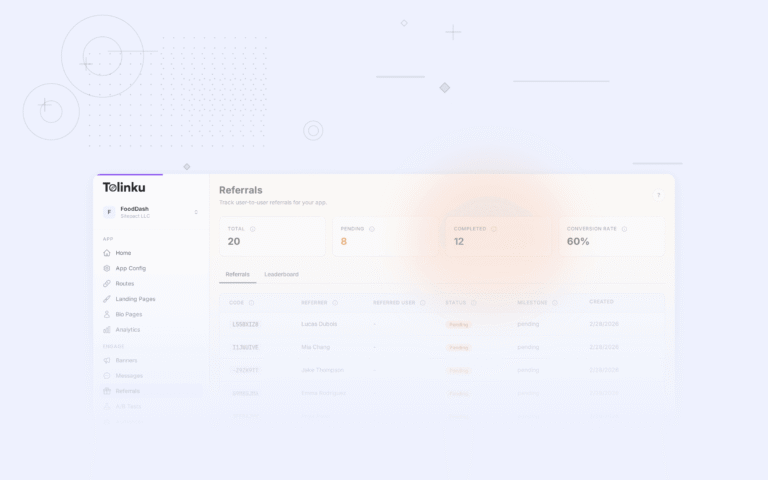
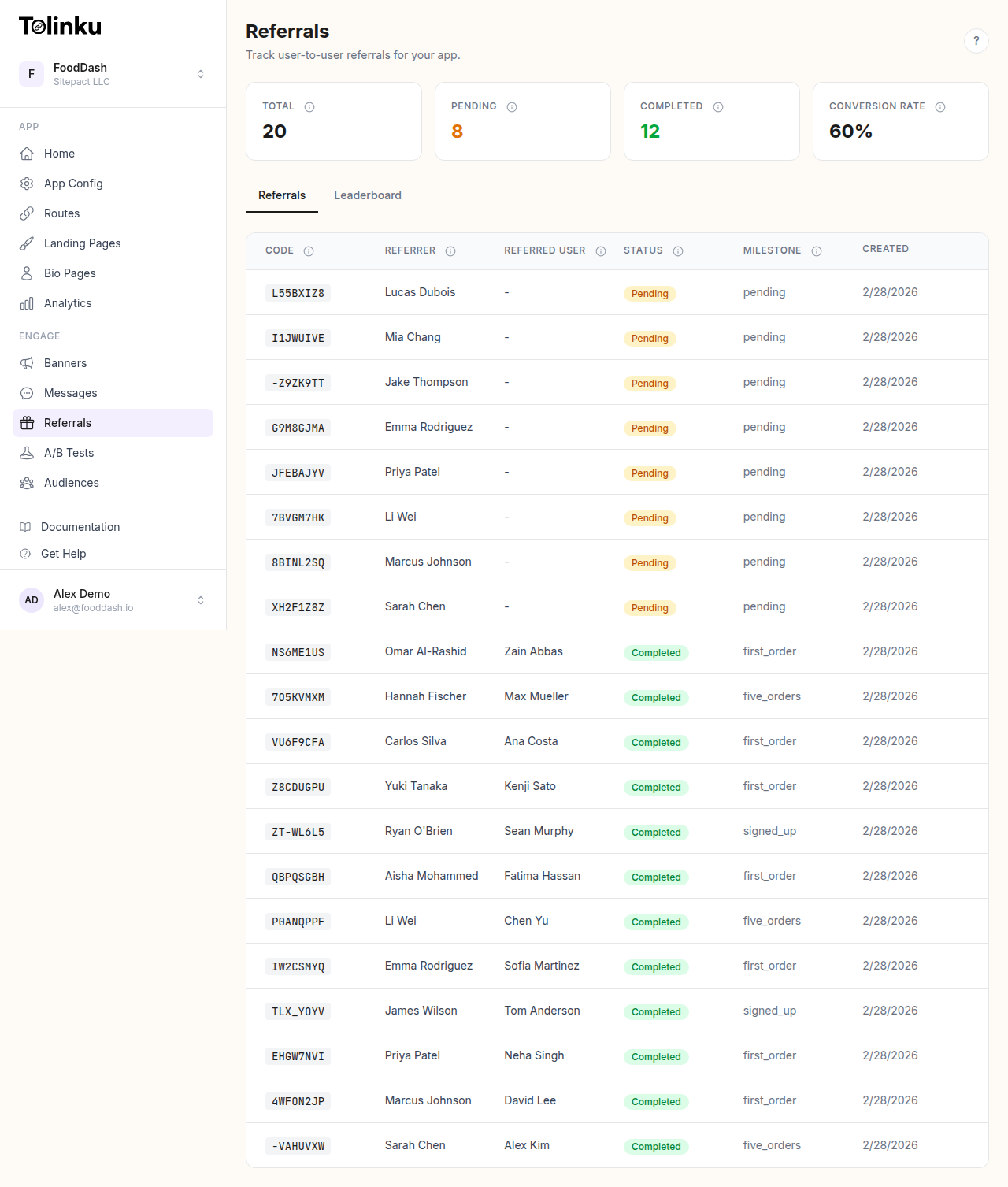 The referrals page with stats cards, referral list, and leaderboard tabs.
The Referral Link Lifecycle
A referral deep link goes through five distinct phases:
- Generation: A unique referral code is created and embedded in a shareable URL
- Distribution: The referrer shares the link via messaging, social media, or email
- Click handling: The link is opened, the click is tracked, and the user is routed to the right destination
- Attribution: The new user installs and opens the app, and the system matches them back to the referral
- Reward fulfillment: Both parties receive their rewards once the required action is completed
Let's examine each phase in detail.
Phase 1: Generating the Referral Link
When a user taps "Invite a Friend" in your app, the SDK calls your deep linking platform to generate a unique referral code. In Tolinku, this happens through a single API call:
POST /v1/api/referral/create
{
  "user_id": "user_123",
  "user_name": "Jane Doe",
  "metadata": { "source": "share_screen" }
}
The platform generates a 10-character code using cryptographically random bytes, producing something like XKCD7B2MNQ. This code gets embedded in a URL:
https://your-domain.tolinku.com/ref/XKCD7B2MNQ
A few things happen behind the scenes during generation:
- Deduplication: If the user already has an active (pending) referral, the existing code is returned instead of creating a new one
- Rate limiting: A configurable per-user cap prevents abuse. If the limit is reached, the API returns a 400 error
- Event tracking: A
referral_createdevent fires, incrementing the referrer's analytics - Webhook dispatch: A
referral.createdwebhook notifies your backend with the code, referrer ID, and full URL
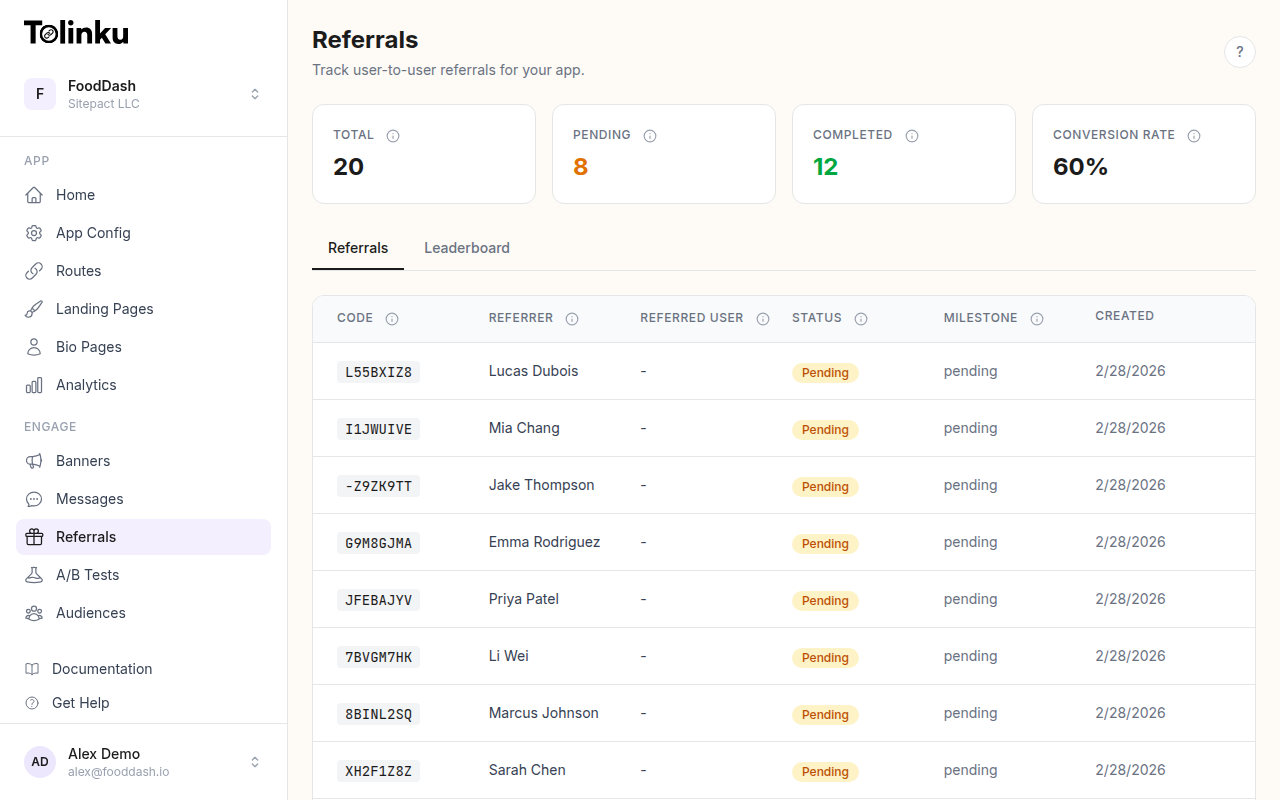
You can configure referral settings per Appspace, including expiration windows (1 to 365 days), per-user limits, and custom milestones.
Phase 2: Sharing the Link
Once the referral URL is generated, the user shares it. The format of the link matters more than you might think.
A referral deep link needs to work across every sharing channel: iMessage, WhatsApp, Twitter/X, email, SMS, even copied and pasted into a notes app. The link itself is a standard HTTPS URL, which means it renders properly as a tappable link in any context.
When shared on social media or messaging apps, the link server responds with Open Graph meta tags so the link renders with a rich preview: title, description, and image. This social preview can be configured per route in the Tolinku dashboard under OG & Social Previews.
Phase 3: Click Handling and Routing
This is where the technical complexity lives. When the referred user taps the link, several things happen within milliseconds:
Device Detection
The link server parses the User-Agent header to determine:
- Operating system: iOS, Android, or desktop
- Device type: Phone, tablet, or computer
- Browser: Safari, Chrome, in-app browser, etc.
Click Tracking
Every click is recorded as an analytics event with:
- IP address and approximate geolocation
- Device and platform information
- Campaign parameters (if any UTM tags are present)
- The referral code from the URL path
A link.clicked webhook fires asynchronously, giving your backend real-time visibility into click activity.
Routing Decision
Based on the device, the server makes a routing decision:
If the user has the app installed (and Universal Links or App Links are configured):
The operating system intercepts the link and opens it directly in the app. The referral code is passed as part of the deep link path (/ref/XKCD7B2MNQ), and the app handles it immediately. No attribution complexity here.
If the user does not have the app (the common case for referrals): This triggers the deferred deep linking flow. The server needs to:
- Store the referral context for later retrieval
- Send the user to the appropriate app store
- Ensure the context survives the install process
Deferred Link Storage
Before redirecting to the app store, the server stores a deferred link record containing the referral path, a fingerprint derived from the user's IP and User-Agent, device signals (timezone, language, screen dimensions), and a unique referrer token.
This record has a 24-hour time-to-live. If the user doesn't install the app within that window, the deferred link expires. For production deployments, these records are stored in Redis for fast retrieval; a memory-based fallback is available for development.
App Store Redirect
The redirect strategy differs by platform:
Android: The user is sent to the Google Play Store with a special referrer query parameter:
https://play.google.com/store/apps/details?id=com.example.app&referrer=tolk_token=abc123def456
The Google Play Install Referrer API preserves this token through the installation process, making it available to the app on first launch.
iOS: The user is sent to the App Store. Since Apple doesn't offer an equivalent to Android's Install Referrer API, the token is stored server-side and matched using device signals after the app opens.
Phase 4: Attribution After Install
This is the most technically challenging phase. The user has installed your app from the store. Now the app needs to "claim" the deferred deep link and extract the referral code.
Android: Token-Based Matching
On Android, attribution is deterministic. Here's the flow:
- The app launches for the first time
- The SDK reads the install referrer using Google's Install Referrer API
- It extracts the
tolk_tokenvalue - It calls the Tolinku API:
GET /api/deferred/claim?token=abc123def456 - The server looks up the deferred link by token, marks it as claimed, and returns the original deep link path
- The app receives
/ref/XKCD7B2MNQand knows this is a referral install
This is a 1:1 deterministic match. There's no ambiguity, no false positives.
iOS: Signal-Based Matching
On iOS, the matching is probabilistic but highly accurate. The process works like this:
- The app launches for the first time
- The SDK collects device signals: timezone, language, screen width, and screen height
- It sends these signals along with the device's IP address to the Tolinku API
- The server searches for unclaimed deferred links from the same IP within a configurable match window (default: 2 hours)
- Each candidate is scored on a 4-point scale:
| Signal | Match Criteria | Points |
|---|---|---|
| Timezone | Exact match | 1 |
| Language | Exact match | 1 |
| Screen width | Within 50 pixels | 1 |
| Screen height | Within 50 pixels | 1 |
- The candidate with the highest score (minimum 2) is selected as the match
- The deferred link is marked as claimed, and the referral path is returned to the app
The 50-pixel tolerance on screen dimensions accounts for minor differences between how the browser and native app report screen size. The 2-hour default window balances accuracy (shorter windows reduce false positives) against user experience (some users take time to find and install an app).
For a deeper look at how this matching works, see Deferred Deep Linking: How It Works Under the Hood.
Phase 5: Completing the Referral
Once the app has the referral code, it needs to complete the referral. This is a server-side API call, not something the SDK handles automatically, because "completion" means different things for different apps.
Simple Completion
For apps where installing is enough:
POST /v1/api/referral/complete
{
  "referral_code": "XKCD7B2MNQ",
  "referred_user_id": "user_456",
  "referred_user_name": "John Doe",
  "milestone": "completed"
}
This sets the referral status to completed, records the timestamp, populates the reward values from the Appspace configuration, and fires a referral.completed webhook.
Multi-Step Milestones
Many apps require the referred user to take a specific action before the referral counts. A food delivery app might require a first order. A fintech app might require account verification. Tolinku supports custom milestones for these scenarios:
POST /v1/api/referral/milestone
{
  "referral_code": "XKCD7B2MNQ",
  "milestone": "signed_up"
}
Each milestone is appended to a history array, creating an audit trail:
[
  { "milestone": "pending", "timestamp": "2026-01-09T12:00:00Z" },
  { "milestone": "signed_up", "timestamp": "2026-01-11T09:00:00Z" },
  { "milestone": "first_purchase", "timestamp": "2026-01-15T10:30:00Z" }
]
When the milestone matches the configured referral_reward_milestone (for example, first_purchase), the referral automatically transitions to completed status.
Phase 6: Reward Fulfillment
Tolinku supports two-sided rewards: one for the referrer and one for the referred user. Both are configured at the Appspace level with a type (discount, credit, custom) and a value.
Claiming Rewards
Rewards are claimed through separate API endpoints:
POST /v1/api/referral/claim-reward         // Referrer claims their reward
POST /v1/api/referral/claim-referee-reward  // Referred user claims theirs
The platform tracks claim status separately for each party. Your backend handles the actual reward fulfillment (issuing discount codes, crediting accounts, etc.) based on webhook notifications and the claim status.
Tracking with the Dashboard
The referral dashboard provides a real-time view of your program's performance:
- Stats cards: Total referrals, pending, completed, expired, and conversion rate
- Referral list: Every referral with status, milestone progress, and reward state
- Leaderboard: Top referrers ranked by completed referrals, showing total reward value earned
You can also track referral activity through analytics with filters for referral-specific events.
Handling Edge Cases
Real-world referral flows involve edge cases that can break attribution if not handled properly.
Expired Referrals
Tolinku uses lazy expiration. When a referral is looked up, the system checks if the creation date plus the configured expiration window has passed. If so, the status is set to expired and the referral can no longer be completed. This avoids the need for background expiration jobs while keeping the data accurate.
Already-Installed Users
If the referred user already has the app, Universal Links (iOS) or App Links (Android) open the app directly. The referral code is in the URL path, so attribution works immediately without deferred deep linking.
Desktop Clicks
When someone clicks a referral link on a desktop browser, there's no app to open. The server redirects to a configurable web fallback URL, which could be a landing page with app store badges, a web version of your app, or a page explaining how to install the mobile app.
Multiple Clicks Before Install
If a user clicks the same referral link multiple times before installing, each click creates or updates the deferred link record. The most recent click's signals are used for matching, which is the correct behavior since those signals will most closely match the ones the app reports on first launch.
Monitoring with Webhooks
Webhooks give your backend real-time notifications at every stage:
| Event | When It Fires | Key Payload Fields |
|---|---|---|
link.clicked |
User taps referral link | prefix, token, platform, device_type |
referral.created |
Referral code generated | referral_code, referrer_id, referral_url |
referral.completed |
Referral reaches completion milestone | referral_code, referrer_id, referred_user_id, milestone |
All webhooks are signed with HMAC-SHA256 using a whsec_ prefixed signing secret, so your backend can verify authenticity. Failed deliveries retry automatically at 1-minute, 5-minute, and 30-minute intervals.
For a practical guide to building automation on top of these webhooks, see Automating Your Referral Program with Webhooks.
Putting It All Together
The end-to-end flow of a referral deep link involves multiple systems working in coordination: your app's SDK, a deep linking platform, app store APIs, and your backend. The complexity is real, but the payoff is significant. When the technical foundation is solid, referral programs can scale to become a primary user acquisition channel.
If you're building a referral program, start with the basics: generate links, handle clicks, implement deferred deep linking for new users. Then layer in milestones, two-sided rewards, and webhook-driven automation as your program matures.
For more on how deferred deep linking specifically applies to referral flows, see Using Deferred Deep Links for Referral Programs.
Get deep linking tips in your inbox
One email per week. No spam.