Most referral programs start the same way. You build a referral link system, hand out codes to users, and track who referred whom. Then you realize you need to actually do something when a referral completes: credit the referrer's account, send a thank-you email, update your CRM, notify your support team. Doing this manually does not scale past your first hundred users.
Webhooks turn your referral program from a passive tracking system into an automated pipeline. Every time a referral event fires (a code is created, a milestone is reached, a referral completes), your backend gets a POST request with the event data. From there, you can trigger whatever workflow makes sense: issue a discount code, send a push notification, update a Slack channel, or log it to your analytics warehouse.
This guide walks through the technical setup for automating referral workflows with webhooks, using Tolinku's referral system as the foundation.
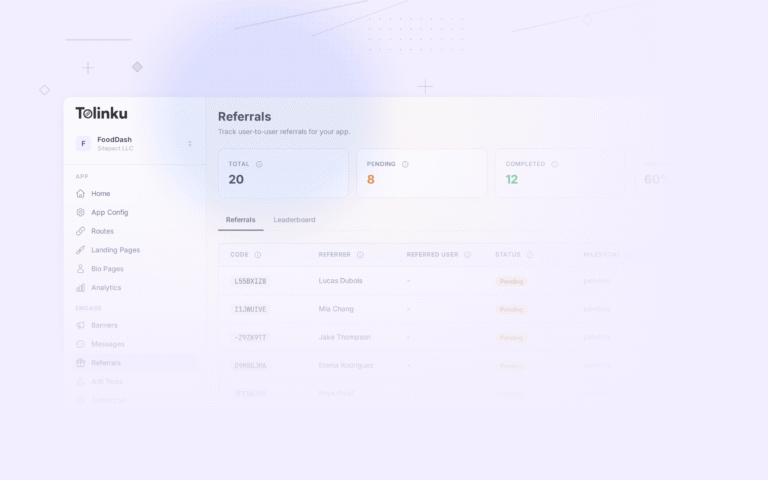
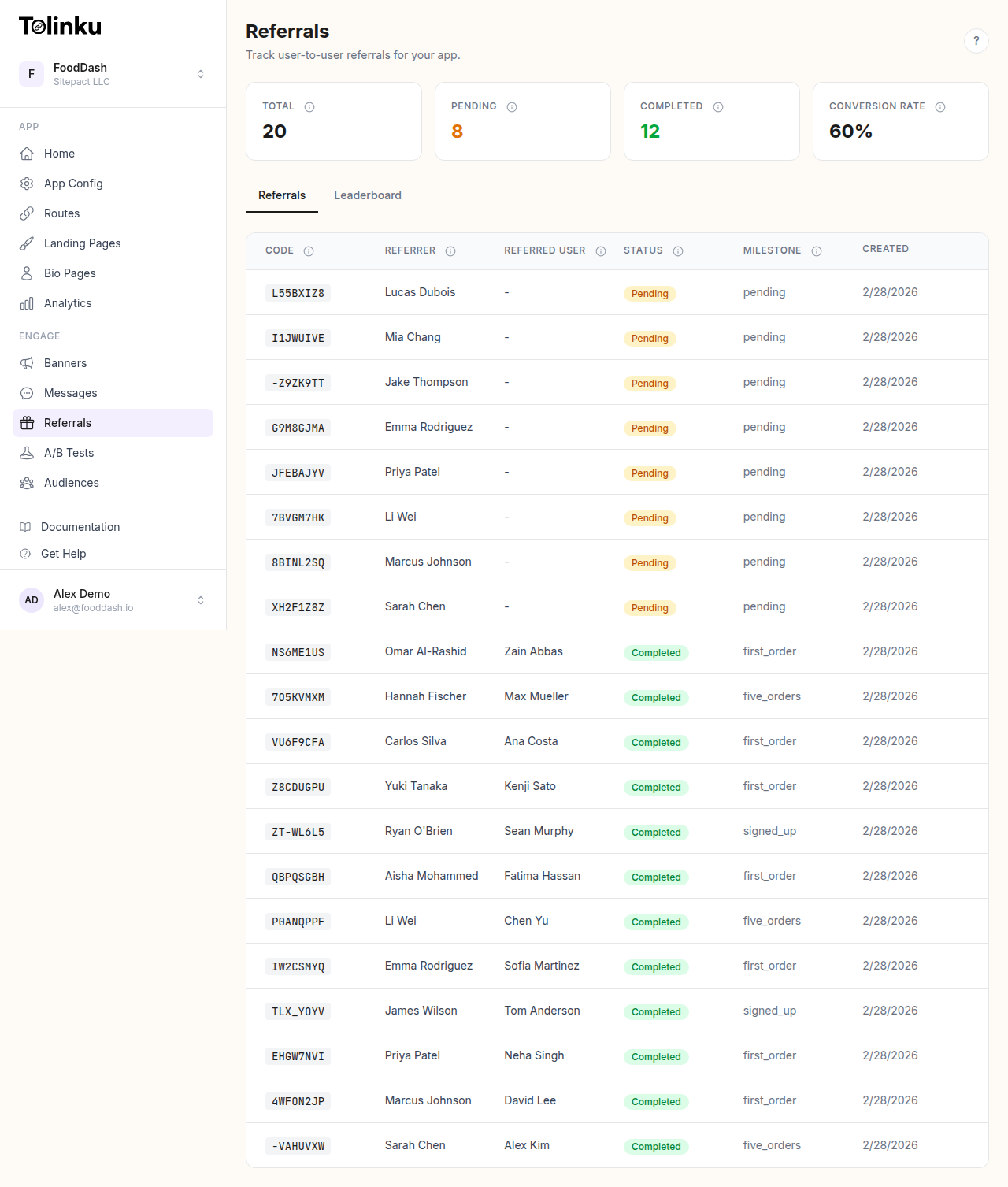 The referrals page with stats cards, referral list, and leaderboard tabs.
How Referral Webhooks Work
A referral webhook follows the same pattern as any other webhook: your server registers an endpoint URL, subscribes to specific event types, and receives HTTP POST requests when those events occur.
Tolinku fires two referral-specific webhook events:
| Event | Fires When |
|---|---|
referral.created |
A new referral code is generated via the API |
referral.completed |
A referred user completes the required milestone |
Each event arrives as a JSON payload with a consistent envelope:
{
  "event": "referral.completed",
  "timestamp": "2026-04-08T14:30:00.000Z",
  "data": {
    "referral_code": "ABC1234567",
    "referrer_id": "user_123",
    "referred_user_id": "user_456",
    "milestone": "first_purchase"
  }
}
The referral.created payload includes the referral_code, referrer_id, and the full referral_url. The referral.completed payload adds the referred_user_id and the milestone that triggered completion.
Every webhook request includes three headers you should care about:
X-Webhook-Event: The event type (e.g.,referral.completed)X-Webhook-Signature: An HMAC-SHA256 signature for verifying authenticityContent-Type: Alwaysapplication/json
Setting Up the Webhook Endpoint
Before wiring up automation logic, you need a webhook receiver. This is a standard HTTP endpoint that accepts POST requests, verifies the signature, and dispatches the event to the right handler.
Here is a minimal Node.js example using Express:
import express from 'express';
import crypto from 'crypto';

const app = express();

// Parse raw body for signature verification
app.post('/webhooks/tolinku', express.raw({ type: 'application/json' }), (req, res) => {
  const signature = req.headers['x-webhook-signature'] as string;
  const event = req.headers['x-webhook-event'] as string;
  const body = req.body.toString();

  // Verify signature
  const secret = process.env.TOLINKU_WEBHOOK_SECRET;
  const expected = crypto.createHmac('sha256', secret).update(body).digest('hex');

  if (signature !== expected) {
    return res.status(401).json({ error: 'Invalid signature' });
  }

  // Parse and dispatch
  const payload = JSON.parse(body);

  switch (event) {
    case 'referral.created':
      handleReferralCreated(payload.data);
      break;
    case 'referral.completed':
      handleReferralCompleted(payload.data);
      break;
  }

  // Always respond 2xx quickly
  res.status(200).json({ received: true });
});
Two things to note here. First, you need the raw request body (not the parsed JSON) for signature verification, because the HMAC is computed over the exact string that was sent. Second, respond with a 2xx status code as fast as possible. If your endpoint takes longer than 10 seconds to respond, the delivery is marked as failed and retried.
Tolinku retries failed deliveries on an escalating schedule: 1 minute, 5 minutes, then 30 minutes. After four total attempts, the event is marked as permanently failed. You can monitor delivery status in the webhook dashboard.
Configuring Webhooks in the Dashboard
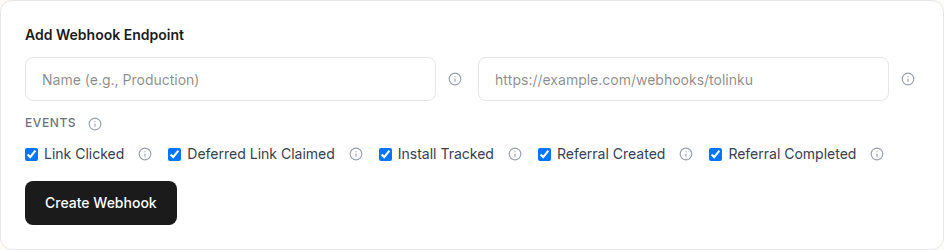
You can create webhook endpoints in the Tolinku dashboard under Webhooks in your Appspace settings. Each webhook needs:
- Name: A descriptive label (e.g., "Referral Automation Handler")
- URL: Your HTTPS endpoint. Tolinku enforces HTTPS and blocks localhost, private IPs, and internal TLDs to prevent SSRF attacks.
- Events: Select which event types this endpoint should receive. For referral automation, subscribe to
referral.createdandreferral.completed.
After creation, Tolinku generates a signing secret (prefixed with whsec_). This secret is shown once, so copy it immediately and store it in your environment variables. You will use it for HMAC signature verification in your webhook handler.
You can also create webhooks via the API if you prefer infrastructure-as-code over dashboard clicks.
Automating Reward Fulfillment
The most common automation is issuing rewards when a referral completes. Tolinku tracks the referral lifecycle and fires referral.completed when the referred user hits the configured milestone. Your job is to fulfill the actual reward.
Here is a practical example that issues a Stripe coupon to the referrer when their referral completes:
import Stripe from 'stripe';

const stripe = new Stripe(process.env.STRIPE_SECRET_KEY);

async function handleReferralCompleted(data: {
  referral_code: string;
  referrer_id: string;
  referred_user_id: string;
  milestone: string;
}) {
  // Look up the referrer in your database
  const referrer = await db.users.findOne({ id: data.referrer_id });
  if (!referrer?.stripeCustomerId) return;

  // Create a one-time coupon
  const coupon = await stripe.coupons.create({
    amount_off: 500, // $5.00
    currency: 'usd',
    duration: 'once',
    name: `Referral reward: ${data.referral_code}`,
  });

  // Attach it to the referrer's next invoice
  await stripe.customers.update(referrer.stripeCustomerId, {
    coupon: coupon.id,
  });

  // Mark reward as claimed in Tolinku
  await fetch('https://your-app.tolinku.com/v1/api/referral/claim-reward', {
    method: 'POST',
    headers: {
      'Content-Type': 'application/json',
      'X-API-Key': process.env.TOLINKU_API_KEY,
    },
    body: JSON.stringify({ referral_code: data.referral_code }),
  });

  // Notify the referrer
  await sendPushNotification(referrer.id, {
    title: 'You earned a reward!',
    body: 'Your friend signed up. $5 credit has been applied to your account.',
  });
}
This pattern separates concerns cleanly. Tolinku handles referral tracking, attribution, and milestone progression. Your backend handles reward fulfillment, payment integration, and user notifications. The webhook is the bridge between the two.
Handling Double-Sided Rewards
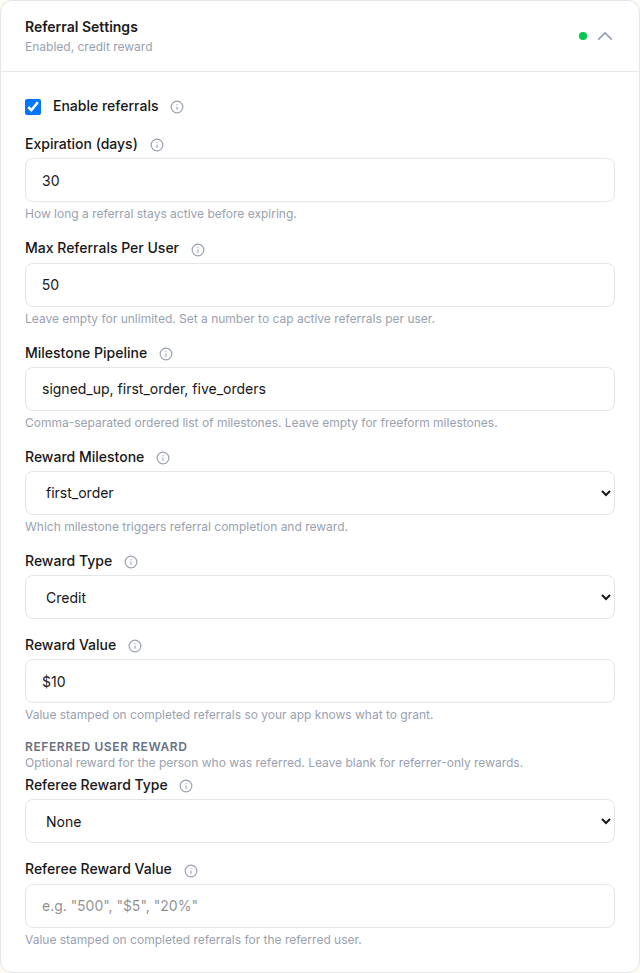
Many referral programs reward both the referrer and the referred user. Tolinku supports this natively. When you configure your referral settings, you can set both a referrer reward and a referee reward (type and value for each).
When referral.completed fires, you can fulfill both sides in the same handler:
async function handleReferralCompleted(data) {
  // Fetch the full referral details from the API
  const res = await fetch(
    `https://your-app.tolinku.com/v1/api/referral/${data.referral_code}`,
    { headers: { 'X-API-Key': process.env.TOLINKU_API_KEY } }
  );
  const referral = await res.json();

  // Referrer reward
  if (referral.reward_type === 'credit') {
    await issueCredit(data.referrer_id, referral.reward_value);
    await claimReward(data.referral_code, 'referrer');
  }

  // Referee reward
  if (referral.referee_reward_type === 'credit') {
    await issueCredit(data.referred_user_id, referral.referee_reward_value);
    await claimReward(data.referral_code, 'referee');
  }
}

async function claimReward(code: string, side: 'referrer' | 'referee') {
  const endpoint = side === 'referrer'
    ? '/v1/api/referral/claim-reward'
    : '/v1/api/referral/claim-referee-reward';

  await fetch(`https://your-app.tolinku.com${endpoint}`, {
    method: 'POST',
    headers: {
      'Content-Type': 'application/json',
      'X-API-Key': process.env.TOLINKU_API_KEY,
    },
    body: JSON.stringify({ referral_code: code }),
  });
}
Calling the claim-reward and claim-referee-reward endpoints updates the referral record so you can track which rewards have been fulfilled. This prevents double-issuing if your webhook handler gets retried.
Multi-Step Referral Funnels with Milestones
Not every referral should complete on signup. Sometimes you want the referred user to take a meaningful action first: make a purchase, complete onboarding, or reach a usage threshold. Tolinku supports custom milestones for exactly this.
Configure your milestones in the Appspace referral settings. For example, an e-commerce app might define these milestones:
signed_up: User created an accountfirst_purchase: User completed their first ordercompleted: Final milestone that triggers the reward
Your app tracks user progress and reports milestones to Tolinku via the API:
// When the referred user signs up
await fetch('https://your-app.tolinku.com/v1/api/referral/milestone', {
  method: 'POST',
  headers: {
    'Content-Type': 'application/json',
    'X-API-Key': process.env.TOLINKU_API_KEY,
  },
  body: JSON.stringify({
    referral_code: 'ABC1234567',
    milestone: 'signed_up',
  }),
});

// Later, when they make their first purchase
await fetch('https://your-app.tolinku.com/v1/api/referral/milestone', {
  method: 'POST',
  headers: {
    'Content-Type': 'application/json',
    'X-API-Key': process.env.TOLINKU_API_KEY,
  },
  body: JSON.stringify({
    referral_code: 'ABC1234567',
    milestone: 'first_purchase',
  }),
});
Each milestone update is stored in the referral's milestone_history array with a timestamp. When the milestone matches your configured referral_reward_milestone, the referral auto-completes and the referral.completed webhook fires. You do not need to call the completion endpoint separately.
This gives you a clean separation: your app reports what the user did, Tolinku decides when the referral qualifies for a reward, and your webhook handler fulfills it.
CRM and Analytics Integration
Beyond reward fulfillment, webhooks let you pipe referral data into your broader tech stack. Here are patterns that work well:
CRM updates: When referral.created fires, tag the referrer in your CRM as an active advocate. When referral.completed fires, update the referred user's record with acquisition source data.
async function handleReferralCreated(data) {
  await crm.contacts.update(data.referrer_id, {
    tags: ['active-referrer'],
    custom_fields: {
      last_referral_code: data.referral_code,
      referral_url: data.referral_url,
    },
  });
}
Analytics warehouse: Forward every referral event to your data warehouse for cohort analysis. Track referral-acquired users separately to measure their lifetime value against other acquisition channels.
async function forwardToWarehouse(event: string, data: any) {
  await bigquery.insert('referral_events', {
    event_type: event,
    referral_code: data.referral_code,
    referrer_id: data.referrer_id,
    referred_user_id: data.referred_user_id || null,
    timestamp: new Date().toISOString(),
  });
}
Slack notifications: Post to a channel when milestones are hit. This is especially useful during the early days of a referral program when you want visibility into what is working.
async function notifySlack(data) {
  await fetch(process.env.SLACK_WEBHOOK_URL, {
    method: 'POST',
    headers: { 'Content-Type': 'application/json' },
    body: JSON.stringify({
      text: `Referral completed! ${data.referrer_id} referred ${data.referred_user_id} (code: ${data.referral_code})`,
    }),
  });
}
Tolinku's analytics dashboard gives you referral stats, conversion rates, and a leaderboard out of the box. Webhooks let you extend that data into systems Tolinku does not control.

Idempotency and Error Handling
Webhook handlers must be idempotent. Because Tolinku retries failed deliveries up to three times, your handler might receive the same event more than once. If you issue a reward on every referral.completed event without checking whether you have already processed that code, you will double-credit users.
The simplest approach is to track processed referral codes:
async function handleReferralCompleted(data) {
  // Check if already processed
  const existing = await db.processedReferrals.findOne({
    referral_code: data.referral_code,
  });
  if (existing) return; // Already handled

  // Process the reward
  await issueReward(data);

  // Mark as processed
  await db.processedReferrals.insertOne({
    referral_code: data.referral_code,
    processed_at: new Date(),
  });
}
Alternatively, use the reward_claimed field from Tolinku's API. Before issuing a reward, fetch the referral and check whether reward_claimed is already true. This works because the claim-reward endpoint is itself idempotent.
For transient failures in your own systems (database down, payment API timeout), let the webhook response return a 5xx status. Tolinku will retry, giving your infrastructure time to recover. Do not swallow errors and return 200 if the reward was not actually issued.
Fraud Prevention in Automated Referrals
Automated reward fulfillment creates a target for abuse. Without safeguards, bad actors can self-refer, create fake accounts, or exploit your reward system at scale. See the referral fraud prevention guide for a deep dive, but here are the key controls relevant to webhook automation:
Rate limits: Tolinku's referral_max_per_user setting caps how many active pending referrals a single user can have. This prevents one user from flooding your system with referral codes.
Expiration: The referral_expiration_days setting automatically expires unclaimed referrals. When a referral expires, its status changes to expired and no completion webhook will fire. This limits the window for abuse.
Verification in your handler: Before issuing rewards, validate the referral against your own business rules. Check that the referred user is a real account (not a disposable email), that the referrer and referee are different people (different IP, different device), and that the completion milestone represents genuine engagement.
async function handleReferralCompleted(data) {
  const referrer = await db.users.findOne({ id: data.referrer_id });
  const referee = await db.users.findOne({ id: data.referred_user_id });

  // Basic fraud checks
  if (referrer.email.split('@')[1] === referee.email.split('@')[1]) {
    // Same email domain, might be self-referral from a custom domain
    await flagForReview(data.referral_code);
    return;
  }

  if (referrer.signupIp === referee.signupIp) {
    // Same IP address, likely self-referral
    await flagForReview(data.referral_code);
    return;
  }

  // Proceed with reward
  await issueReward(data);
}
The point is not to catch every fraud case in the webhook handler. It is to add a layer of validation before money changes hands. Flag suspicious cases for manual review rather than blocking them outright.
Testing Your Webhook Integration
Tolinku provides a test webhook feature in the dashboard. Click "Send Test" on any configured webhook to receive a test payload:
{
  "event": "test",
  "timestamp": "2026-04-08T10:00:00.000Z",
  "data": {
    "message": "This is a test webhook from Tolinku.",
    "webhook_id": "abc123",
    "appspace_id": "def456"
  }
}
For end-to-end testing of referral automation, use the referral API to create a referral, advance it through milestones, and complete it. Each step fires the corresponding webhook, letting you verify your handler processes the full lifecycle correctly.
During development, tools like webhook.site or ngrok are useful for inspecting payloads before your handler code is ready. Once you move to staging, point the webhook at your actual endpoint and monitor the delivery log in the Tolinku dashboard for failures.
Putting It All Together
Here is the full architecture for an automated referral program:
- User generates a referral link via your app's UI, which calls the Tolinku referral API to create a code.
- Tolinku fires
referral.createdto your webhook. Your handler tags the user as an active referrer in your CRM and posts to Slack. - The referred user clicks the link. Tolinku handles deep linking (or deferred deep linking if the app is not installed), attribution, and routing.
- Your app reports milestones as the referred user progresses through your funnel: signup, activation, first purchase.
- Tolinku fires
referral.completedwhen the reward milestone is reached. Your handler issues rewards to both sides via Stripe, marks them as claimed via the API, and sends notifications. - Everything is logged: Tolinku tracks the referral lifecycle and delivery attempts. Your warehouse gets the raw events for long-term analysis.
The entire pipeline runs without manual intervention. You configure it once, and it scales with your user base. When you need to change reward amounts or add a new milestone, update the referral settings in the dashboard. The webhook handler adapts because it reads reward values from the referral record rather than hardcoding them.
Building Referral Programs That Actually Work covers the strategy side: what incentives drive sharing, how to structure tiers, and when to launch. This article covered the plumbing. Together, they give you a referral program that runs itself.
Get deep linking tips in your inbox
One email per week. No spam.