If your analytics stack runs through Segment, your deep link events should too. When deep link clicks, installs, and referrals live in the same CDP as your other product events, you can build cohorts, trigger campaigns, and run attribution analysis without stitching data together from separate sources.
This guide covers how to forward Tolinku webhook events to Segment using a lightweight receiver. If you haven't set up webhooks yet, start with the webhook setup guide.
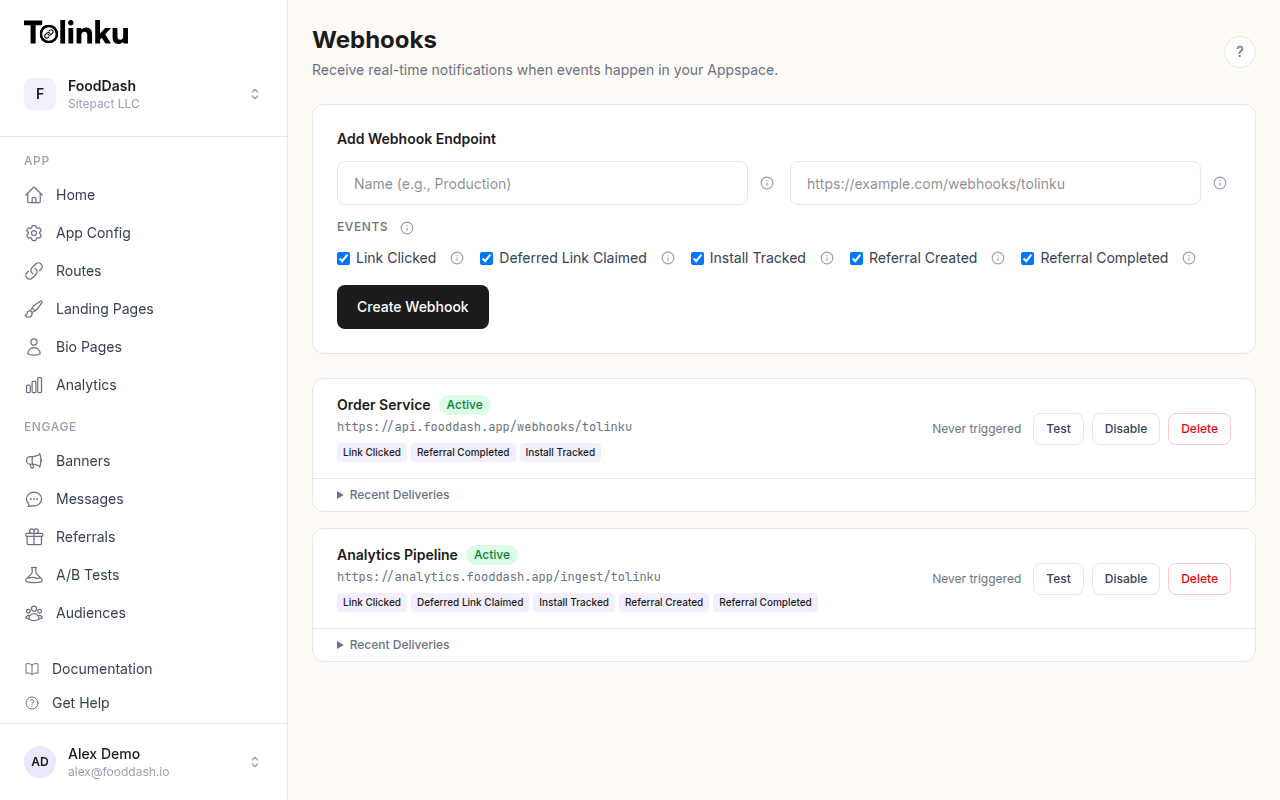 The webhooks page with create form, webhook list, and delivery log.
Why Segment Instead of Direct Integrations?
You could send webhook events directly to each analytics tool (Amplitude, Mixpanel, BigQuery). We cover that approach in webhooks for analytics pipelines. The Segment approach adds a layer of indirection, but it has real advantages:
- One integration, many destinations. Forward deep link events to Amplitude, Mixpanel, BigQuery, Redshift, HubSpot, Braze, and dozens of other tools by toggling destinations in Segment's UI. No code changes needed.
- Consistent schema. Segment enforces a schema across all your event sources. Deep link events follow the same structure as your web and mobile events, making cross-platform analysis straightforward.
- Retroactive forwarding. When you add a new destination in Segment, you can replay historical events to it. Direct integrations only capture events from the moment they're connected.
- Identity resolution. Segment's identity graph helps tie anonymous deep link clicks to known users when they eventually authenticate.
The tradeoff is an extra hop (Tolinku sends to your receiver, your receiver sends to Segment, Segment sends to destinations). For most teams, the added latency (milliseconds) is negligible compared to the operational simplicity.
Architecture
Tolinku Webhook → Your Receiver (verify + transform) → Segment HTTP API → Destinations
The receiver does three things:
- Verifies the
X-Webhook-Signatureheader - Transforms the Tolinku event into Segment's Track call format
- Sends the transformed event to Segment's HTTP Tracking API
The Receiver
Here's a complete Express server that receives Tolinku webhooks and forwards them to Segment.
import express from 'express';
import crypto from 'crypto';
import { Analytics } from '@segment/analytics-node';

const app = express();
app.use('/webhooks', express.raw({ type: 'application/json' }));

const WEBHOOK_SECRET = process.env.WEBHOOK_SECRET!; // whsec_...
const analytics = new Analytics({ writeKey: process.env.SEGMENT_WRITE_KEY! });

app.post('/webhooks/tolinku', (req, res) => {
  // Verify signature
  const signature = req.headers['x-webhook-signature'] as string;
  const expected = crypto
    .createHmac('sha256', WEBHOOK_SECRET)
    .update(req.body)
    .digest('hex');

  if (signature !== expected) {
    return res.status(401).send('Invalid signature');
  }

  res.status(200).send('OK');

  const event = JSON.parse(req.body.toString());
  forwardToSegment(event);
});

function forwardToSegment(event: any) {
  const { event: eventType, timestamp, data } = event;

  analytics.track({
    anonymousId: generateAnonymousId(event),
    event: mapEventName(eventType),
    timestamp: new Date(timestamp),
    properties: {
      ...data,
      source: 'tolinku_webhook',
      original_event_type: eventType,
    },
    context: {
      ip: data.ip,
      library: {
        name: 'tolinku-webhook-receiver',
        version: '1.0.0',
      },
    },
  });
}

function mapEventName(eventType: string): string {
  const names: Record<string, string> = {
    'link.clicked': 'Deep Link Clicked',
    'deferred_link.claimed': 'Deferred Link Claimed',
    'install.tracked': 'Install Tracked',
    'referral.created': 'Referral Created',
    'referral.completed': 'Referral Completed',
  };
  return names[eventType] || `Webhook ${eventType}`;
}

function generateAnonymousId(event: any): string {
  // Generate a consistent anonymous ID from event data
  // This allows Segment to group events from the same source
  const seed = `${event.data.ip}-${event.data.platform}-${event.data.device_type}`;
  return crypto.createHash('sha256').update(seed).digest('hex').substring(0, 32);
}

app.listen(3000, () => console.log('Receiver listening on port 3000'));
Let's break down the key decisions.
Event Naming
Segment's Track specification recommends human-readable event names in Title Case. The mapping converts Tolinku's internal event types to Segment-friendly names:
| Tolinku Event | Segment Event Name |
|---|---|
link.clicked |
Deep Link Clicked |
deferred_link.claimed |
Deferred Link Claimed |
install.tracked |
Install Tracked |
referral.created |
Referral Created |
referral.completed |
Referral Completed |
This follows Segment's naming conventions: object + past-tense verb. Keeping event names consistent with this pattern means they'll feel natural alongside your other Segment events.
Identity: Anonymous vs. Known Users
Deep link webhook events fire at the link level, not the user level. When someone clicks a deep link, Tolinku doesn't necessarily know who they are. This is why the receiver uses anonymousId rather than userId.
The generateAnonymousId function creates a consistent hash from the IP, platform, and device type. This isn't a true user identity, but it groups events from the same source together. In Segment, these anonymous events can later be merged with identified user profiles through Segment's identity resolution.
If your deep links carry a user identifier (for example, a referral token that maps to a known user), you can resolve that on the receiver side and pass a userId instead:
function forwardToSegment(event: any) {
  const { event: eventType, timestamp, data } = event;

  // If we can resolve a known user from the event data
  const userId = resolveUserId(data);

  analytics.track({
    ...(userId ? { userId } : { anonymousId: generateAnonymousId(event) }),
    event: mapEventName(eventType),
    timestamp: new Date(timestamp),
    properties: {
      ...data,
      source: 'tolinku_webhook',
      original_event_type: eventType,
    },
  });
}

function resolveUserId(data: any): string | null {
  // Example: look up user by referral token
  // This would query your database
  return null;
}
Properties and Context
The properties object passes all event data fields through to Segment. The spread operator (...data) forwards every field from the Tolinku payload without hardcoding specific field names. This means when Tolinku adds new fields to event payloads, they automatically flow through to Segment.
Two additional fields are added:
source: 'tolinku_webhook'lets you filter these events in Segment and downstream toolsoriginal_event_typepreserves the raw Tolinku event type for reference
The context object includes the IP address (Segment uses this for geo-enrichment) and a library identifier so you can distinguish these events from client-side SDK events in Segment's debugger.
Idempotency
Tolinku retries failed webhook deliveries (3 retries at 1 minute, 5 minutes, and 30 minutes). If your receiver was temporarily down, you'll receive the same event multiple times when it recovers.
Segment handles deduplication through the messageId field. The @segment/analytics-node library generates a unique messageId for each track() call by default. To make retries idempotent, generate a deterministic messageId from the event content:
function forwardToSegment(event: any) {
  const messageId = crypto
    .createHash('sha256')
    .update(JSON.stringify(event))
    .digest('hex');

  analytics.track({
    messageId,
    anonymousId: generateAnonymousId(event),
    event: mapEventName(event.event),
    timestamp: new Date(event.timestamp),
    properties: {
      ...event.data,
      source: 'tolinku_webhook',
    },
  });
}
Now if the same event is received twice (due to a retry), the same messageId is generated, and Segment deduplicates it. See the webhook retry logic guide for more on handling retries.
Deploying the Receiver
The receiver is a small, stateless Express server. It's a good candidate for:
- AWS Lambda + API Gateway: Use the
serverless-httpwrapper. The receiver handles one request at a time and doesn't need persistent state. - Google Cloud Run: Deploy as a container. Cloud Run scales to zero when idle and spins up on demand.
- Fly.io or Railway: Simple deployment from a Dockerfile. Good for teams that want a straightforward hosting experience.
- Your existing server: If you already run a Node.js backend, add the webhook route to it.
The receiver needs two environment variables:
WEBHOOK_SECRET: Your Tolinku webhook signing secret (whsec_...)SEGMENT_WRITE_KEY: Your Segment source write key
For production, add health checks, structured logging, and error monitoring. A dead receiver means missed events (though Tolinku's retry logic provides a buffer).
Testing the Integration
- Configure the webhook in your Tolinku Appspace pointing to your receiver URL
- Send a test webhook using the Test button in the Tolinku dashboard
- Check Segment's debugger (app.segment.com > Sources > your source > Debugger) to confirm the event arrived
- Click a real deep link and verify the
Deep Link Clickedevent appears in Segment with the correct properties
Common issues:
- No events in Segment debugger: Check that your
SEGMENT_WRITE_KEYis correct and the receiver logs show successful forwarding - Events arrive but properties are empty: Make sure you're parsing the raw body correctly (
JSON.parse(req.body.toString())) - Duplicate events: Implement the deterministic
messageIdapproach described above
Segment Destinations for Deep Link Events
Once events flow into Segment, enable destinations to forward them automatically:
| Destination | Use Case |
|---|---|
| Amplitude / Mixpanel | Product analytics, funnel analysis |
| BigQuery / Snowflake | Data warehouse for long-term storage and SQL queries |
| HubSpot / Salesforce | CRM attribution for referral-driven signups |
| Braze / Iterable | Trigger re-engagement campaigns based on deep link behavior |
| Google Analytics 4 | Attribution reporting alongside web analytics |
Each destination receives the same event data. You configure field mappings in Segment's destination settings, not in your receiver code.
Volume Considerations
The @segment/analytics-node library batches events automatically (default: 15 events or 5 seconds, whichever comes first). For high-volume webhook traffic, you can tune the batch settings:
const analytics = new Analytics({
  writeKey: process.env.SEGMENT_WRITE_KEY!,
  flushAt: 50,       // Send when batch reaches 50 events
  flushInterval: 2000, // Or every 2 seconds
});
Segment's HTTP Tracking API has a rate limit of 500 requests per second for most plans. Each batch counts as one request, so batching 50 events per request gives you an effective throughput of 25,000 events per second, which is well beyond what most webhook integrations produce.
For the full picture of connecting webhooks to analytics tools, see the webhooks for analytics pipelines guide. For no-code alternatives, see connecting deep links to Zapier.
Get deep linking tips in your inbox
One email per week. No spam.