Your sales team wants to know which deep link a lead clicked before signing up. Your marketing team wants to see which campaigns drive qualified leads. Your product team wants to understand how referral links map to account creation. All of this data exists in your Tolinku webhooks, but it's not useful until it lands in your CRM.
This guide covers how to connect deep link webhook events to Salesforce, HubSpot, and Pipedrive. The pattern is the same for any CRM: receive the webhook, match the event to a contact or lead, and update the record with attribution data. If you're new to webhooks, start with the webhook setup guide.
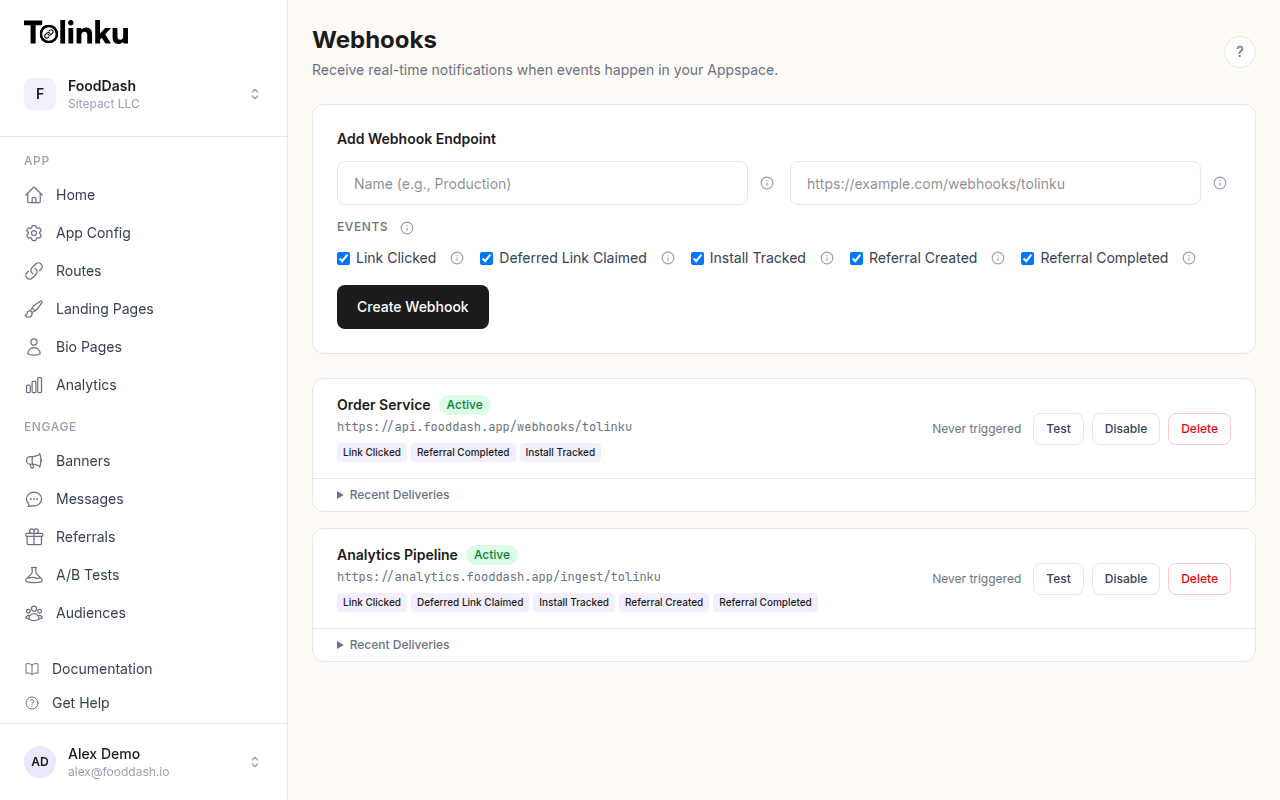 The webhooks page with create form, webhook list, and delivery log.
What Deep Link Data Belongs in Your CRM
Not every webhook event needs to go into your CRM. A link.clicked event fires on every single deep link tap, which could be thousands per day. Your CRM doesn't need that volume, and your sales team won't look at raw click records.
The events that matter for CRM integration are:
install.tracked: A user installed your app through a deep link. This is a lead creation or lead enrichment event.referral.created: A user signed up through a referral link. This creates a lead with referral attribution.referral.completed: A referred user completed the target action (e.g., first purchase, subscription). This updates the lead's lifecycle stage.deferred_link.claimed: A deferred deep link was resolved after install. This enriches the lead with the original campaign context.
Subscribe only to these events in your webhook configuration. Filtering at the source keeps your pipeline lean.
The Receiver Pattern
Every CRM integration follows the same architecture:
Tolinku Webhook → Receiver (verify signature) → Match/Create Contact → Update CRM
Here's the shared receiver code. The CRM-specific logic plugs into the processEvent function.
import express from 'express';
import crypto from 'crypto';

const app = express();
app.use('/webhooks', express.raw({ type: 'application/json' }));

const WEBHOOK_SECRET = process.env.WEBHOOK_SECRET!; // whsec_...

app.post('/webhooks/tolinku', async (req, res) => {
  const signature = req.headers['x-webhook-signature'] as string;
  const expected = crypto
    .createHmac('sha256', WEBHOOK_SECRET)
    .update(req.body)
    .digest('hex');

  if (signature !== expected) {
    return res.status(401).send('Invalid signature');
  }

  res.status(200).send('OK');

  const event = JSON.parse(req.body.toString());
  try {
    await processEvent(event);
  } catch (err) {
    console.error('CRM update failed:', err);
  }
});
See the webhook security guide for detailed signature verification patterns.
HubSpot Integration
HubSpot's API uses a straightforward REST interface for contact management.
Creating or Updating Contacts
const HUBSPOT_TOKEN = process.env.HUBSPOT_ACCESS_TOKEN!;

async function processEvent(event: any) {
  const { event: eventType, timestamp, data } = event;

  switch (eventType) {
    case 'install.tracked':
      await upsertHubSpotContact(data, {
        lifecycle_stage: 'lead',
        first_touch_campaign: data.campaign || '',
        first_touch_platform: data.platform || '',
        install_date: timestamp,
      });
      break;

    case 'referral.created':
      await upsertHubSpotContact(data, {
        lifecycle_stage: 'lead',
        referral_source: data.referrer_token || '',
        referral_date: timestamp,
      });
      break;

    case 'referral.completed':
      await upsertHubSpotContact(data, {
        lifecycle_stage: 'customer',
        conversion_date: timestamp,
      });
      break;
  }
}

async function upsertHubSpotContact(
  data: any,
  properties: Record<string, string>
) {
  // Search for existing contact by email or create new
  const response = await fetch(
    'https://api.hubapi.com/crm/v3/objects/contacts',
    {
      method: 'POST',
      headers: {
        'Content-Type': 'application/json',
        'Authorization': `Bearer ${HUBSPOT_TOKEN}`,
      },
      body: JSON.stringify({
        properties: {
          ...properties,
          deep_link_token: data.token || '',
          deep_link_prefix: data.prefix || '',
        },
      }),
    }
  );

  if (response.status === 409) {
    // Contact already exists; update instead
    const existing = await response.json();
    const contactId = existing.message.match(/ID: (\d+)/)?.[1];
    if (contactId) {
      await fetch(
        `https://api.hubapi.com/crm/v3/objects/contacts/${contactId}`,
        {
          method: 'PATCH',
          headers: {
            'Content-Type': 'application/json',
            'Authorization': `Bearer ${HUBSPOT_TOKEN}`,
          },
          body: JSON.stringify({ properties }),
        }
      );
    }
  }
}
Custom Properties
Before this works, you need to create custom contact properties in HubSpot:
- Go to Settings > Properties > Contact Properties
- Create these custom properties:
first_touch_campaign(Single-line text)first_touch_platform(Single-line text)install_date(Date picker)referral_source(Single-line text)referral_date(Date picker)conversion_date(Date picker)deep_link_token(Single-line text)deep_link_prefix(Single-line text)
Group them under a "Deep Link Attribution" property group so your sales team can find them easily on the contact record.
Salesforce Integration
Salesforce's REST API requires OAuth authentication and uses a slightly different upsert pattern.
Authentication
Salesforce uses an OAuth 2.0 flow. For server-to-server integration, use the JWT Bearer flow or a Connected App with client credentials.
async function getSalesforceToken(): Promise<string> {
  const response = await fetch(
    `${process.env.SF_INSTANCE_URL}/services/oauth2/token`,
    {
      method: 'POST',
      headers: { 'Content-Type': 'application/x-www-form-urlencoded' },
      body: new URLSearchParams({
        grant_type: 'client_credentials',
        client_id: process.env.SF_CLIENT_ID!,
        client_secret: process.env.SF_CLIENT_SECRET!,
      }),
    }
  );
  const data = await response.json();
  return data.access_token;
}
Creating Leads
async function processEvent(event: any) {
  const { event: eventType, timestamp, data } = event;
  const token = await getSalesforceToken();
  const baseUrl = process.env.SF_INSTANCE_URL;

  if (eventType === 'install.tracked' || eventType === 'referral.created') {
    await fetch(`${baseUrl}/services/data/v59.0/sobjects/Lead`, {
      method: 'POST',
      headers: {
        'Content-Type': 'application/json',
        'Authorization': `Bearer ${token}`,
      },
      body: JSON.stringify({
        FirstName: 'Deep Link',
        LastName: `Lead ${data.token || 'Unknown'}`,
        Company: 'Unknown',
        LeadSource: 'Deep Link',
        Deep_Link_Campaign__c: data.campaign || '',
        Deep_Link_Platform__c: data.platform || '',
        Deep_Link_Token__c: data.token || '',
        Install_Date__c: timestamp,
        Status: 'New',
      }),
    });
  }

  if (eventType === 'referral.completed') {
    // Find and update the existing lead
    const search = await fetch(
      `${baseUrl}/services/data/v59.0/query?q=${encodeURIComponent(
        `SELECT Id FROM Lead WHERE Deep_Link_Token__c = '${data.token}' LIMIT 1`
      )}`,
      {
        headers: { 'Authorization': `Bearer ${token}` },
      }
    );
    const result = await search.json();
    if (result.records?.length > 0) {
      await fetch(
        `${baseUrl}/services/data/v59.0/sobjects/Lead/${result.records[0].Id}`,
        {
          method: 'PATCH',
          headers: {
            'Content-Type': 'application/json',
            'Authorization': `Bearer ${token}`,
          },
          body: JSON.stringify({
            Status: 'Converted',
            Conversion_Date__c: timestamp,
          }),
        }
      );
    }
  }
}
Custom Fields
Create these custom fields on the Lead object in Salesforce Setup:
Deep_Link_Campaign__c(Text)Deep_Link_Platform__c(Text)Deep_Link_Token__c(Text, External ID)Install_Date__c(DateTime)Conversion_Date__c(DateTime)
Making
Deep_Link_Token__can External ID enables upsert operations, which simplifies the create-or-update pattern.Pipedrive Integration
Pipedrive's API is simpler than Salesforce and works well for smaller sales teams.
const PIPEDRIVE_TOKEN = process.env.PIPEDRIVE_API_TOKEN!;
const PIPEDRIVE_URL = `https://${process.env.PIPEDRIVE_DOMAIN}.pipedrive.com/api/v1`;

async function processEvent(event: any) {
  const { event: eventType, timestamp, data } = event;

  if (eventType === 'install.tracked' || eventType === 'referral.created') {
    // Create a person in Pipedrive
    const person = await fetch(`${PIPEDRIVE_URL}/persons?api_token=${PIPEDRIVE_TOKEN}`, {
      method: 'POST',
      headers: { 'Content-Type': 'application/json' },
      body: JSON.stringify({
        name: `Deep Link Lead (${data.token || 'unknown'})`,
        // Custom fields (use your Pipedrive field keys)
        '1a2b3c': data.campaign || '',  // Campaign custom field
        '4d5e6f': data.platform || '',  // Platform custom field
      }),
    });

    const personData = await person.json();

    // Optionally create a deal
    await fetch(`${PIPEDRIVE_URL}/deals?api_token=${PIPEDRIVE_TOKEN}`, {
      method: 'POST',
      headers: { 'Content-Type': 'application/json' },
      body: JSON.stringify({
        title: `Referral: ${data.token || 'Unknown'}`,
        person_id: personData.data.id,
        stage_id: 1, // First stage of your pipeline
      }),
    });
  }
}
Matching Webhook Events to CRM Records
The biggest challenge in CRM integration is identity. A
link.clickedorinstall.trackedevent identifies a device and a campaign, not a person. You can't create a meaningful CRM record from an IP address and a platform string alone.There are three strategies for bridging this gap:
1. Match on Referral Token
If the deep link is a referral link, the
dataobject includes a token that maps to a specific referral. Your app's backend knows which user created that referral, so you can look up the referrer and create a CRM record with full attribution.2. Match on Downstream Registration
The most common pattern: when a user installs the app and registers, your app's backend creates the CRM record and attaches the deep link attribution data that was captured at install time. The webhook provides real-time notification that an install happened; the app backend provides the user identity.
3. Enrichment After the Fact
Create a "stub" CRM record from the webhook event (with campaign, platform, and token), then enrich it later when the user registers. Your app sends a second API call to the CRM with the user's email and name, matching on the deep link token.
No-Code Alternative: Zapier
If you don't want to build and host a receiver, Zapier can connect Tolinku webhooks to HubSpot, Salesforce, and Pipedrive without code. The tradeoff: no signature verification and limited transformation logic. For low-volume, non-sensitive integrations, Zapier is a reasonable starting point.
Handling Retries and Duplicates
Tolinku retries failed webhook deliveries (3 retries at 1 minute, 5 minutes, and 30 minutes). Your CRM integration must handle duplicate events gracefully.
For HubSpot: Use the contact deduplication built into the API. Upserting by email or a custom unique field prevents duplicates.
For Salesforce: Use External IDs on the Lead or Contact object. The
upsertendpoint creates a new record or updates an existing one based on the External ID value.For Pipedrive: Search for existing persons by custom field before creating. Pipedrive doesn't have a native upsert operation.
As a general practice, generate a deduplication key from the webhook payload (a hash of the event content) and check for its existence before creating records. See the webhook retry logic guide for more on idempotent processing.
What Your Sales Team Sees
After integration, a CRM record for a referral-driven lead might show:
- Lead Source: Deep Link
- Campaign:
instagram-story-may - Platform: iOS
- Link Token:
summer-promo - Install Date: 2026-05-21 09:14:00
- Referral Source: user-abc123
- Conversion Date: 2026-05-21 09:32:00
This gives the sales team immediate context: the lead came from an Instagram campaign, installed on iOS, and converted within 18 minutes of install. That's the kind of attribution data that changes how you follow up.
Configure your webhooks in your Tolinku Appspace and start routing deep link attribution data to where your team already works.
Get deep linking tips in your inbox
One email per week. No spam.