QR codes are opaque. A user cannot tell where a QR code leads before scanning it. This makes QR codes a vector for phishing, malware distribution, and social engineering. As a business using QR codes in marketing, you need to protect your customers from these risks and build trust in your QR code campaigns.
For deep linking security, see deep linking security: preventing hijacking and abuse. For QR code design, see QR code design best practices for higher scan rates.
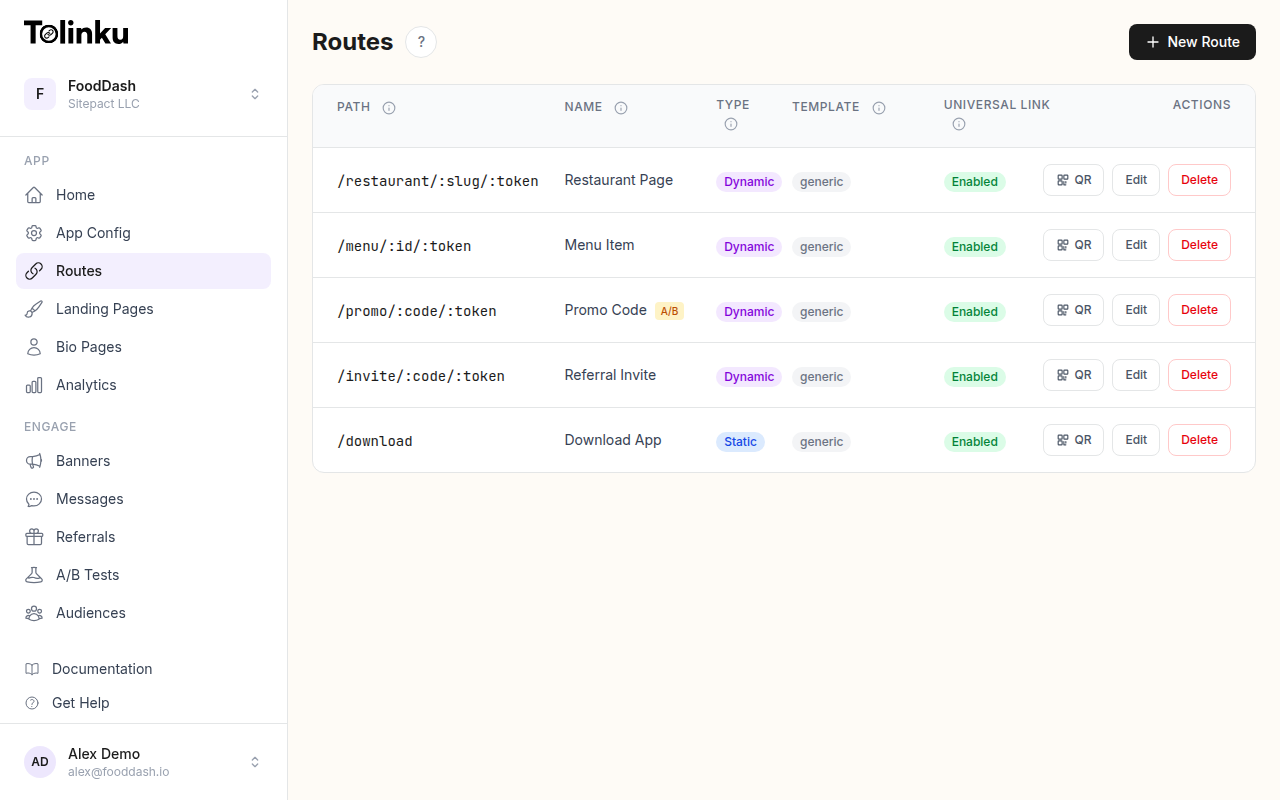 Tolinku route configuration with QR code generation for each deep link.
The Risks
QR Code Phishing ("Quishing")
Attackers print fraudulent QR codes and place them over legitimate ones. A sticker on a parking meter, a poster in a public space, or a replacement table tent in a restaurant redirects users to a phishing site that mimics a login page, payment form, or app download.
The FBI has issued warnings about QR code fraud targeting payment systems and cryptocurrency wallets.
Malicious Redirects
A QR code can redirect to:
- A fake login page to steal credentials.
- A page that triggers an app download (potentially malware on Android via sideloading).
- A page that exploits browser vulnerabilities.
- A URL that initiates an unwanted action (e.g.,
tel:ormailto:scheme abuse).
QR Code Overlay Attacks
Physical QR codes are vulnerable to replacement. An attacker can:
- Place a sticker with a different QR code over the original.
- Replace a poster or flyer entirely.
- Print a slightly different QR code on the same material.
This is especially common in shared public spaces (parking lots, transit stations, public bulletin boards).
Data Harvesting
QR codes that redirect through tracking services can collect:
- Device type and operating system.
- IP address and approximate location.
- Browser fingerprint.
- Timestamp and frequency of scans.
While this data collection is standard for analytics, malicious actors can use it for profiling.
Protecting Your Customers
Use Your Own Domain
Never use a third-party URL shortener domain for QR codes. Use a branded domain that customers recognize:
- Trustworthy:
go.yourcompany.com/menu(customers recognize your brand) - Suspicious:
bit.ly/3xK7fR(could go anywhere)
A branded domain lets customers verify the destination before trusting the QR code.
HTTPS Only
All QR code URLs should use HTTPS. Modern browsers warn about HTTP URLs, and some mobile scanners flag HTTP links as potentially unsafe.
Preview Before Redirect
Most modern phone cameras show the URL before navigating. Make sure your URL is readable and trustworthy:
https://go.yourcompany.com/summer-sale    ← Clear destination
https://bit.ly/3x7kfR2                    ← Opaque, no trust signal
Tamper-Resistant Printing
For physical QR codes in public spaces:
- Printed directly on materials: QR codes printed as part of the design (not stickers) are harder to replace.
- Recessed or etched: QR codes on metal, acrylic, or glass are tamper-resistant.
- Tamper-evident stickers: If stickers are necessary, use materials that show visible damage when removed.
- Regular inspection: Staff should periodically check that QR codes have not been replaced.
Landing Page Verification
When a QR code leads to your domain, the landing page should clearly identify your brand:
- Show your logo and brand colors.
- Display the HTTPS padlock in the browser.
- Avoid immediately requesting sensitive information (login, payment).
For app downloads, always redirect to official app stores (Apple App Store, Google Play) rather than direct APK/IPA downloads.
Protecting Your Business
Monitor for Abuse
If someone creates counterfeit QR codes pointing to a phishing site that mimics your brand:
- Monitor for domains similar to yours (typosquatting).
- Set up Google Alerts for your brand name + "QR code" + "scam."
- Report phishing sites to the hosting provider and Google Safe Browsing.
Validate QR Code Destinations
Before printing QR codes, verify the encoded URL:
- Generate the QR code.
- Scan it with a phone camera.
- Verify the URL shown matches the intended destination.
- Click through and verify the landing page.
This catches encoding errors and typos before materials go to print.
URL Expiration
For time-limited campaigns, set QR code URLs to expire after the campaign ends. An expired link should show a branded "campaign ended" page, not a generic error.
This prevents attackers from acquiring expired domains or reusing old QR code URLs for malicious purposes.
Access Controls
Limit who can create and modify QR code destinations in your organization:
- Only authorized team members should create new short links.
- Changes to existing QR code destinations should be logged.
- High-traffic QR codes (printed on packaging, in stores) should require approval before destination changes.
Security for Different QR Code Types
Payment QR Codes
Payment QR codes (linking to payment processors) require extra safeguards:
- Use dynamic QR codes that generate unique tokens per transaction.
- Never use static QR codes for payments.
- Display the payment amount on the confirmation screen before the user authorizes.
Wi-Fi QR Codes
QR codes that connect to Wi-Fi networks (WIFI:T:WPA;S:NetworkName;P:Password;;) can be malicious:
- The QR code could connect the user to a rogue access point.
- Verify the network name matches the expected network.
- Use WPA3 encryption where possible.
vCard QR Codes
QR codes that add contacts (BEGIN:VCARD...) can include malicious URLs in the website or note fields. Sanitize all fields before encoding.
User Education
If your business uses QR codes, educate customers:
- In-store signage: "Our QR codes always lead to [yourcompany.com]. If the URL looks different, do not proceed."
- On printed materials: Display the destination URL next to the QR code so users can verify.
- App notifications: If your app processes QR code scans, validate the URL domain before navigating.
What to Tell Customers
- Check the URL preview before tapping "Open."
- Only scan QR codes from trusted sources (your branded materials, official store displays).
- Be cautious of QR codes on stickers placed over other materials.
- Never enter passwords or payment details on a page reached via a QR code unless you verify the domain.
Technical Safeguards
Content Security Policy
If your QR code landing pages are on your domain, use Content Security Policy headers to prevent script injection:
Content-Security-Policy: default-src 'self'; script-src 'self' https://trusted-cdn.com
Certificate Transparency
Monitor Certificate Transparency logs for certificates issued for domains similar to yours. Attackers may create look-alike domains with valid SSL certificates.
URL Validation in Apps
If your app scans QR codes and opens URLs, validate the domain before navigating:
func handleScannedUrl(_ urlString: String) {
    guard let url = URL(string: urlString),
          let host = url.host,
          allowedDomains.contains(host) else {
        showWarning("This QR code links to an unrecognized domain.")
        return
    }

    // Safe to navigate
    openUrl(url)
}

let allowedDomains = ["yourcompany.com", "go.yourcompany.com"]
Tolinku for Secure QR Codes
Tolinku generates QR codes on your custom domain, so users see your branded URL when scanning. All routes use HTTPS, and you can set route expiration to automatically disable links after a campaign ends.
For QR code analytics, see QR codes and short links for mobile apps. For deep linking security, see deep linking security: preventing hijacking and abuse.
Get deep linking tips in your inbox
One email per week. No spam.