A user clicks your campaign link, installs the app, and creates an account. Three days later, they haven't opened the app again. If you had an automated email sequence triggered by the install event, that re-engagement email would already be in their inbox.
Deep link webhooks turn passive link tracking into active marketing triggers. Instead of querying an analytics dashboard to find users who installed but didn't return, you let the events drive the workflow. This guide covers how to connect Tolinku webhooks to email platforms (SendGrid, Mailchimp, and generic SMTP) for automated sequences. For the webhook setup, see the webhook setup guide.
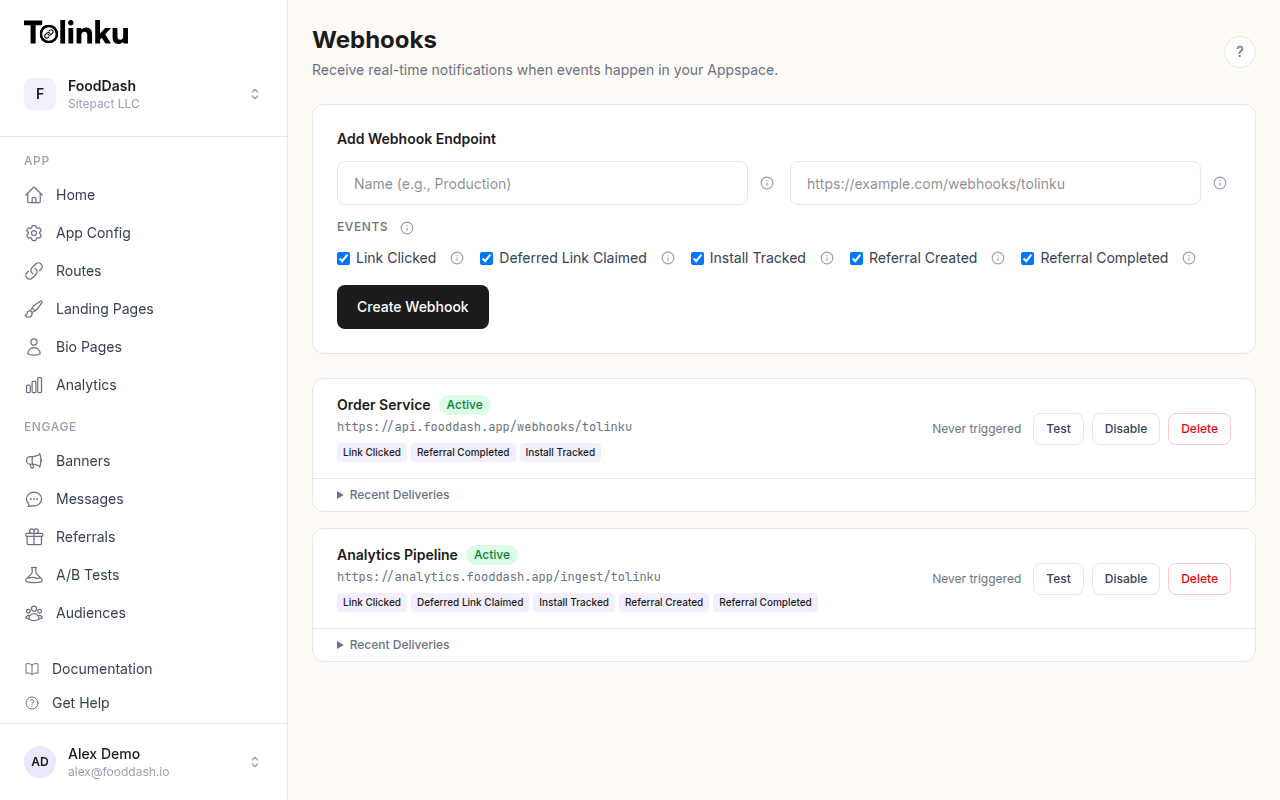 The webhooks page with create form, webhook list, and delivery log.
Which Events Trigger Emails?
Not every webhook event should send an email. Here's how each event type maps to email use cases:
| Event | Email Use Case | Who Receives It |
|---|---|---|
install.tracked |
Welcome sequence, onboarding tips | The new user (if email is known) |
referral.created |
"Your friend signed up!" notification | The referrer |
referral.completed |
Reward confirmation, thank-you email | Both referrer and referred user |
deferred_link.claimed |
Personalized onboarding based on original link context | The new user |
link.clicked |
Rarely used for email (too high volume) | N/A |
The key constraint: you need the recipient's email address. Webhook events carry attribution data (campaign, platform, token), not user PII. Your receiver needs to look up the email from your user database using context from the event.
The Identity Bridge
Tolinku webhook events identify a deep link interaction, not a person. To send an email, you need to bridge from the event to a user record.
There are two patterns:
Pattern 1: Lookup on Referral Token
For referral events (referral.created, referral.completed), the event data includes a token that maps to a referral. Your backend knows which user created that referral link. Query your database to find the referrer's email.
async function getEmailForEvent(event: any): Promise<string | null> {
  const { event: eventType, data } = event;

  if (eventType === 'referral.created' || eventType === 'referral.completed') {
    // Look up the referrer by the referral token
    const referrer = await db.query(
      'SELECT email FROM users WHERE referral_token = $1',
      [data.token]
    );
    return referrer.rows[0]?.email || null;
  }

  if (eventType === 'install.tracked') {
    // The install event itself doesn't carry an email.
    // Store the attribution data and send the email when the user registers.
    // Your registration flow should check for pending attribution and trigger the email.
    return null;
  }

  return null;
}
Pattern 2: Deferred Email Trigger
For install events, you typically can't send an email immediately because you don't know the user's email yet. Instead:
- Store the webhook event attribution data (campaign, platform, token) in a temporary table
- When the user registers and provides their email, match the attribution data
- Trigger the appropriate email sequence at that point
This means the email isn't truly triggered by the webhook alone. The webhook provides the attribution context; the registration event provides the identity. Together, they trigger a personalized email.
SendGrid Integration
SendGrid's API is straightforward for transactional emails.
Transactional Email on Referral Completion
import crypto from 'crypto';
import express from 'express';

const app = express();
app.use('/webhooks', express.raw({ type: 'application/json' }));

const WEBHOOK_SECRET = process.env.WEBHOOK_SECRET!;
const SENDGRID_API_KEY = process.env.SENDGRID_API_KEY!;

app.post('/webhooks/tolinku', async (req, res) => {
  const signature = req.headers['x-webhook-signature'] as string;
  const expected = crypto
    .createHmac('sha256', WEBHOOK_SECRET)
    .update(req.body)
    .digest('hex');

  if (signature !== expected) {
    return res.status(401).send('Invalid signature');
  }

  res.status(200).send('OK');

  const event = JSON.parse(req.body.toString());
  await handleEvent(event);
});

async function handleEvent(event: any) {
  if (event.event === 'referral.completed') {
    await sendReferralRewardEmail(event);
  }
}

async function sendReferralRewardEmail(event: any) {
  const referrerEmail = await getEmailForEvent(event);
  if (!referrerEmail) return;

  await fetch('https://api.sendgrid.com/v3/mail/send', {
    method: 'POST',
    headers: {
      'Content-Type': 'application/json',
      'Authorization': `Bearer ${SENDGRID_API_KEY}`,
    },
    body: JSON.stringify({
      personalizations: [
        {
          to: [{ email: referrerEmail }],
          dynamic_template_data: {
            reward_type: 'credit',
            reward_amount: '$10',
            referred_date: new Date(event.timestamp).toLocaleDateString(),
          },
        },
      ],
      from: { email: '[email protected]', name: 'Your App' },
      template_id: process.env.SENDGRID_REFERRAL_TEMPLATE_ID,
    }),
  });

  console.log(`Referral reward email sent to ${referrerEmail}`);
}
Dynamic Templates
SendGrid's dynamic templates let you design the email in SendGrid's editor and pass variables from your webhook handler. Create templates for:
- Referral reward confirmation: "Your friend just signed up! Here's your $10 credit."
- Welcome email: "Welcome to [App Name]. Here's how to get started." (triggered on registration, enriched with attribution data)
- Re-engagement: "You installed [App Name] from our [Campaign] campaign. Here are 3 things to try."
Mailchimp Integration
Mailchimp is better suited for marketing sequences than individual transactional emails.
Adding Contacts to an Automation
Instead of sending individual emails, add users to a Mailchimp audience with tags. The tags trigger pre-built automations.
const MAILCHIMP_API_KEY = process.env.MAILCHIMP_API_KEY!;
const MAILCHIMP_SERVER = process.env.MAILCHIMP_SERVER!; // e.g., 'us14'
const MAILCHIMP_LIST_ID = process.env.MAILCHIMP_LIST_ID!;

async function addToMailchimpAudience(
  email: string,
  tags: string[],
  mergeFields: Record<string, string>
) {
  const subscriberHash = crypto
    .createHash('md5')
    .update(email.toLowerCase())
    .digest('hex');

  // Add or update the contact
  await fetch(
    `https://${MAILCHIMP_SERVER}.api.mailchimp.com/3.0/lists/${MAILCHIMP_LIST_ID}/members/${subscriberHash}`,
    {
      method: 'PUT',
      headers: {
        'Content-Type': 'application/json',
        'Authorization': `Basic ${Buffer.from(`anystring:${MAILCHIMP_API_KEY}`).toString('base64')}`,
      },
      body: JSON.stringify({
        email_address: email,
        status_if_new: 'subscribed',
        merge_fields: mergeFields,
      }),
    }
  );

  // Apply tags
  await fetch(
    `https://${MAILCHIMP_SERVER}.api.mailchimp.com/3.0/lists/${MAILCHIMP_LIST_ID}/members/${subscriberHash}/tags`,
    {
      method: 'POST',
      headers: {
        'Content-Type': 'application/json',
        'Authorization': `Basic ${Buffer.from(`anystring:${MAILCHIMP_API_KEY}`).toString('base64')}`,
      },
      body: JSON.stringify({
        tags: tags.map(name => ({ name, status: 'active' })),
      }),
    }
  );
}

// Usage in webhook handler
async function handleEvent(event: any) {
  if (event.event === 'referral.completed') {
    const email = await getEmailForEvent(event);
    if (!email) return;

    await addToMailchimpAudience(email, ['referral-reward', 'active-referrer'], {
      CAMPAIGN: event.data.campaign || '',
      PLATFORM: event.data.platform || '',
      REF_DATE: new Date(event.timestamp).toISOString().split('T')[0],
    });
  }
}
In Mailchimp, create automations triggered by tags:
- Tag
referral-rewardtriggers a "Your reward is ready" email sequence - Tag
active-referrertriggers a "Share again and earn more" follow-up after 7 days - Tag
installed-from-campaigntriggers a welcome sequence with campaign-specific content
Generic SMTP
If you use a custom email system or a provider without a REST API, send via SMTP using Nodemailer:
import nodemailer from 'nodemailer';

const transporter = nodemailer.createTransport({
  host: process.env.SMTP_HOST,
  port: parseInt(process.env.SMTP_PORT || '587'),
  secure: false,
  auth: {
    user: process.env.SMTP_USER,
    pass: process.env.SMTP_PASS,
  },
});

async function sendEmail(to: string, subject: string, html: string) {
  await transporter.sendMail({
    from: '"Your App" <[email protected]>',
    to,
    subject,
    html,
  });
}
Preventing Duplicate Emails
Tolinku retries failed webhook deliveries (3 retries at 1 minute, 5 minutes, and 30 minutes). If your receiver was temporarily down and processes the retry, the same event fires your email handler again.
Emails are not idempotent: sending the same reward confirmation twice is a bad user experience.
Solution: Track which events you've already processed.
const processedEvents = new Set<string>();

async function handleEvent(event: any) {
  // Generate a dedup key from the event content
  const eventHash = crypto
    .createHash('sha256')
    .update(JSON.stringify(event))
    .digest('hex');

  if (processedEvents.has(eventHash)) {
    console.log('Duplicate event, skipping email');
    return;
  }

  processedEvents.add(eventHash);

  // Process the event...
}
For production, replace the in-memory Set with a Redis key (with a TTL matching your retry window) or a database table. See the webhook retry logic guide for more on idempotent processing.
Email Sequences by Event Type
Here are practical email sequences for each webhook event:
Install Tracked Sequence
- Day 0: Welcome email with getting-started tips (triggered on user registration, enriched with campaign attribution from the webhook)
- Day 2: Feature highlight email based on the campaign that drove the install
- Day 5: "Need help?" email with support links and onboarding resources
- Day 14: Re-engagement email if the user hasn't returned
Referral Created Sequence
- Immediate: "Your friend [name] just signed up through your link!"
- Day 1: "Here's what happens next" (explaining the reward criteria)
Referral Completed Sequence
- Immediate: "You earned [reward]! Here's how to redeem it."
- Day 3: "Share your link again and earn more rewards."
Testing
Before connecting to your production email platform:
- Use MailHog or Mailtrap as a local email sink during development
- Send test webhooks using the Test button in the Tolinku dashboard
- Verify your deduplication logic by sending the same event twice
- Check that emails render correctly with the dynamic data from webhook payloads
See the webhook testing tools guide for more on testing strategies.
For a no-code alternative, you can connect Tolinku webhooks to email platforms through Zapier without building a custom receiver.
Get deep linking tips in your inbox
One email per week. No spam.