The CTA button is the smallest and most impactful element of your smart banner. Two words on a button determine whether a visitor becomes an app user or scrolls past. The difference between "Download" and "Open in App" can be a 30-50% change in click-through rate, depending on context.
This guide covers CTA copy patterns, button design, and what the data says about which CTAs convert best. For banner positioning, see banner position and UX. For dismiss behavior, see banner dismiss behavior.
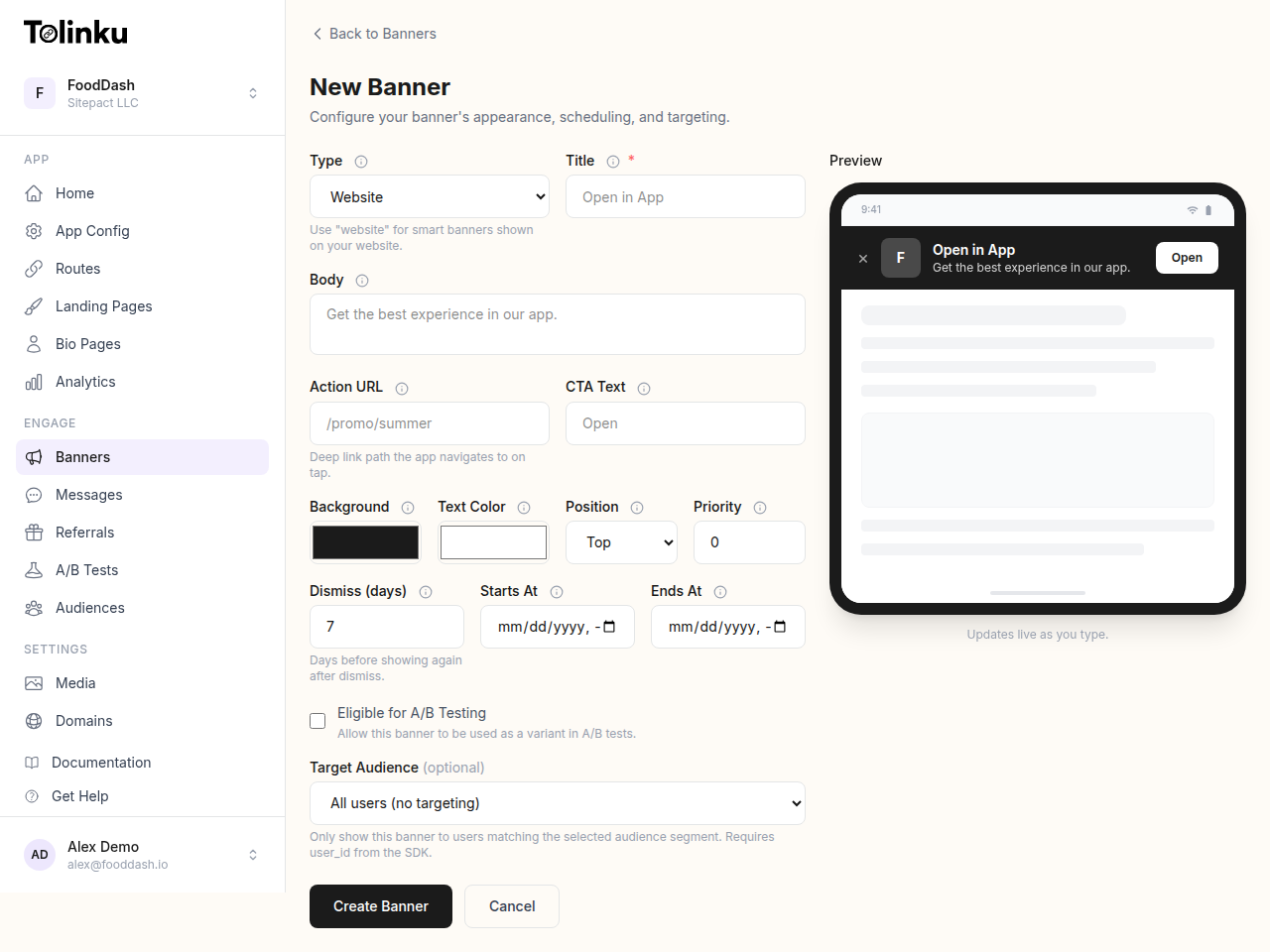 The banner creation form with title, body, colors, CTA, scheduling, and live preview.
CTA Copy That Works
Action-Oriented CTAs
The CTA should describe what happens when the user taps it, not what the app is:
| CTA | Why It Works |
|---|---|
| "Open in App" | Implies the content is already there, waiting. Low commitment. |
| "Continue in App" | For users already consuming content. Natural next step. |
| "View in App" | Specific to viewing content (articles, products, profiles). |
| "Shop in App" | E-commerce specific. Clear action and context. |
| "Get the App" | Generic but clear. Works as a default. |
| CTA | Why It Underperforms |
|---|---|
| "Download" | Emphasizes effort (downloading), not value. |
| "Install" | Technical, cold. Nobody wants to "install" things. |
| "Try Now" | Vague. Try what? |
| "Learn More" | Does not communicate that this leads to an app install. |
Value-First CTAs
Add the value proposition to the CTA or the supporting text:
CTA: "Shop Ad-Free"
CTA: "Read Offline"
CTA: "Get 20% Off"
CTA: "Unlock Premium"
These CTAs answer "why should I tap this?" in two words.
Urgency CTAs (Use Sparingly)
For time-sensitive campaigns:
CTA: "Claim Offer"
CTA: "Join Now"
CTA: "Start Free Trial"
Urgency CTAs work for promotional campaigns but lose effectiveness when overused. Do not use urgency language on evergreen banners.
Platform-Specific CTAs
Tailor the CTA to the platform:
function getCTA() {
  if (/iPhone|iPad/.test(navigator.userAgent)) {
    return "Open in iOS App";
  }
  if (/Android/.test(navigator.userAgent)) {
    return "Open in Android App";
  }
  return "Get the App";
}
Or use store-specific language:
- iOS: "Open" (matches App Store conventions)
- Android: "Install" or "Open" (matches Play Store)
Button Design
Size and Tap Target
The CTA button must meet minimum tap target sizes:
- Apple HIG: 44×44 points minimum
- Material Design: 48×48 dp minimum
- WCAG 2.5.5: 44×44 CSS pixels minimum
.smart-banner__cta {
  min-height: 44px;
  min-width: 80px;
  padding: 10px 20px;
  font-size: 14px;
  font-weight: 600;
  border: none;
  border-radius: 8px;
  background: #4361ee;
  color: white;
  cursor: pointer;
  white-space: nowrap;
}
Color Contrast
The CTA should be the highest-contrast element in the banner. Use your primary brand color or a contrasting accent:
/* High contrast: blue CTA on dark banner */
.smart-banner {
  background: #1a1a2e;
  color: #e0e0e0;
}

.smart-banner__cta {
  background: #4361ee;
  color: #ffffff;
}
The CTA button should pass WCAG AA contrast ratio (4.5:1 for normal text, 3:1 for large text).
Button vs. Link Style
Use a button style (filled, rounded) rather than a text link style. Buttons have higher tap rates because they signal "this is the primary action":
/* Button style (higher CTR) */
.smart-banner__cta--button {
  background: #4361ee;
  color: white;
  border-radius: 8px;
  padding: 10px 20px;
}

/* Link style (lower CTR, less intrusive) */
.smart-banner__cta--link {
  background: none;
  color: #4361ee;
  text-decoration: underline;
  padding: 10px;
}
For banners where you want to be less aggressive (content apps, returning visitors), the link style works. For campaigns where conversion matters most, use the button style.
Supporting Copy
The CTA button does not work in isolation. The banner message sets up the CTA:
Message + CTA Pairs
Message: "Continue reading in our app"
CTA: "Open"

Message: "Summer Sale: 30% off everything"
CTA: "Shop Now"

Message: "4.8 stars, 50K+ reviews"
CTA: "Get the App"

Message: "Free for the first 30 days"
CTA: "Start Trial"
The message provides context and motivation; the CTA provides the action. Together, they form a complete pitch.
Star Ratings and Social Proof
Including the app's star rating increases CTR by 10-20%:
<div class="smart-banner__rating">
  <span class="stars">★★★★★</span>
  <span class="rating-text">4.8 (12K ratings)</span>
</div>
Social proof (download counts, ratings) reduces the perceived risk of installing.
App Icon
Always include the app icon in the banner. It provides visual recognition and helps users verify they are installing the right app:
<img src="/app-icon-64.png"
     class="smart-banner__icon"
     alt="App Name"
     width="40"
     height="40" />
Use a high-resolution icon (at least 2x for retina displays). The icon should match what the user sees on the App Store / Play Store.
A/B Testing CTAs
Test different CTA variants to find what works for your audience:
function getCTAVariant() {
  const variants = [
    { cta: "Open in App", id: "a" },
    { cta: "Get the App", id: "b" },
    { cta: "Continue Reading", id: "c" },
  ];

  // Deterministic assignment based on user session
  const hash = simpleHash(getSessionId());
  const variant = variants[hash % variants.length];

  analytics.track('banner_cta_impression', {
    variant: variant.id,
    cta: variant.cta,
  });

  return variant;
}
Track:
- CTR per variant: Which CTA gets the most clicks?
- Install rate per variant: Which CTA leads to the most actual installs (not just clicks)?
- Dismiss rate per variant: Do different CTAs affect how often users dismiss the banner?
Run the test for at least 1,000 impressions per variant before drawing conclusions.
Tolinku CTA Configuration
Tolinku's smart banners let you configure CTA text, button style, and color through the dashboard. A/B testing of CTA variants is supported, with automatic analytics tracking of CTR by variant.
For banner design, see the smart banners guide. For animation effects on the CTA button, see animated smart banners.
Get deep linking tips in your inbox
One email per week. No spam.