QR codes were once dismissed as a relic of early smartphone marketing. Then the pandemic forced restaurants, retailers, and event venues to adopt contactless menus and check-ins, and suddenly QR codes were everywhere. That wave never receded. By 2026, QR codes appear on product packaging, billboards, business cards, concert wristbands, and restaurant table tents. Paired with short links, they form one of the most practical tools in any mobile app marketer's toolkit.
Short links, meanwhile, have been a staple of digital marketing for over a decade. They compress long, ugly URLs into something readable and shareable. When you combine short links with QR codes and deep linking, you get a system that can route a user from a physical poster straight into a specific screen inside your mobile app.
This guide covers how QR codes and short links work, how to brand and track them, and how to connect them to your mobile app's deep linking setup.
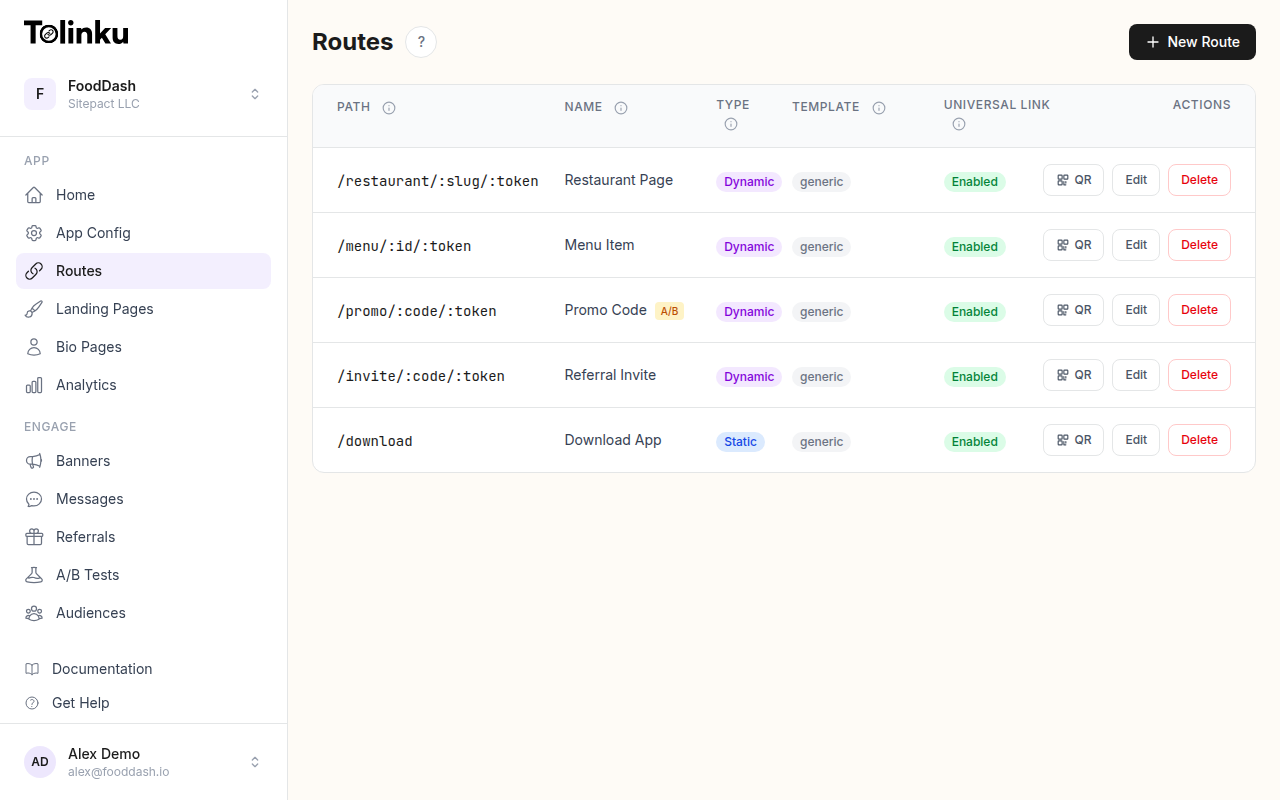 Tolinku route configuration with QR code generation for each deep link.
How QR Codes Work
A QR (Quick Response) code is a two-dimensional barcode that encodes data in a grid of black and white squares. The format was invented by Denso Wave in 1994 for tracking automotive parts, but its open specification made it available for any use case. The ISO/IEC 18004 standard defines the encoding rules.
A QR code stores data using one of four encoding modes:
- Numeric: digits only (0-9), most efficient at 3.3 digits per module pair
- Alphanumeric: digits, uppercase letters, and a few symbols
- Byte: any 8-bit data, typically UTF-8 text
- Kanji: double-byte characters for Japanese text
For URLs, the byte mode is most common. The data is encoded, split into codewords, and then combined with error correction codewords using Reed-Solomon error correction. QR codes support four error correction levels:
| Level | Recovery Capacity | Use Case |
|---|---|---|
| L (Low) | ~7% | Digital displays, clean environments |
| M (Medium) | ~15% | General purpose |
| Q (Quartile) | ~25% | Printed materials |
| H (High) | ~30% | Codes with logo overlays or heavy wear |
Higher error correction means the code can still be read even if part of it is damaged or obscured. This is why you can place a logo in the center of a QR code and it still scans correctly: the error correction fills in the missing data.
When a smartphone camera detects a QR code, it identifies the three finder patterns (the large squares in three corners), determines the code's orientation and size, reads the format information, and decodes the data. Modern smartphones running iOS 11+ or Android 8+ handle this natively through the camera app, with no third-party scanner needed.
Static vs Dynamic QR Codes
This distinction matters more than most people realize.
Static QR codes encode the destination URL directly in the code's data. The URL is baked into the pattern itself. If you need to change where the code points, you must generate and print an entirely new code. Static codes are fine for permanent destinations: a link to your app's listing on the App Store, your company website, or a stable product page.
Dynamic QR codes encode a short redirect URL instead. When scanned, the redirect URL forwards the user to whatever destination you've configured on the server side. You can change the destination at any time without reprinting the code. This is critical for:
- Seasonal campaigns: point the same in-store QR code to different promotions throughout the year
- A/B testing: swap destinations to measure which landing page converts better
- Error recovery: fix a broken link without reprinting thousands of flyers
- Analytics: the redirect server can log every scan before forwarding
If you're printing QR codes on physical materials (packaging, signage, print ads), always use dynamic codes. The cost of reprinting is almost always higher than the cost of running a redirect.
Short Links for Mobile Apps
A short link is a compact URL that redirects to a longer destination. The anatomy is simple:
https://yourapp.link/promo
  ^         ^         ^
  scheme   domain    path (slug)
For mobile apps, short links serve three purposes:
- Readability:
yourapp.link/summer-saleis easier to type, remember, and share than a URL with query parameters and path segments - Tracking: the redirect layer captures analytics before forwarding
- Deep linking: the redirect can include logic to route users into the app (or to the app store if not installed)
Redirect Chains and Latency
Every redirect adds latency. A typical short link redirect (HTTP 301 or 302) takes 50-200ms depending on server location and DNS resolution. For most use cases, this is negligible. But stacking redirects (short link redirects to a tracking URL, which redirects to a landing page, which redirects to the app store) adds up quickly.
Keep your redirect chain as short as possible. Ideally, your short link service handles tracking, deep link resolution, and the final redirect in a single hop.
Vanity URLs vs Random Slugs
Most short link services let you choose between a random slug (yourapp.link/a3xK9) and a custom vanity slug (yourapp.link/summer-sale). For more on creating memorable, on-brand links, see branded short links. Vanity slugs are better for:
- Print materials where users might type the URL manually
- Social media posts where the link is visible
- Brand recognition and trust
Random slugs are fine for QR codes (nobody types them) and for links generated programmatically at scale.
Combining QR Codes with Deep Links
This is where QR codes and short links become genuinely powerful for mobile apps. A QR code that opens a web page is useful. A QR code that opens a specific screen inside your app is far more useful.
Here's how it works:
- User scans a QR code on a coffee bag
- The QR code contains a short link:
https://brew.app/colombia-blend - The short link server checks the user's device
- If the app is installed, the server returns a Universal Link (iOS) or App Link (Android) that opens the app directly to the Colombia Blend product page
- If the app is not installed, the server redirects to the App Store or Play Store, and (through deferred deep linking) the app opens to the correct page after installation
This flow requires a few pieces working together:
- Universal Links (iOS): configured through an
apple-app-site-associationfile on your domain. See Apple's documentation on Universal Links. - App Links (Android): configured through a
assetlinks.jsonfile and intent filters. See Android's App Links documentation. - A redirect server: handles device detection and routing logic
- Deferred deep linking: preserves the intended destination through the app store install flow
Here's what a basic device-detection redirect looks like on the server side:
app.get('/:slug', async (req, res) => {
  const route = await getRoute(req.params.slug);
  if (!route) return res.status(404).send('Not found');

  const ua = req.headers['user-agent'] || '';
  const isIOS = /iPhone|iPad|iPod/.test(ua);
  const isAndroid = /Android/.test(ua);

  // Log the click for analytics
  await logClick({
    routeId: route.id,
    userAgent: ua,
    referrer: req.headers.referer,
    ip: req.ip,
    timestamp: Date.now()
  });

  if (isIOS) {
    // Universal Links handle this automatically if configured
    // Fallback to App Store
    return res.redirect(route.iosStoreUrl);
  }

  if (isAndroid) {
    // App Links handle this automatically if configured
    // Fallback to Play Store
    return res.redirect(route.androidStoreUrl);
  }

  // Desktop or unknown: send to web landing page
  return res.redirect(route.webUrl);
});
In practice, you don't want to build and maintain this yourself. Deep linking platforms like Tolinku handle device detection, Universal Link and App Link configuration, deferred deep linking, and analytics out of the box.
Branding Your Links
Generic short domains (like those from free URL shorteners) work, but they don't build trust. Users are more likely to tap a link from brew.app/promo than from genericshortener.io/a3xK9.
Custom Domains
Setting up a custom domain for your short links involves:
- Register a short domain: something like
brew.app,go.yourcompany.com, orlinks.yourbrand.com - Point DNS: configure a CNAME or A record pointing to your link management service
- SSL certificate: ensure HTTPS works on the custom domain (most platforms handle this automatically)
- Configure routes: set up your short link paths under the custom domain
A branded domain does more than look professional. It also:
- Improves click-through rates (users trust recognizable domains)
- Protects against domain blocklisting (shared short domains sometimes get flagged by spam filters)
- Reinforces brand identity in every channel where links appear
- Gives you full control if you ever switch link management providers
For QR codes specifically, the domain doesn't matter as much (users don't see it before scanning), but the landing experience after scanning should feel on-brand.
UTM Parameters on Short Links
Attach UTM parameters to your short links for campaign tracking in Google Analytics or any analytics tool:
https://brew.app/colombia-blend?utm_source=packaging&utm_medium=qr&utm_campaign=spring-launch
Most link management platforms let you set UTM parameters through their dashboard, so you don't have to manually append query strings. The parameters pass through the redirect to your final destination, where your analytics tool picks them up.
QR Code Design Best Practices
A QR code that doesn't scan is worthless. Follow these rules:
Size and Distance
The general rule: the QR code should be at least 1/10th the scanning distance. For a poster viewed from 10 feet away, the code needs to be at least 1 foot (30 cm) across. For a business card held at arm's length, 2 cm is the minimum.
The QR Code specification recommends a minimum module size of 0.33mm for print. In practice, aim larger.
| Medium | Minimum Size | Typical Scan Distance |
|---|---|---|
| Business card | 2 cm x 2 cm | 15-30 cm |
| Product label | 2.5 cm x 2.5 cm | 15-45 cm |
| Flyer / menu | 3 cm x 3 cm | 30-60 cm |
| Poster | 10 cm x 10 cm | 1-3 m |
| Billboard | 30+ cm x 30+ cm | 5-15 m |
Contrast
QR codes require high contrast between the dark modules and the light background. Black on white is the safest choice. Dark blue, dark green, or dark red on white also work. Avoid:
- Light colors on light backgrounds
- Gradients across the code
- Inverting the colors (white modules on a dark background can cause scanning issues on some devices)
Adding Logos
You can place a logo in the center of a QR code if you use error correction level H (30% recovery). Keep the logo to no more than 20-25% of the code's total area, and test extensively. Different phone cameras and scanning apps vary in their tolerance.
Quiet Zone
Every QR code needs a white border (quiet zone) around it. The specification requires a minimum of 4 modules of white space on all sides. Don't let other design elements crowd into this space.
Testing
Test every QR code before printing. Test with:
- At least 3 different phones (mix of iOS and Android)
- The native camera app (not a third-party scanner)
- The intended viewing distance
- The actual print medium (screens and paper render differently)
- Both bright and dim lighting conditions
Analytics and Tracking
QR codes and short links are only as useful as the data they generate. Here's what you should track:
Scan and Click Metrics
For a complete walkthrough of tracking scan performance, see QR code analytics.
- Total scans/clicks: raw volume over time
- Unique scans: deduplicated by device or IP
- Scan time: when people scan (time of day, day of week)
- Location: country, city, or region based on IP geolocation
- Device type: iOS vs Android vs desktop
- Referrer: where the user came from (useful for short links shared online)
Campaign Attribution
Pairing UTM parameters with your QR codes lets you attribute conversions to specific physical touchpoints. For example:
Poster in Store A:   brew.app/promo?utm_source=store-a&utm_medium=poster&utm_campaign=spring
Poster in Store B:   brew.app/promo?utm_source=store-b&utm_medium=poster&utm_campaign=spring
Bag label:           brew.app/promo?utm_source=bag-label&utm_medium=packaging&utm_campaign=spring
All three QR codes point to the same destination, but the UTM parameters tell you exactly which physical location or material drove each scan. This data flows into your analytics dashboard alongside your digital campaign data. For more on monitoring link performance, see short link click tracking.
Conversion Funnels
Track the full funnel:
- QR code scanned (link clicked)
- Landing page viewed
- App store visited (if app not installed)
- App installed
- Target screen reached inside the app
- Conversion event (purchase, signup, etc.)
Drop-off between steps tells you where to optimize. If 80% of scanners reach the landing page but only 10% install the app, your landing page needs work. If 90% install but only 20% reach the target screen, your deferred deep linking may be broken.
Use Cases
QR codes and short links appear across nearly every industry. Here are the most effective applications:
Retail and E-Commerce
- Product packaging: link to setup guides, warranty registration, or reorder pages inside your app
- In-store displays: link to product reviews, comparison tools, or exclusive in-app promotions
- Receipts: link to a feedback form or loyalty program signup in the app
- Price tags: link to detailed product information, sizing guides, or AR try-on features
Restaurants and Food Service
- Table tents: link to the menu, ordering flow, or loyalty program within your app
- Takeout packaging: link to reorder the same meal through the app
- Tip jars: link to a tipping page (no app required, but can prompt app install)
Events and Entertainment
- Tickets: QR code for entry that also deep links to event details in the app
- Wristbands and badges: link to schedules, maps, or networking features
- Stage signage: link to artist pages, setlists, or merchandise in the app
- Post-event follow-up: printed materials with QR codes linking to photo galleries or recordings
Print Media and Direct Mail
- Magazine ads: link to an interactive experience or product page in the app
- Postcards and flyers: link to a signup flow or promotional offer
- Catalogs: link each product to its detail page in the app
Product Packaging and Manufacturing
- User manuals: link to video tutorials or interactive guides
- Warranty cards: link to registration forms
- Recall notices: link to safety information and return instructions
Out-of-Home Advertising
- Billboards: link to a landing page or app download (use large QR codes and keep the URL simple for manual entry as backup)
- Transit ads: bus stops, subway cards, and taxi screens with scannable codes
- Storefront windows: link to current promotions or store hours in the app
QR Codes and Short Links with Tolinku
Tolinku provides QR codes and short links as part of its deep linking platform. Here's what the setup looks like:
Routes and QR Codes
In Tolinku, a route is a deep link path configuration. Each route gets its own short link and downloadable QR code. When a user scans the QR code or clicks the short link, the platform handles device detection, app-installed checks, and deferred deep linking automatically.
For example, if you create a route at /summer-promo, your short link becomes yourdomain.com/summer-promo, and the corresponding QR code encodes that URL. You configure the iOS Universal Link behavior, Android App Link behavior, and web fallback all in one place.
Custom Domains
Tolinku supports custom domains so your short links and QR codes use your own branded domain. Point your DNS, and the platform handles SSL provisioning and link routing.
Analytics
Every scan and click is tracked with device type, location, timestamp, and referrer data. The analytics dashboard shows scan volume over time, device breakdowns, and geographic distribution. UTM parameters pass through to your downstream analytics tools.
Generating QR Codes Programmatically
If you need to generate QR codes at scale (for product packaging, personalized mailers, or dynamic campaigns), you can use any standard QR code library pointed at your Tolinku short links. Here's a Node.js example using the popular qrcode package:
import QRCode from 'qrcode';

const routes = [
  { slug: 'colombia-blend', label: 'Colombia Blend' },
  { slug: 'ethiopia-natural', label: 'Ethiopia Natural' },
  { slug: 'guatemala-honey', label: 'Guatemala Honey' },
];

for (const route of routes) {
  const url = `https://brew.app/${route.slug}`;

  // Generate PNG file
  await QRCode.toFile(
    `./qr-codes/${route.slug}.png`,
    url,
    {
      errorCorrectionLevel: 'H',
      margin: 4,
      width: 400,
      color: {
        dark: '#1a1a2e',
        light: '#ffffff'
      }
    }
  );

  // Generate SVG string (for print-ready vector output)
  const svg = await QRCode.toString(url, {
    type: 'svg',
    errorCorrectionLevel: 'H',
    margin: 4
  });

  console.log(`Generated QR for ${route.label}: ${url}`);
}
For print production, always use SVG or high-resolution PNG (300+ DPI). Low-resolution raster images will produce blurry codes that fail to scan.
Common Mistakes to Avoid
1. Using static QR codes on printed materials. Once printed, you can't change the destination. Always use dynamic codes (via a short link redirect) for anything physical.
2. Forgetting to test before printing. A surprising number of QR code campaigns launch with broken links, incorrect destinations, or codes that don't scan at the intended distance. Print a proof and test it with real phones.
3. Skipping the quiet zone. Designers sometimes crop QR codes too tightly or place them against busy backgrounds. Maintain the required white border on all sides.
4. Encoding too much data. The more data a QR code contains, the denser (and harder to scan) it becomes. Encode a short redirect URL, not a long URL with dozens of query parameters.
5. Not tracking scans. If you're not measuring scans, you have no idea whether your QR code campaign is working. Use dynamic codes with analytics built in.
6. Ignoring the mobile experience after the scan. The QR code is just the entry point. If the landing page is slow, not mobile-optimized, or doesn't route to the right place in the app, the scan was wasted. Test the full flow from scan to conversion.
7. Placing QR codes where scanning is impractical. A QR code on a highway billboard is useless (drivers can't safely scan it). A QR code on the bottom of a heavy appliance is useless (users won't flip it over). Think about the physical context.
8. Using URL shorteners that might disappear. Free link shortening services shut down or change terms. If your QR codes are printed on packaging with a two-year shelf life, make sure your redirect service will still be running in two years. Using a custom domain that you control protects you here.
9. Overcomplicating the redirect chain. Short link to tracker to landing page to app store: each redirect adds latency and a potential failure point. Minimize hops.
10. Not setting UTM parameters. Without UTM tagging, your QR code scans blend into "direct" traffic in your analytics. Tag every link so you can attribute conversions correctly.
Conclusion
QR codes and short links are simple technologies, but they become genuinely useful when combined with deep linking and proper analytics. A QR code on a coffee bag that opens the exact product page inside your app, tracks the scan, and attributes the eventual purchase to that specific bag design: that's a measurable, optimizable marketing channel.
The setup is straightforward. Use dynamic QR codes backed by short link redirects. Brand your links with a custom domain. Tag everything with UTM parameters. Test the full flow from scan to in-app conversion. Track the results and iterate.
Whether you're running a retail chain, a restaurant, an event, or a direct-to-consumer brand, the combination of QR codes, short links, and deep linking gives you a direct path from the physical world into your mobile app, with data at every step.
Get deep linking tips in your inbox
One email per week. No spam.