Batch processing is fine for dashboards you check once a day. It's not fine when you need to detect a broken campaign link within minutes, trigger a re-engagement email within seconds of an install, or shut down a referral fraud pattern before it costs you money.
Real-time event processing takes the push-based nature of Tolinku webhooks and extends it into a full event-driven architecture. Instead of storing events and querying them later, you process each event as it arrives: transforming, enriching, routing, and acting on it immediately. For the webhook setup basics, see the webhook setup guide. For streaming to analytics tools specifically, see the analytics pipelines guide.
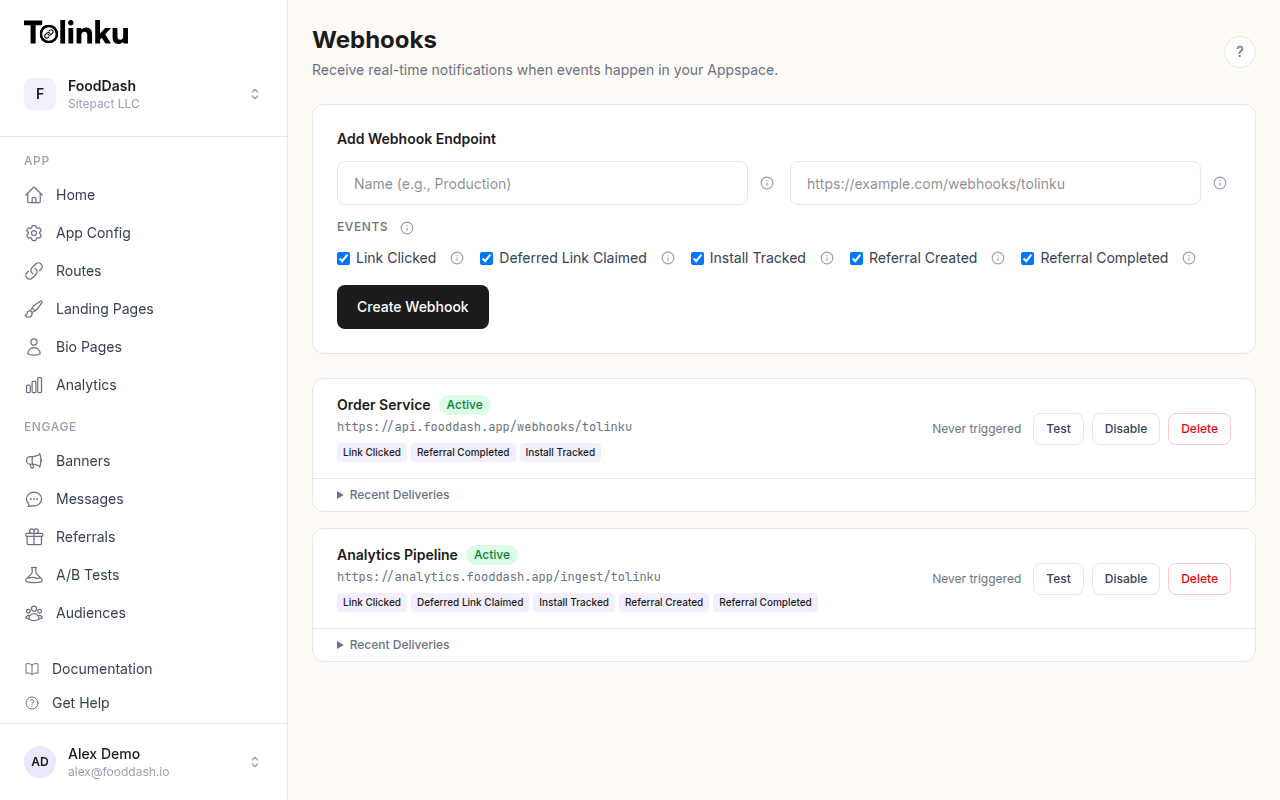 The webhooks page with create form, webhook list, and delivery log.
Why Real-Time?
Batch processing (hourly or daily) works for reporting. Real-time processing enables:
- Instant campaign feedback: See conversion rates change as you adjust targeting
- Fraud detection: Catch anomalous referral patterns within minutes instead of discovering them in a monthly report
- Triggered workflows: Send a push notification 5 minutes after an install, while the user's interest is still high
- Dynamic routing: Adjust deep link destinations based on real-time traffic patterns
- Live dashboards: Show stakeholders what's happening right now, not what happened yesterday
Architecture Patterns
Pattern 1: Direct Processing
The simplest pattern. Your webhook receiver processes each event inline.
Tolinku → Receiver → Process → Store/Act
app.post('/webhooks/tolinku', async (req, res) => {
  // Verify signature...
  res.status(200).send('OK');

  const event = JSON.parse(req.body.toString());

  // Process inline
  await enrichEvent(event);
  await routeToDestinations(event);
  await checkAlertConditions(event);
});
Pros: Simple, no infrastructure beyond the receiver.
Cons: Processing time adds up. If enrichEvent takes 200ms and routeToDestinations takes 300ms, you're spending 500ms per event. At 100 events/second, you need concurrency or you'll fall behind.
Best for: Low-volume integrations (under 10 events/second) with fast processing logic.
Pattern 2: Queue-Based Fan-Out
Decouple ingestion from processing using a message queue.
Tolinku → Receiver → Queue → Worker 1 (analytics)
                            → Worker 2 (alerts)
                            → Worker 3 (CRM)
import { SQSClient, SendMessageCommand } from '@aws-sdk/client-sqs';

const sqs = new SQSClient({});

app.post('/webhooks/tolinku', async (req, res) => {
  // Verify signature...
  res.status(200).send('OK');

  await sqs.send(new SendMessageCommand({
    QueueUrl: process.env.SQS_QUEUE_URL!,
    MessageBody: req.body.toString(),
    MessageAttributes: {
      EventType: {
        DataType: 'String',
        StringValue: req.headers['x-webhook-event'] as string,
      },
    },
  }));
});
Each worker pulls from the queue (or a fan-out topic) and handles its own concern. Workers are independent: if the CRM integration is slow, it doesn't affect analytics ingestion.
Best for: Medium-volume integrations with multiple destinations or processing steps.
Pattern 3: Stream Processing
For high-volume, low-latency requirements, use a streaming platform like Kafka or Amazon Kinesis.
Tolinku → Receiver → Kafka Topic → Stream Processor → Destinations
The stream processor can:
- Window events (count clicks per campaign per minute)
- Join event streams (correlate clicks with installs)
- Detect patterns (referral fraud, broken links)
Best for: High-volume integrations (100+ events/second) where you need windowed aggregations or stream joins.
Event Enrichment
Raw webhook events are useful but limited. Enrichment adds context that makes events actionable.
Geo-Enrichment
The link.clicked event includes an IP address. Resolve it to a country, region, and city:
import { Reader } from '@maxmind/geoip2-node';

let geoReader: Reader;

async function initGeo() {
  geoReader = await Reader.open('/path/to/GeoLite2-City.mmdb');
}

function enrichWithGeo(event: any): any {
  if (!event.data.ip) return event;

  try {
    const geo = geoReader.city(event.data.ip);
    return {
      ...event,
      data: {
        ...event.data,
        country: geo.country?.isoCode || null,
        region: geo.subdivisions?.[0]?.isoCode || null,
        city: geo.city?.names?.en || null,
      },
    };
  } catch {
    return event;
  }
}
MaxMind's GeoLite2 database is free and updates weekly. Tolinku uses the same database for its built-in analytics.
Campaign Metadata
The webhook carries a campaign string. Your campaign management system has richer metadata: budget, target audience, creative variant, channel. Join on the campaign ID:
async function enrichWithCampaign(event: any): Promise<any> {
  if (!event.data.campaign) return event;

  const campaign = await db.query(
    'SELECT channel, budget, target_audience FROM campaigns WHERE campaign_id = $1',
    [event.data.campaign]
  );

  if (campaign.rows.length === 0) return event;

  return {
    ...event,
    data: {
      ...event.data,
      channel: campaign.rows[0].channel,
      budget: campaign.rows[0].budget,
      target_audience: campaign.rows[0].target_audience,
    },
  };
}
User Identity
For referral events, resolve the referral token to a user profile:
async function enrichWithUser(event: any): Promise<any> {
  if (!event.data.referrer_token) return event;

  const user = await db.query(
    'SELECT id, email, name FROM users WHERE referral_token = $1',
    [event.data.referrer_token]
  );

  if (user.rows.length === 0) return event;

  return {
    ...event,
    data: {
      ...event.data,
      referrer_id: user.rows[0].id,
      referrer_name: user.rows[0].name,
    },
  };
}
Event Routing
After enrichment, route events to different destinations based on type and content.
interface EventRouter {
  condition: (event: any) => boolean;
  handler: (event: any) => Promise<void>;
}

const routes: EventRouter[] = [
  // All events go to the data warehouse
  {
    condition: () => true,
    handler: sendToWarehouse,
  },
  // Install events trigger a welcome workflow
  {
    condition: (e) => e.event === 'install.tracked',
    handler: triggerWelcomeWorkflow,
  },
  // Referral completions update the CRM
  {
    condition: (e) => e.event === 'referral.completed',
    handler: updateCRM,
  },
  // High-value events go to Slack
  {
    condition: (e) => ['install.tracked', 'referral.completed'].includes(e.event),
    handler: notifySlack,
  },
  // Anomalous click patterns trigger alerts
  {
    condition: (e) => e.event === 'link.clicked' && e.data.country === 'XX',
    handler: flagSuspiciousClick,
  },
];

async function routeEvent(event: any) {
  const enriched = await enrichEvent(event);

  const promises = routes
    .filter(route => route.condition(enriched))
    .map(route => route.handler(enriched).catch(err =>
      console.error(`Route handler failed: ${err.message}`)
    ));

  await Promise.allSettled(promises);
}
Each route runs independently. A Slack notification failure doesn't prevent the warehouse write.
Windowed Aggregations
Some insights require looking at events in aggregate, not individually. Windowed processing groups events by time and computes metrics over each window.
Sliding Window: Clicks Per Campaign Per Minute
interface WindowBucket {
  campaign: string;
  count: number;
  firstSeen: number;
}

const windows = new Map<string, WindowBucket>();
const WINDOW_SIZE_MS = 60_000; // 1 minute

function recordClick(event: any) {
  const campaign = event.data.campaign || 'unknown';
  const key = `${campaign}`;

  const bucket = windows.get(key);
  if (bucket && Date.now() - bucket.firstSeen < WINDOW_SIZE_MS) {
    bucket.count++;
  } else {
    // Emit the completed window
    if (bucket) emitWindow(key, bucket);
    windows.set(key, { campaign, count: 1, firstSeen: Date.now() });
  }
}

function emitWindow(key: string, bucket: WindowBucket) {
  console.log(`Campaign ${bucket.campaign}: ${bucket.count} clicks in window`);
  // Send to dashboard, check thresholds, etc.
}

// Flush windows periodically
setInterval(() => {
  const now = Date.now();
  for (const [key, bucket] of windows.entries()) {
    if (now - bucket.firstSeen >= WINDOW_SIZE_MS) {
      emitWindow(key, bucket);
      windows.delete(key);
    }
  }
}, 10_000);
For production workloads, use a proper stream processing framework (Kafka Streams, Apache Flink, or AWS Kinesis Data Analytics) instead of in-memory windows. But for moderate volumes, the in-memory approach works and avoids infrastructure complexity.
Exactly-Once Processing
Webhooks are delivered at-least-once. Tolinku retries failed deliveries (3 retries at 1 minute, 5 minutes, and 30 minutes). Your processing pipeline must handle duplicates.
For event storage (warehouse, database), deduplicate on insert using a hash of the event content:
const eventHash = crypto
  .createHash('sha256')
  .update(JSON.stringify(event))
  .digest('hex');

await db.query(
  'INSERT INTO events (hash, event_type, data) VALUES ($1, $2, $3) ON CONFLICT (hash) DO NOTHING',
  [eventHash, event.event, JSON.stringify(event)]
);
For side effects (emails, Slack notifications, CRM updates), check the dedup table before acting:
async function processOnce(event: any, handler: () => Promise<void>) {
  const hash = crypto
    .createHash('sha256')
    .update(JSON.stringify(event))
    .digest('hex');

  const exists = await db.query(
    'SELECT 1 FROM processed_events WHERE hash = $1',
    [hash]
  );

  if (exists.rows.length > 0) return;

  await handler();
  await db.query('INSERT INTO processed_events (hash) VALUES ($1)', [hash]);
}
See the webhook idempotency guide for a deeper treatment.
Scaling Considerations
| Volume | Receiver | Processing | Storage |
|---|---|---|---|
| < 10/sec | Single process | Inline | Direct DB insert |
| 10-100/sec | Load balanced | Queue + workers | Batch inserts |
| 100-1000/sec | Auto-scaling | Kafka + stream processors | Streaming warehouse load |
| > 1000/sec | Edge workers | Kafka + Flink/Spark | Dedicated analytics cluster |
Most deep link integrations fall in the first two tiers. If you're processing over 100 events per second, you likely have a mature engineering team and existing streaming infrastructure to plug into.
Error Handling
In a real-time pipeline, errors need to be handled without losing events:
- Dead-letter queue (DLQ): Events that fail processing go to a separate queue for investigation. Don't discard them.
- Circuit breaker: If a downstream service (CRM, analytics API) is consistently failing, stop sending events to it temporarily. Queue them and replay when the service recovers.
- Backpressure: If your processor can't keep up with the event rate, signal the queue to slow down rather than dropping events.
// Simple circuit breaker
class CircuitBreaker {
  private failures = 0;
  private lastFailure = 0;
  private readonly threshold = 5;
  private readonly resetMs = 30_000;

  isOpen(): boolean {
    if (this.failures >= this.threshold) {
      if (Date.now() - this.lastFailure > this.resetMs) {
        this.failures = 0; // Reset after cooldown
        return false;
      }
      return true;
    }
    return false;
  }

  recordFailure() {
    this.failures++;
    this.lastFailure = Date.now();
  }

  recordSuccess() {
    this.failures = 0;
  }
}
For monitoring your pipeline's health, see the webhook delivery monitoring guide. For handling webhook failures and retries, see the retry logic guide.
Get deep linking tips in your inbox
One email per week. No spam.