

Activity Log
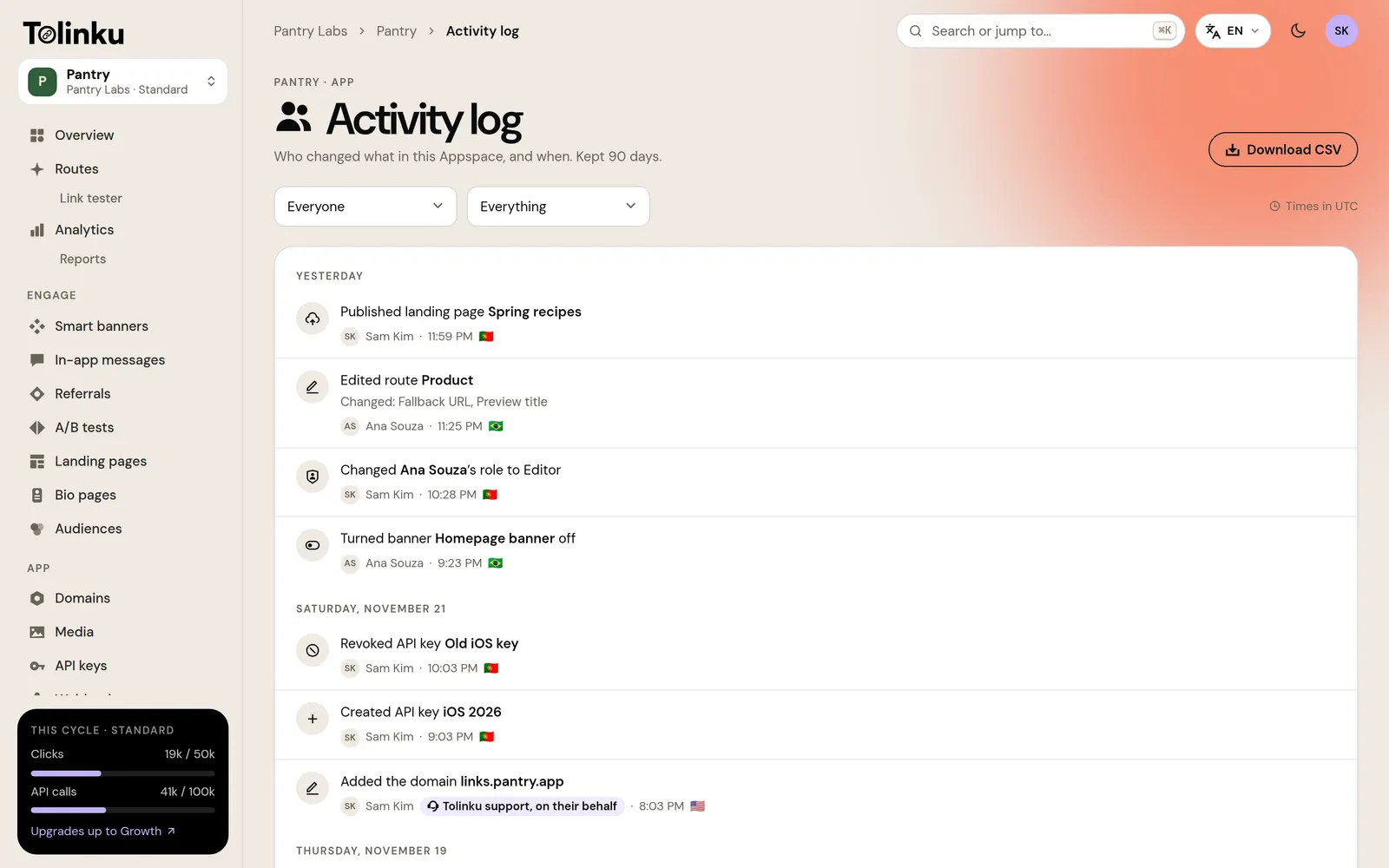
The Activity log shows who changed what in your Appspace, and when. Use it to find out who edited a route, who turned a banner off, or who invited a new team member.
To open it, click Activity log under Members in the sidebar.
Who can see it
Section titled “Who can see it”- The activity log is on every paid plan. On the Free plan, the page explains what it does and links to an upgrade. Tolinku records changes on the Free plan too, so they’re already in the log when you upgrade.
- Only owners and admins can open it. Editors and viewers don’t see it in the sidebar.
- Changes to the account itself only show up for the account owner. These are creating or deleting an Appspace, and cancelling or resuming the subscription. They’re marked Account.
What’s recorded
Section titled “What’s recorded”Tolinku adds a row each time someone on your team changes something:
| Area | Recorded changes |
|---|---|
| Routes | Creating, editing and deleting routes, new short links, and changes to the QR code style. |
| Smart banners, In-app messages, Audiences, Webhooks | Creating, editing, turning on or off, and deleting. For messages, also publishing a new design. For webhooks, also new signing secrets, test sends and resent deliveries. |
| Landing pages, Bio pages | Creating, editing, publishing and deleting. Landing pages also record duplicates. |
| A/B tests | Starting, editing, pausing, resuming, picking a winner and deleting. |
| Domains | Adding and removing domains, subdomains and email click domains, verifying an email click domain, and changing the main domain. |
| Media | Uploading, renaming and deleting files. |
| API keys | Creating, renaming, revoking and deleting keys. |
| Members | Invitations sent, resent and cancelled, role changes, and people removed. |
| Settings | Changes to Appspace settings, and deleting the Appspace. |
| Reports | Creating, editing, pausing and deleting scheduled reports, and raw event exports. |
| Billing | Plan changes and billing cap changes for this Appspace, and cancelling or resuming the subscription. |
Each row shows:
- What happened, with the name of the thing that changed. A deleted route keeps its name in the log.
- For an edit, the fields that changed, for example Changed: Fallback URL, Preview title.
- Who made the change, and the time.
- The country the change was made from, as a flag, when it’s known.
Times are shown in your Appspace’s reporting timezone, so the whole team sees the same days and times. You can change it in the General section of Settings.
Finding a change
Section titled “Finding a change”The page shows the last 90 days, newest first, grouped by day.
- Use the first menu to show one person’s changes, or Everyone.
- Use the second menu to show one area, like Routes or Domains, or Everything.
- Click Clear to remove both filters.
The page shows 100 changes at a time. Click Older changes at the bottom to see more.
Downloading the log
Section titled “Downloading the log”Click Download CSV to download the log as a CSV file. It uses the filters you’ve picked, and covers the same 90 days.
The file has these columns:
| Column | Contents |
|---|---|
time_utc | When the change was made, in UTC. |
person | The name of the person who made it. |
email | Their email address. |
on_behalf | Tolinku support when support made the change. Empty otherwise. |
action | The kind of change, for example route.update. |
description | The change in words, as shown on the page. |
target | The name of the thing that changed. |
changed | For an edit, the fields that changed. |
country | The two-letter country code. |
Changes made by Tolinku support
Section titled “Changes made by Tolinku support”Sometimes Tolinku support signs in as you to help with a problem. Anything support changes while signed in as you is recorded under your name, with a Tolinku support, on their behalf label next to it. In the CSV file, the on_behalf column says Tolinku support. The log doesn’t say which member of the support team made the change.
Why can’t I see the activity log?
Section titled “Why can’t I see the activity log?”Check two things. The Appspace needs a paid plan, and you need to be an owner or admin. See Team Members for roles.
Is everything my team does recorded?
Section titled “Is everything my team does recorded?”The log records changes, not views. Opening a page, looking at analytics or downloading a report isn’t recorded. Raw event exports are the one exception: starting one is recorded. Saving something without changing any field isn’t recorded either.
Can I see changes older than 90 days?
Section titled “Can I see changes older than 90 days?”No. The page and the CSV file both cover the last 90 days.