

Email Links
Email platforms wrap every link in an email in their own click-tracking address. That is how they count clicks. It also means a tap on the link goes to the email platform’s domain, not to your link domain, so the phone opens the browser instead of your app.
Email links fix that. You tell Tolinku which click-tracking domain your email platform uses, and links in your emails open your app. Your email platform still counts every click.
How it works
Section titled “How it works”- Someone taps a link in an email It’s on your click-tracking domain.
- Your app opens The phone knows the domain belongs to your app.
- Tolinku unwraps the link The email platform still counts the click.
- The right screen opens The one the email linked to.
There are two ways, and your email platform decides which one you use.
Tolinku handles the domain
Section titled “Tolinku handles the domain”For SendGrid, Amazon SES, and Braze when it sends through SendGrid or Amazon SES.
You point your click-tracking subdomain (its CNAME record) at Tolinku instead of at the email platform. Tolinku then:
- serves the Apple and Android association files on that domain, so the phone knows your app may open those links;
- claims only the links you mark for the app (SendGrid’s
/uni/links, or Amazon SES links with your custom path), so unsubscribe pages and “view in browser” links stay on the web; - passes every other request through to your email platform untouched, so its click and open tracking, unsubscribe links and reports keep working.
Before Tolinku answers on the domain, you prove you own it with a TXT record. The SSL certificate is issued for you.
Your platform hosts the files
Section titled “Your platform hosts the files”For Klaviyo, Iterable, Salesforce Marketing Cloud and Customer.io.
These platforms host the association files on their own click-tracking domain. Tolinku generates the files for your app, and you upload them in the email platform. Nothing changes in your DNS.
Either way
Section titled “Either way”When someone taps a link in an email, the phone opens your app with the click-tracking address. Your app hands that address to the Tolinku SDK, which asks Tolinku where it leads. Tolinku asks the email platform without following the redirect, so the platform counts the click once, as it always has. The SDK then gives your app the route, just like any other Tolinku link.
Choose your email platform
Section titled “Choose your email platform”| Email platform | How it works | Guide |
|---|---|---|
| SendGrid | Tolinku handles the domain | SendGrid |
| Amazon SES | Tolinku handles the domain | Amazon SES |
| Braze (sending with SendGrid or Amazon SES) | Tolinku handles the domain | Braze |
| Klaviyo | Your platform hosts the files | Klaviyo |
| Iterable | Your platform hosts the files | Iterable |
| Salesforce Marketing Cloud | Your platform hosts the files | Salesforce Marketing Cloud |
| Customer.io | Your platform hosts the files | Customer.io |
Each guide covers the whole setup from start to finish, including your app.
Requirements
Section titled “Requirements”- A paid plan. Email links are not part of the Free plan. They also stop while the Appspace is frozen, has an unpaid bill, or is held at its limit on basic links (see Billing & Plans). See What happens if my plan changes? below.
- Your app’s details in Settings. For iOS, your Apple team ID and bundle ID (Configuring iOS). For Android, your package name and SHA-256 certificate fingerprint (Configuring Android). Tolinku builds the association files from these.
- App open attribution not set to Always. With Always, Tolinku keeps links away from the operating system so every tap loads the hand-off page. That applies to email links too, so they stay in the browser. See Attributing App Opens.
- Tolinku SDK 0.8.2 or later in your app, on every platform you ship. Email links need it.
- The Admin or Owner role to add, verify or remove an email domain. Editors can open a domain and see its setup steps.
- Up to 20 email domains per Appspace.
Add an email domain
Section titled “Add an email domain”-
Go to Domains in the sidebar.
-
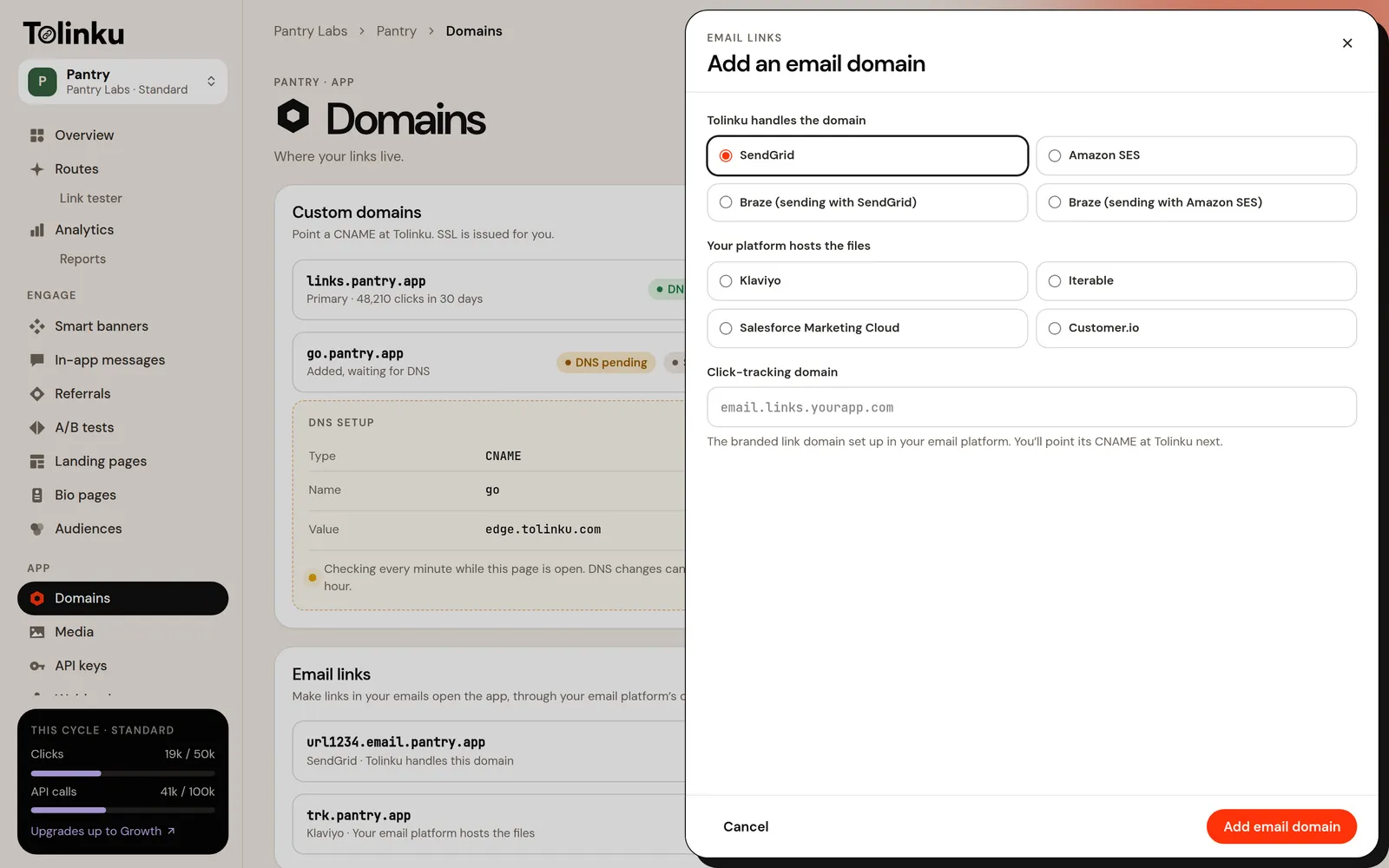
In the Email links card, click Add email domain.
-
Choose your email platform. They are grouped under Tolinku handles the domain and Your platform hosts the files.
-
In Click-tracking domain, enter the click-tracking subdomain your email platform uses, like
email.links.yourapp.com. This is the email platform’s domain, not your Tolinku link domain. -
For Amazon SES (and Braze sending with Amazon SES), also choose the AWS region you send from and enter a Custom path for app links.
-
Click Add email domain. The setup steps for your platform open next. You can come back to them any time by clicking the domain in the Email links card.
The rest depends on your platform. Follow its guide from the table above.
Set up your app
Section titled “Set up your app”Every platform needs these two changes in your app. The setup steps in the dashboard show the exact lines for your domain.
Add the domain
Section titled “Add the domain”iOS: in Xcode, under Signing & Capabilities, add the click-tracking domain to Associated Domains:
applinks:email.links.yourapp.comAndroid: add the domain to an intent filter. SendGrid and Amazon SES need a path prefix (/uni/ for SendGrid, /CL1/your-custom-path/ for Amazon SES), so only the links you mark open the app. The other platforms use the whole domain.
<intent-filter android:autoVerify="true"> <action android:name="android.intent.action.VIEW" /> <category android:name="android.intent.category.DEFAULT" /> <category android:name="android.intent.category.BROWSABLE" /> <data android:scheme="https" android:host="email.links.yourapp.com" android:pathPrefix="/uni/" /></intent-filter>Give the email domain its own <intent-filter>. Android combines all the <data> lines in one filter, so a path prefix written there would also apply to your other link domains.
Pass the link to the SDK
Section titled “Pass the link to the SDK”When your app opens from a link, pass the whole URL to links.resolve. It works out where an email link leads and returns the route. It also handles your ordinary Tolinku links, so you can send every incoming link through it.
func handle(_ url: URL) async { if let link = await Tolinku.shared?.links.resolve(url) { route(link.deepLinkPath) } else { // Not a link Tolinku could resolve: fall back to your own handling. }}lifecycleScope.launch { val link = Tolinku.links.resolve(uri.toString()) if (link != null) { route(link.deepLinkPath) } else { // Not a link Tolinku could resolve: fall back to your own handling. }}const link = await Tolinku.links.resolve(url);if (link) { route(link.deep_link_path);} else { // Not a link Tolinku could resolve: fall back to your own handling.}final link = await Tolinku.instance.links.resolve(url);if (link != null) { route(link.deepLinkPath);} else { // Not a link Tolinku could resolve: fall back to your own handling.}const link = await tolinku.links.resolve(url);if (link) { route(link.deep_link_path);} else { // Not a link Tolinku could resolve: fall back to your own handling.}resolve never throws. It returns nothing when it can’t resolve the link, for example on a bad network, or when the email link leads to a page that isn’t one of your routes. The SDK must be configured with your publishable API key. For more on resolve, see the SDK reference for iOS, Android, React Native, Flutter or Web.
Clicks and reports
Section titled “Clicks and reports”The email platform counts the click once, in its own reports, the same way it did before. Tolinku asks the platform where the link leads without following the redirect, so the click isn’t counted twice. Customer.io works differently: it doesn’t wrap app links, so Tolinku reports the click to Customer.io for you.
Removing an email domain
Section titled “Removing an email domain”Open the domain from the Email links card and click Remove.
If your platform hosts the files, remove the files from your email platform too. Otherwise links keep opening your app, but Tolinku no longer says where they lead.
FAQ and troubleshooting
Section titled “FAQ and troubleshooting”Which email platforms aren’t supported?
Section titled “Which email platforms aren’t supported?”- Mailchimp doesn’t offer a custom click-tracking domain, so there is no domain for Tolinku to work with.
- OneSignal email isn’t supported.
If your platform isn’t listed, it isn’t supported yet.
What happens if my plan changes?
Section titled “What happens if my plan changes?”Email links need a paid plan, and Tolinku checks every time a link is resolved.
- Tolinku handles the domain: Tolinku stops claiming links on it, so the phone opens them in the browser. Tolinku keeps passing requests to your email platform, so the links still work and clicks are still counted.
- Your platform hosts the files: the files you uploaded stay where they are, so links still open your app. Tolinku won’t say where they lead, so
resolvereturns nothing and your app falls back to its own handling.
Links still open the browser
Section titled “Links still open the browser”- Check that your app has SDK 0.8.2 or later and lists the click-tracking domain in Associated Domains (iOS) or an intent filter (Android).
- For SendGrid and Amazon SES, check that the link carries the attribute (
universal="true"orses:custom-path). Unmarked links stay in the browser on purpose. - Check that App open attribution isn’t set to Always.
- Pasting a link into Safari’s address bar never opens an app. Send a real email to a test phone and tap the link there.
- iOS fetches the association file when the app is installed, through Apple’s CDN, which can take a while to pick up changes. Reinstall the app after you change anything.
”The TXT record isn’t there yet”
Section titled “”The TXT record isn’t there yet””DNS changes can take a few minutes. Check the record’s name: it’s _tolinku. followed by the click-tracking domain, for example _tolinku.email.links.yourapp.com. Some DNS providers add your domain to the name for you; if yours does, enter only the part before it.
”That domain already serves links”
Section titled “”That domain already serves links””The click-tracking domain can’t be one of your Tolinku link domains, in this Appspace or any other. Use the email platform’s own click-tracking subdomain.
”Another account has already verified this click domain”
Section titled “”Another account has already verified this click domain””Only one Appspace can handle a click-tracking domain. Contact support if you need to move it.
Should the CNAME be proxied through Cloudflare?
Section titled “Should the CNAME be proxied through Cloudflare?”No. If you use Cloudflare, set the record to DNS only (grey cloud), as you would for a custom domain.